PowerShell – List Local or Remote Programs with an Exclusion List of Programs

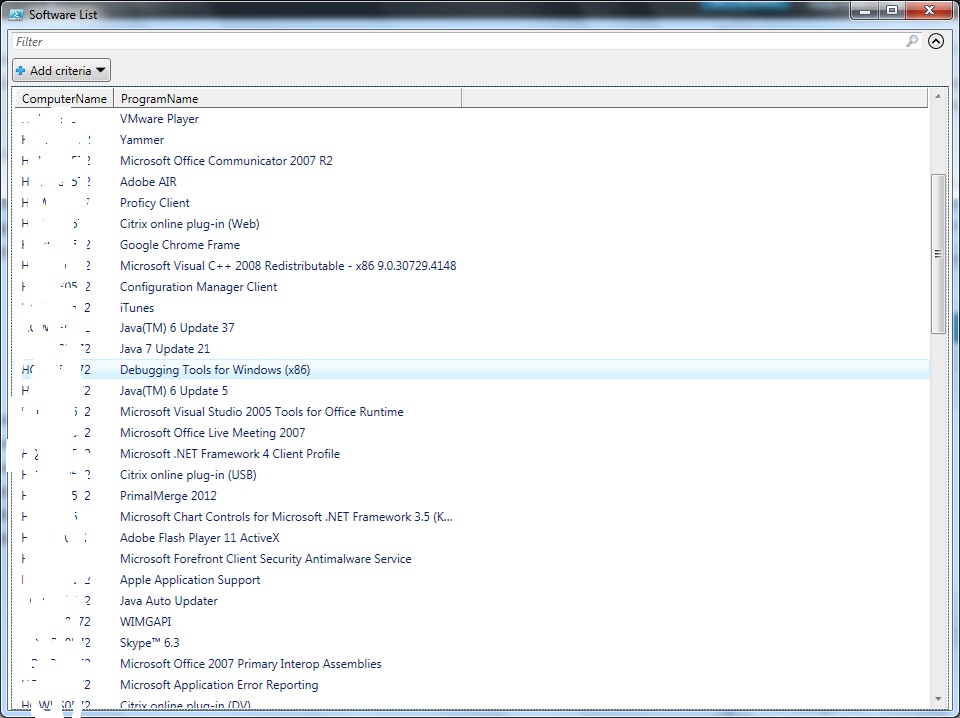
This post is to list all the software installed on your local or remote machines. The exclusion list is an array item which holds the programs  that you wanted to exclude it from displaying.

********************************************************************************

Function Get-SoftwareList {
param(
[CmdletBinding()]
[string[]]$ComputerName = $env:COMPUTERNAME
)

$writeArray=@()
$excludeArray=@()
#List of programs to exclude
$excludeArray = (“Security Update for Windows”,
“Update for Windows”,
“Update for Microsoft .NET”,
“Security Update for Microsoft”,
“Hotfix for Windows”,
“Hotfix for Microsoft .NET Framework”,
“Hotfix for Microsoft Visual Studio 2007 Tools”,
“Hotfix”)
foreach ($Computer in $ComputerName) {
$RegBase = [Microsoft.Win32.RegistryKey]::OpenRemoteBaseKey([Microsoft.Win32.RegistryHive]::LocalMachine,$Computer)
$RegUninstall = $RegBase.OpenSubKey(‘SOFTWARE\Microsoft\Windows\CurrentVersion\Uninstall’)
$RegUninstall.GetSubKeyNames() |
ForEach-Object {
$DisplayName = ($RegBase.OpenSubKey(“SOFTWARE\Microsoft\Windows\CurrentVersion\Uninstall\$_”)).GetValue(‘DisplayName’)
$donotwrite = $false
if (($DisplayName -ne “”) -and ($DisplayName -ne $null)) {

Foreach($exclude in $excludeArray)
{
if($DisplayName.StartsWith($exclude) -eq $TRUE)
{
$donotwrite = $true
break
}
}
if ($donotwrite -eq $false)
{
$writeArray +=New-Object -TypeName PSCustomObject -Property @{
ComputerName = $Computer
ProgramName = $DisplayName }
}
}
}

}

$column1 = @{expression=”ComputerName”; width=12; label=”ComputerName”; alignment=”left”}
$column2 = @{expression=”ProgramName”; width=120; label=”ProgramName”; alignment=”left”}
$writeArray|format-table $column1, $column2
$writeArray.GetEnumerator() | Out-GridView -Title “Software List”
}

********************************************************************************

Download here SoftwareList

Example 1 – Local Machine

PS:\>Get-SoftwareList

Example 2 -Remote computer

PS:\>Get-SoftwareList -ComputerName <COMPUTERNAME>

Example 3- Remote Computers

PS:\>Get-SoftwareList -ComputerName <COMPUTERNAME1,COMPUTERNAME2….>

Output –

SoftWareList

Posted in PowerShell | Tagged | 4 Comments

PowerShell – Uptime of Multiple Machines – Example for Custom Formatting and Grid View

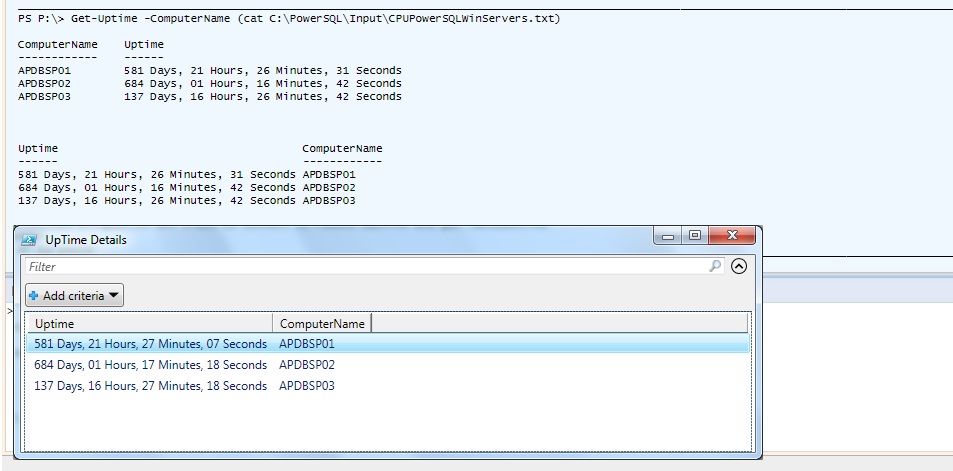
This post is to help you out in finding UpTime of one or more computers also you can pass file as its input parameter . Most of the time, the Powershell console might not fit all the required output columns. By default, the ordering of the columns are based on the width of an output data. The best way is to manage it through Custom Formatting or Grid View. This example will show an output in all three formats.

Download the code here Uptime

Function Get-Uptime
<#
.SYNOPSIS
Get uptime of a any given server
.DESCRIPTION
This function uses Win32_OperatingSystem WMI class to connect to remote machine and get lastboottime
.PARAMETER COMPUTERNAMES
Pass computer name as parameter
.EXAMPLE 1
Get-Uptime
.EXAMPLE 2
Get-Uptime -ComputerName Computername1,computername2
.EXAMPLE 3
Get-Uptime -ComputerName Computername1
.EXAMPLE
Get-Uptime -ComputerName (cat C:\PowerSQL\WinServers.txt)
.NOTES
To get help:
Get-Help Get-Uptime
.LINK
https://sqlpowershell.wordpress.com
#>
{
param
(
[Parameter(Position=0,Mandatory=$true)]
[alias(“cn”)]
[string[]]$ComputerName =”LocalComputer”
)

$Object =@()
foreach ($Computer in $ComputerName)
{
if(Test-Connection -ComputerName $Computer -Count 1 -ea 0) {
$Uptime = Get-WmiObject -Class Win32_OperatingSystem -ComputerName $Computer
$LastBootUpTime = $Uptime.ConvertToDateTime($Uptime.LastBootUpTime)
$Time = (Get-Date) – $LastBootUpTime
$Object += New-Object PSObject -Property @{
ComputerName = $Computer.ToUpper();
Uptime = ‘{0:00} Days, {1:00} Hours, {2:00} Minutes, {3:00} Seconds’ -f $Time.Days, $Time.Hours, $Time.Minutes, $Time.Seconds;}
}

}

$column1 = @{expression=”ComputerName”; width=15; label=”ComputerName”; alignment=”left”}
$column2 = @{expression=”Uptime”; width=45; label=”Uptime”; alignment=”left”}

# with Customized formatting
$Object|format-table $column1, $column2

#Without formatting
$Object|Format-Table -AutoSize

#Grid output
$Object.GetEnumerator() | Out-GridView -Title ” UpTime Details”

}

Output-

uptime

Posted in PowerShell | Tagged , , | Leave a comment

PowerShell – Delete Registry Entries – Remote Machines – Example Profile Deletion


#The following SID registry entry to be deleted across all mutiple Machines, SID is a user #who owns this user profile. Run the below script in Powershell console or ISE

$sid = ‘S-1-5-21-3656904587-1668747452’

$scriptblock = {
param($sid)
$regpath = ‘HKLM:\SOFTWARE\Microsoft\Windows NT\CurrentVersion\ProfileList’
Remove-Item -path (Join-Path $regPath $sid) -force -recurse
}

#The list of servers are entered in Server.txt file. The below foreach statement will loop #through all servers for the above said SID.

Foreach ($srv in get-content “C:\Server.txt”)
{
# Need to pass the variables that will be used in the remote session with the argumentlist
Invoke-Command -computername $srv -scriptblock $scriptblock -argumentlist $sid
}

Posted in Uncategorized | Tagged , | 2 Comments

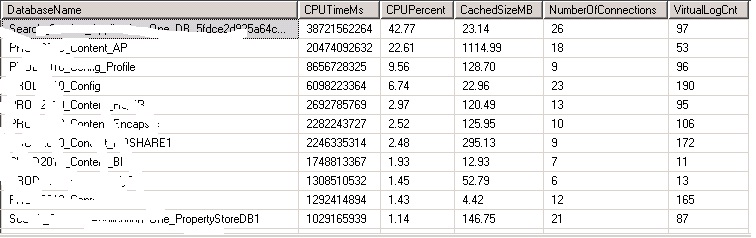
SQL – Find CPU,Memory,Connections, VLF’s,I/O of all the Databases

Find CPU, Memory, No Of Connections/databases and VLF’s and I/O details in one single script. 

You just need to run the below T-SQL in SSMS

Download the code here Metrics

*****************************************************************************

USE MASTER

GO
DECLARE @DML1 nvarchar(MAX),
@DML2 nvarchar(MAX),
@DML3 nvarchar(MAX),
@DML4 nvarchar(MAX)

DECLARE @Aggregate_IO_Statistics TABLE
(
[I/O Rank] [bigint] NULL,
[Database Name] [nvarchar](128) NULL,
[physicalName] [nvarchar](1) NULL,
[total_num_of_writes] [bigint] NULL,
[total_num_of_bytes_written] [bigint] NULL,
[total_num_of_reads] [bigint] NULL,
[Total I/O (MB)] [decimal](12, 2) NULL,
[I/O Percent] [decimal](5, 2) NULL
)
SET @DML1=’WITH Aggregate_IO_Statistics
AS
(SELECT DB_NAME(DM_IO_STATS.database_id) AS [Database Name],
left(f.physical_name, 1) physicalName,
SUM(DM_IO_STATS.num_of_writes) AS total_num_of_writes,
SUM(DM_IO_STATS.num_of_bytes_written) AS total_num_of_bytes_written,
SUM(DM_IO_STATS.num_of_reads) AS total_num_of_reads,
CAST(SUM(num_of_bytes_read + num_of_bytes_written)/1048576 AS DECIMAL(12, 2)) AS io_in_mb
FROM sys.dm_io_virtual_file_stats(NULL,NULL) AS [DM_IO_STATS]
inner join sys.master_files f on f.database_id=DM_IO_STATS.database_id and f.file_id=DM_IO_STATS.file_id
GROUP BY DM_IO_STATS.database_id,left(f.physical_name, 1))
SELECT ROW_NUMBER() OVER(ORDER BY io_in_mb DESC) AS [I/O Rank], [Database Name],physicalName,total_num_of_writes,
total_num_of_bytes_written,total_num_of_reads,io_in_mb AS [Total I/O (MB)],
CAST(io_in_mb/ SUM(io_in_mb) OVER() * 100.0 AS DECIMAL(5,2)) AS [I/O Percent]
FROM Aggregate_IO_Statistics
ORDER BY [I/O Rank]
OPTION (RECOMPILE)’

INSERT INTO @Aggregate_IO_Statistics
EXEC sp_executesql @DML1

–select * from @Aggregate_IO_Statistics

–SELECT * FROM @Aggregate_IO_Statistics
DECLARE @Userconnections TABLE
(
[DatabaseName] [nvarchar](128) NULL,
[NumberOfConnections] [int] NULL
)

SET @DML2=’
SELECT DB_NAME(dbid),COUNT(*) DatabaseName FROM sys.sysprocesses –where kpid>0
group by DB_NAME(dbid)
ORDER BY DB_NAME(dbid) DESC OPTION (RECOMPILE)

–SELECT DB_NAME(dbid),COUNT(*) DatabaseName FROM sys.sysprocesses –where kpid>0
–group by DB_NAME(dbid)
–ORDER BY DB_NAME(dbid) DESC OPTION (RECOMPILE)
INSERT INTO @Userconnections
EXEC sp_executesql @DML2

–SELECT * FROM @Userconnections

DECLARE @CacheMemoryDB TABLE(
[Database Name] [nvarchar](128) NULL,
[Cached Size (MB)] [decimal](10, 2) NULL
)
SET @DML3=’SELECT DB_NAME(database_id) AS [Database Name],
CAST(COUNT(*) * 8/1024.0 AS DECIMAL (10,2)) AS [Cached Size (MB)]
FROM sys.dm_os_buffer_descriptors WITH (NOLOCK)
WHERE database_id > 4 — system databases
AND database_id <> 32767 — ResourceDB
GROUP BY DB_NAME(database_id)
ORDER BY [Cached Size (MB)] DESC OPTION (RECOMPILE)’

INSERT INTO @CacheMemoryDB
EXEC sp_executesql @DML3

–SELECT * FROM @CacheMemoryDB
DECLARE @DB_CPU_Stats TABLE (
[row_num] [bigint] NULL,
[DatabaseName] [nvarchar](128) NULL,
[CPU_Time_Ms] [bigint] NULL,
[CPUPercent] [decimal](5, 2) NULL
)

SET @DML4=’WITH DB_CPU_Stats
AS
(SELECT DatabaseID, DB_Name(DatabaseID) AS [DatabaseName], SUM(total_worker_time) AS [CPU_Time_Ms]
FROM sys.dm_exec_query_stats AS qs WITH (NOLOCK)
CROSS APPLY (SELECT CONVERT(int, value) AS [DatabaseID]
FROM sys.dm_exec_plan_attributes(qs.plan_handle)
WHERE attribute = N”dbid”) AS F_DB
GROUP BY DatabaseID)
SELECT ROW_NUMBER() OVER(ORDER BY [CPU_Time_Ms] DESC) AS [row_num],
DatabaseName, [CPU_Time_Ms],
CAST([CPU_Time_Ms] * 1.0 / SUM([CPU_Time_Ms]) OVER() * 100.0 AS DECIMAL(5, 2)) AS [CPUPercent]
FROM DB_CPU_Stats
WHERE DatabaseID > 4 — system databases
AND DatabaseID <> 32767 — ResourceDB
ORDER BY row_num OPTION (RECOMPILE)’

–How many Virtual Log Files or VLFs are present in your log file.
INSERT INTO @DB_CPU_Stats
EXEC sp_executesql @DML4

–SELECT * FROM @DB_CPU_Stats
CREATE TABLE #VLFInfo (FileID int,
FileSize bigint, StartOffset bigint,
FSeqNo bigint, [Status] bigint,
Parity bigint, CreateLSN numeric(38));

CREATE TABLE #VLFCountResults(DatabaseName sysname, VLFCount int);

EXEC sp_MSforeachdb N’Use [?];
INSERT INTO #VLFInfo
EXEC sp_executesql N”DBCC LOGINFO([?])”;
INSERT INTO #VLFCountResults
SELECT DB_NAME(), COUNT(*)
FROM #VLFInfo;
TRUNCATE TABLE #VLFInfo;’
–SELECT DatabaseName, VLFCount FROM #VLFCountResults ORDER BY VLFCount DESC;

SELECT
cs.DatabaseName DatabaseName,
isnull(cs.CPU_Time_Ms,0) CPUTimeMs,
isnull(cs.CPUPercent,0) CPUPercent,
isnull(cm.[Cached Size (MB)],0) CachedSizeMB,
isnull(uc.NumberOfConnections,0) NumberOfConnections,
VR.VLFCount VirtualLogCnt
FROM @DB_CPU_Stats cs
left join @CacheMemoryDB CM on cm.[Database Name]=cs.[DatabaseName]
left join @Userconnections uc on uc.DatabaseName=cs.[DatabaseName]
left join #VLFCountResults VR on Vr.DatabaseName=cs.[DatabaseName]

–order by io.[I/O Percent],cs.CPUPercent,cm.[Cached Size (MB)]desc

SELECT * FROM @Aggregate_IO_Statistics

DROP TABLE #VLFInfo;
DROP TABLE #VLFCountResults;

********************************************************************************

Output –

Metrics

Posted in SQL | Tagged , , , , | 4 Comments

SQL – Identify & Drop Duplicate Index

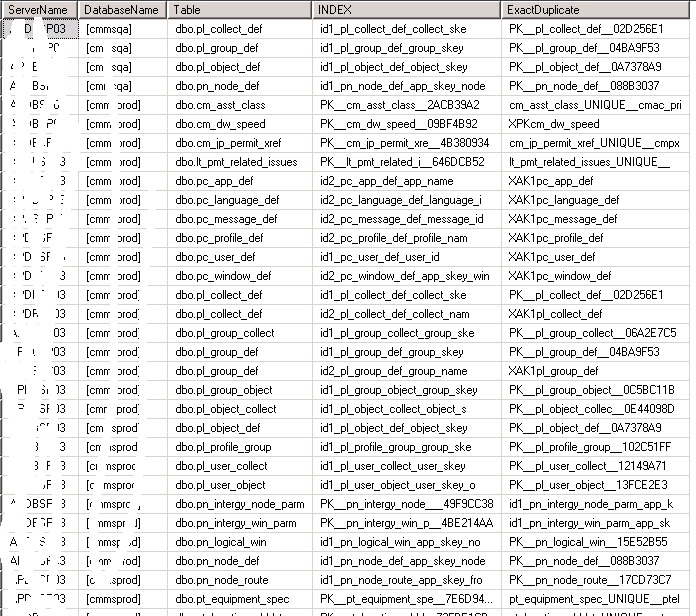
This post explains the simple steps to identify a duplicate indexes in all the databases.  The duplicate index are more than one indexes that differ only by it’s name but consist of identical fields internally. It generates overhead when performing updates, inserts or deletes, require lot of resources for rebuilds, take up space but are never used. Its always good cleanup.

Output of the below T-SQL are direct eligible items to delete. Please double check output before deleting any indexes.

Download the code here Duplicate_Index

Copy and paste the below code and execute it through SSMS

****************************

DECLARE @DBName [nvarchar] (128)
,@RowID [int]
,@LoopStatus [int]
,@DML varchar(max)

SET @RowID=1
SET @LoopStatus=1

DECLARE @DuplicateIndexFind TABLE
(
[table] [nvarchar](257) NULL,
[index] [sysname] NULL,
[exactduplicate] [sysname] NULL,
[DbName] varchar(100) NULL
)

DECLARE @DatabaseList TABLE ([RowNo] [smallint] identity (1, 1)
,[DBName] [varchar](200))

INSERT INTO @DatabaseList
SELECT ‘[‘+[name]+’]’ FROM [master].[sys].[databases] WITH (NOLOCK)
WHERE [state_desc] = ‘ONLINE’
AND [source_database_id] IS NULL
AND [database_id] > 4

WHILE @LoopStatus<>0
BEGIN
SELECT @DBName = [DBName]
FROM @DatabaseList WHERE [RowNo] = @RowID
IF @@ROWCOUNT=0
BEGIN
SET @LoopStatus=0
END
ELSE
BEGIN
SET @DML=’USE ‘+ @DBName +CHAR(13)+’;’+ ‘
with indexcols as
(
select object_id as id, index_id as indid, name,
(
select case keyno when 0 then NULL else colid end as [data()]
from ‘+ @DBName +’.sys.sysindexkeys’ +’ as k
where k.id = i.object_id
and k.indid = i.index_id
order by keyno, colid
for xml path(””)) as cols,
(
select case keyno when 0 then colid else NULL end as [data()]
from ‘+ @DBName +’.sys.sysindexkeys’ +’ as k
where k.id = i.object_id
and k.indid = i.index_id
order by colid
for xml path(””)
) as inc
from ‘+ @DBName +’.sys.indexes as i)
select
object_schema_name(c1.id) + ”.” + object_name(c1.id) as ”table”,
c1.name as ”index”,
c2.name as ”exactduplicate”
from indexcols as c1
join indexcols as c2
on c1.id = c2.id
and c1.indid < c2.indid
and c1.cols = c2.cols
and c1.inc = c2.inc
order by object_schema_name(c1.id) + ”.” + object_name(c1.id)’

INSERT INTO @DuplicateIndexFind([table] ,[index],[exactduplicate]) exec (@DML)

update @DuplicateIndexFind
set DbName=@DBName
where DbName is NULL

SET @RowID=@RowID+1
END
END

select @@Servername ServerName,DbName DatabaseName,[Table],[INDEX],ExactDuplicate from @DuplicateIndexFind

*************************************************************

Cross verify output using the below statement

sp_helpindex ‘pl_collect_def’

Output:-

duplicate_index

Thanks for reading my space.

Happy Learning!!

Posted in SQL, T-SQL | Tagged , , , | 4 Comments

SQLCMD – Database Backup and Restore – Automation – Quickest and Simplest method

In today’s world we rely more on third party tools to do a Backup and Restore of databases. Most of us still use SQL Native method to do a Database Backup and Restoration. This post illustrates the quickest way of taking backup and restore it on the destination server. I’m using Robocopy utility to perform the data transfer activity. Please refer below one of my previous post on Robocopy.

https://sqlpowershell.wordpress.com/2013/07/05/sqlcmd-quick-copy-of-files-using-robocopy/

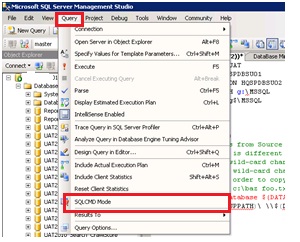
By default, SQLCMD mode is not enabled in the Query Editor. You can enable scripting mode by clicking the SQLCMD Mode icon in the toolbar or by selecting SQLCMD Mode from the Query menu. Please refer this link for more information. Go to SSMS Menu -> Query ->Select SQLCMD.

Image

copy and paste the below code SSMS and Modify the below variables as per requirement . I would rather say it to download it from the below link

T-SQL Code is here –  Backup and Restore

:setvar DATABASE UAT2010_Search
:setvar SOURCE HQSPDBSU01
:setvar DESTINATION HQSPDBSU02
:setvar BACKUPPATH g:\MSSQL
:setvar RESTOREPATH g:\MSSQL
:setvar LOGICALDATANAME UAT2010_Search
:setvar LOGICALLOGNAME UAT2010_Search_Log
:setvar RESTOREDATAPATH “G:\Program Files\Microsoft SQL Server\MSSQL10_50.MSSQLSERVER\MSSQL\DATA”
:setvar RESTORELOGPATH “G:\Program Files\Microsoft SQL Server\MSSQL10_50.MSSQLSERVER\MSSQL\DATA”
:setvar COPYPATH g$\MSSQL
:setvar Timeout 10

—Before Execution

:CONNECT $(SOURCE)
select * from sys.databases where name=’$(DATABASE)’

Go

:CONNECT $(DESTINATION)
select * from sys.databases where name=’$(DATABASE)’

SET NOCOUNT ON
GO

:CONNECT $(SOURCE)
Go
print ‘*** Take full backup of Source database $(DATABASE) with copy_only option***’
IF (left(cast(SERVERPROPERTY(‘ProductVersion’)as varchar),5)=’10.50′ and SERVERPROPERTY(‘EngineEdition’)=3) OR (left(cast(SERVERPROPERTY(‘ProductVersion’)as varchar),5)=’10.00′ and SERVERPROPERTY(‘EngineEdition’)in(2,3))
BEGIN
— Compression Option is set
BACKUP DATABASE $(DATABASE) TO DISK = ‘$(BACKUPPATH)\$(DATABASE).bak’
WITH COPY_ONLY, NOFORMAT, INIT, NAME = ‘$(DATABASE) Full Database Backup’, SKIP, NOREWIND, NOUNLOAD, STATS = 10,COMPRESSION
END
ELSE
BEGIN
–Backups are not compressed for older versions
BACKUP DATABASE $(DATABASE) TO DISK = ‘$(BACKUPPATH)\$(DATABASE).bak’
WITH COPY_ONLY, NOFORMAT, INIT, NAME = ‘$(DATABASE) Full Database Backup’, SKIP, NOREWIND, NOUNLOAD, STATS = 10
END
GO
—-2. Copy the files from Source to Destination –

print ‘*** Copy database $(DATABASE) from Source server $(Source) to Destination server $(destination) ***’

!!ROBOCOPY $(BACKUPPATH)\ \\$(Destination)\$(COPYPATH) $(DATABASE).*
GO
—–3. Restore database to Destination
print ‘*** Restore full backup of database $(DATABASE) ***’
:CONNECT $(Destination)
GO
RESTORE DATABASE $(DATABASE)
FROM disk = ‘$(RESTOREPATH)\$(DATABASE).bak’
WITH RECOVERY, NOUNLOAD, STATS = 10,REPLACE,
MOVE ‘$(LogicalDataName)’ TO
‘$(RestoreDataPath)\$(LogicalDataName).mdf’,
MOVE ‘$(LogicalLogName)’
TO ‘$(RestoreDataPath)\$(LogicalLogName).ldf’
GO

— After Execution
:CONNECT $(SOURCE)
select * from sys.databases where name=’$(DATABASE)’

Go

:CONNECT $(DESTINATION)
select * from sys.databases where name=’$(DATABASE)’

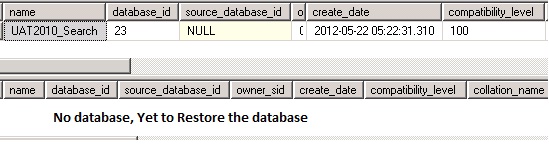
Before –

Image

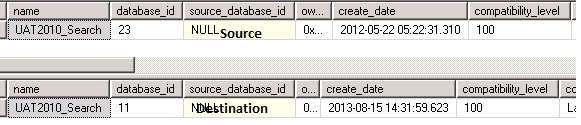
After –

Image

Posted in Backup and Restore, Robocopy, SETVAR, SQL, SQLCMD, Uncategorized | Tagged , , , | 7 Comments

PowerShell – Invoke Commands,Batch files & Executable file – Dynamically passing Parameters

I’ve recently got a request to invoke an executable file from Powershell. Different ways of executing a executable file is given below. The advantage is that either you can pass the parameters dynamically by reading it from a text file or using variables.

  1. You can use Invoke-Expression
  2. Use of  call operator ‘&’ [“invocation operator”] –  Run a command, script, or script block.  The call operator does not parse the command, it cannot interpret command parameters.

I’m invoking RMTSHARE.EXE. The syntax is given below

RMTSHARE  \\server\sharename=drive:path  [/GRANT [user[:perm][ /GRANT user[:perm]]]

Eample 1:

$ser = “adbpsp18” ; $user = “XYZ” ; $SrvPath = “F:\PowerSQL\Input”

Invoke-Expression -Command “C:\RMTSHARE.EXE \\$ser\$user$=$SrvPath /GRANT qnts\cc648:full”

Example 2:

$ser = “adbpsp18” ; $user = “XYZ” ; $SrvPath = “F:\PowerSQL\Input”

&”C:\RMTSHARE.EXE” \\$ser\$user$=$SrvPath /GRANT qnts\cc876:full

 Thanks for reading!!!

Posted in PowerShell | Tagged , , | Leave a comment

SQL – One Query to fetch SQL Jobs Details of All SQL Version – 2000/05/08/R2

Single Query to fetch complete details of sql jobs and you can run it across different version of SQL [2000/2005/2008 and R2]. I’ve undergone dynamic query string limitation issue and hence I’m including the workaround details in the same post. The dynamic query cannot exceed 4000 characters. The workaround is to split your one big string into multiple smaller strings and execute them by using concatenation operator(“+”)

For Example –

DECLARE @DML1 NVARCHAR(4000)
DECLARE @DML2 NVARCHAR(4000)

SET @DML1 = ‘select *’
SET @DML2 = ‘FROM msdb.dbo.sysjobschedules’

–Now execute them together
EXEC (@DML1 + @DML2)

*****************************************************************************

Query to Pull SQL Jobs Details – Copy and Paste the below code in SSMS 

********************************************************************************

IF (left(cast(SERVERPROPERTY(‘ProductVersion’)as varchar),5)=’10.00′ and SERVERPROPERTY(‘EngineEdition’)=3) OR (left(cast(SERVERPROPERTY(‘ProductVersion’)as varchar),5)=’10.50′ and SERVERPROPERTY(‘EngineEdition’)in(2,3)) OR (left(cast(SERVERPROPERTY(‘ProductVersion’)as varchar),5)=’9.00.’ and SERVERPROPERTY(‘EngineEdition’)in(2,3))
BEGIN
DECLARE @DML11 VARCHAR(8000)
DECLARE @DML12 VARCHAR(8000)
DECLARE @DML13 VARCHAR(8000)

SET @DML11=’SELECT ”’+ @@Servername +”’ ServerName,@@version Version
[Schedule_UID] AS [ScheduleID]
, [name] AS [ScheduleName]
, CASE [enabled]
WHEN 1 THEN ”Yes”
WHEN 0 THEN ”No”
END AS [IsEnabled]
, CASE
WHEN [freq_type] = 64 THEN ”Start automatically when SQL Server Agent starts”
WHEN [freq_type] = 128 THEN ”Start whenever the CPUs become idle”
WHEN [freq_type] IN (4,8,16,32) THEN ”Recurring”
WHEN [freq_type] = 1 THEN ”One Time”
END [ScheduleType]
, CASE [freq_type]
WHEN 1 THEN ”One Time”
WHEN 4 THEN ”Daily”
WHEN 8 THEN ”Weekly”
WHEN 16 THEN ”Monthly”
WHEN 32 THEN ”Monthly – Relative to Frequency Interval”
WHEN 64 THEN ”Start automatically when SQL Server Agent starts”
WHEN 128 THEN ”Start whenever the CPUs become idle”
END [Occurrence]
,
CASE [freq_type]
WHEN 4 THEN ”Occurs every ” + CAST([freq_interval] AS VARCHAR(3)) + ” day(s)”
WHEN 8 THEN ”Occurs every ” + CAST([freq_recurrence_factor] AS VARCHAR(3))
+ ” week(s) on ”
+ CASE WHEN [freq_interval] & 1 = 1 THEN ”Sunday” ELSE ”” END
+ CASE WHEN [freq_interval] & 2 = 2 THEN ”, Monday” ELSE ”” END
+ CASE WHEN [freq_interval] & 4 = 4 THEN ”, Tuesday” ELSE ”” END
+ CASE WHEN [freq_interval] & 8 = 8 THEN ”, Wednesday” ELSE ”” END
+ CASE WHEN [freq_interval] & 16 = 16 THEN ”, Thursday” ELSE ”” END
+ CASE WHEN [freq_interval] & 32 = 32 THEN ”, Friday” ELSE ”” END
+ CASE WHEN [freq_interval] & 64 = 64 THEN ”, Saturday” ELSE ”” END
WHEN 16 THEN ”Occurs on Day ” + CAST([freq_interval] AS VARCHAR(3))
+ ” of every ”
+ CAST([freq_recurrence_factor] AS VARCHAR(3)) + ” month(s)”
WHEN 32 THEN ”Occurs on ”
+ CASE [freq_relative_interval]
WHEN 1 THEN ”First”
WHEN 2 THEN ”Second”
WHEN 4 THEN ”Third”
WHEN 8 THEN ”Fourth”
WHEN 16 THEN ”Last”
END
+ ” ”
+ CASE [freq_interval]
WHEN 1 THEN ”Sunday”
WHEN 2 THEN ”Monday”
WHEN 3 THEN ”Tuesday”
WHEN 4 THEN ”Wednesday”
WHEN 5 THEN ”Thursday”
WHEN 6 THEN ”Friday”
WHEN 7 THEN ”Saturday”
WHEN 8 THEN ”Day”
WHEN 9 THEN ”Weekday”
WHEN 10 THEN ”Weekend day”
END
+ ” of every ” + CAST([freq_recurrence_factor] AS VARCHAR(3))
+ ” month(s)”
END AS [Recurrence]
,

CASE [freq_subday_type]
WHEN 1 THEN ”Occurs once at ”
+ STUFF(
STUFF(RIGHT(”000000” + CAST([active_start_time] AS VARCHAR(6)), 6)
, 3, 0, ”:”)
, 6, 0, ”:”)
WHEN 2 THEN ”Occurs every ”
+ CAST([freq_subday_interval] AS VARCHAR(3)) + ” Second(s) between ”
+ STUFF(
STUFF(RIGHT(”000000” + CAST([active_start_time] AS VARCHAR(6)), 6)
, 3, 0, ”:”)
, 6, 0, ”:”)
+ ” & ”
+ STUFF(
STUFF(RIGHT(”000000” + CAST([active_end_time] AS VARCHAR(6)), 6)
, 3, 0, ”:”)
, 6, 0, ”:”)’
SET @DML12=’WHEN 4 THEN ”Occurs every ”
+ CAST([freq_subday_interval] AS VARCHAR(3)) + ” Minute(s) between ”
+ STUFF(
STUFF(RIGHT(”000000” + CAST([active_start_time] AS VARCHAR(6)), 6)
, 3, 0, ”:”)
, 6, 0, ”:”)
+ ” & ”
+ STUFF(
STUFF(RIGHT(”000000” + CAST([active_end_time] AS VARCHAR(6)), 6)
, 3, 0, ”:”)
, 6, 0, ”:”)
WHEN 8 THEN ”Occurs every ”
+ CAST([freq_subday_interval] AS VARCHAR(3)) + ” Hour(s) between ”
+ STUFF(
STUFF(RIGHT(”000000” + CAST([active_start_time] AS VARCHAR(6)), 6)
, 3, 0, ”:”)
, 6, 0, ”:”)
+ ” & ”
+ STUFF(
STUFF(RIGHT(”000000” + CAST([active_end_time] AS VARCHAR(6)), 6)
, 3, 0, ”:”)
, 6, 0, ”:”)
END [Frequency]
, STUFF(
STUFF(CAST([active_start_date] AS VARCHAR(8)), 5, 0, ”-”)
, 8, 0, ”-”) AS [ScheduleUsageStartDate]
, STUFF(
STUFF(CAST([active_end_date] AS VARCHAR(8)), 5, 0, ”-”)
, 8, 0, ”-”) AS [ScheduleUsageEndDate]
, [date_created] AS [ScheduleCreatedOn]
, [date_modified] AS [ScheduleLastModifiedOn]
FROM [msdb].[dbo].[sysschedules]
ORDER BY [ScheduleName]

SET @DML13=@DML11+@DML12
exec (@DML13)

END
IF (left(cast(SERVERPROPERTY(‘ProductVersion’)as varchar),5)=’8.00.’ and SERVERPROPERTY(‘EngineEdition’)=3)
BEGIN
DECLARE @DML1 VARCHAR(8000)
DECLARE @DML2 VARCHAR(8000)
DECLARE @DML3 VARCHAR(8000)

SET @DML1=’SELECT ”’+ @@Servername +”’ ServerName,@@version Version,
so.[job_id] AS [ScheduleID]
, so.[name] AS [ScheduleName]
, CASE so.[enabled]
WHEN 1 THEN ”Yes”
WHEN 0 THEN ”No”
END AS [IsEnabled]
, CASE
WHEN [freq_type] = 64 THEN ”Start automatically when SQL Server Agent starts”
WHEN [freq_type] = 128 THEN ”Start whenever the CPUs become idle”
WHEN [freq_type] IN (4,8,16,32) THEN ”Recurring”
WHEN [freq_type] = 1 THEN ”One Time”
END [ScheduleType]
, CASE [freq_type]
WHEN 1 THEN ”One Time”
WHEN 4 THEN ”Daily”
WHEN 8 THEN ”Weekly”
WHEN 16 THEN ”Monthly”
WHEN 32 THEN ”Monthly – Relative to Frequency Interval”
WHEN 64 THEN ”Start automatically when SQL Server Agent starts”
WHEN 128 THEN ”Start whenever the CPUs become idle”
END [Occurrence]
,
CASE [freq_type]
WHEN 4 THEN ”Occurs every ” + CAST([freq_interval] AS VARCHAR(3)) + ” day(s)”
WHEN 8 THEN ”Occurs every ” + CAST([freq_recurrence_factor] AS VARCHAR(3))
+ ” week(s) on ”
+ CASE WHEN [freq_interval] & 1 = 1 THEN ”Sunday” ELSE ”” END
+ CASE WHEN [freq_interval] & 2 = 2 THEN ”, Monday” ELSE ”” END
+ CASE WHEN [freq_interval] & 4 = 4 THEN ”, Tuesday” ELSE ”” END
+ CASE WHEN [freq_interval] & 8 = 8 THEN ”, Wednesday” ELSE ”” END
+ CASE WHEN [freq_interval] & 16 = 16 THEN ”, Thursday” ELSE ”” END
+ CASE WHEN [freq_interval] & 32 = 32 THEN ”, Friday” ELSE ”” END
+ CASE WHEN [freq_interval] & 64 = 64 THEN ”, Saturday” ELSE ”” END
WHEN 16 THEN ”Occurs on Day ” + CAST([freq_interval] AS VARCHAR(3))
+ ” of every ”
+ CAST([freq_recurrence_factor] AS VARCHAR(3)) + ” month(s)”
WHEN 32 THEN ”Occurs on ”
+ CASE [freq_relative_interval]
WHEN 1 THEN ”First”
WHEN 2 THEN ”Second”
WHEN 4 THEN ”Third”
WHEN 8 THEN ”Fourth”
WHEN 16 THEN ”Last”
END
+ ” ”
+ CASE [freq_interval]
WHEN 1 THEN ”Sunday”
WHEN 2 THEN ”Monday”
WHEN 3 THEN ”Tuesday”
WHEN 4 THEN ”Wednesday”
WHEN 5 THEN ”Thursday”
WHEN 6 THEN ”Friday”
WHEN 7 THEN ”Saturday”
WHEN 8 THEN ”Day”
WHEN 9 THEN ”Weekday”
WHEN 10 THEN ”Weekend day”
END
+ ” of every ” + CAST([freq_recurrence_factor] AS VARCHAR(3))
+ ” month(s)”
END AS [Recurrence]
,

CASE [freq_subday_type]
WHEN 1 THEN ”Occurs once at ”
+ STUFF(
STUFF(RIGHT(”000000” + CAST([active_start_time] AS VARCHAR(6)), 6)
, 3, 0, ”:”)
, 6, 0, ”:”)
WHEN 2 THEN ”Occurs every ”
+ CAST([freq_subday_interval] AS VARCHAR(3)) + ” Second(s) between ”
+ STUFF(
STUFF(RIGHT(”000000” + CAST([active_start_time] AS VARCHAR(6)), 6)
, 3, 0, ”:”)
, 6, 0, ”:”)
+ ” & ”
+ STUFF(
STUFF(RIGHT(”000000” + CAST([active_end_time] AS VARCHAR(6)), 6)
, 3, 0, ”:”)
, 6, 0, ”:”)’
SET @DML2=’WHEN 4 THEN ”Occurs every ”
+ CAST([freq_subday_interval] AS VARCHAR(3)) + ” Minute(s) between ”
+ STUFF(
STUFF(RIGHT(”000000” + CAST([active_start_time] AS VARCHAR(6)), 6)
, 3, 0, ”:”)
, 6, 0, ”:”)
+ ” & ”
+ STUFF(
STUFF(RIGHT(”000000” + CAST([active_end_time] AS VARCHAR(6)), 6)
, 3, 0, ”:”)
, 6, 0, ”:”)
WHEN 8 THEN ”Occurs every ”
+ CAST([freq_subday_interval] AS VARCHAR(3)) + ” Hour(s) between ”
+ STUFF(
STUFF(RIGHT(”000000” + CAST([active_start_time] AS VARCHAR(6)), 6)
, 3, 0, ”:”)
, 6, 0, ”:”)
+ ” & ”
+ STUFF(
STUFF(RIGHT(”000000” + CAST([active_end_time] AS VARCHAR(6)), 6)
, 3, 0, ”:”)
, 6, 0, ”:”)
END [Frequency]
, STUFF(
STUFF(CAST([active_start_date] AS VARCHAR(8)), 5, 0, ”-”)
, 8, 0, ”-”) AS [ScheduleUsageStartDate]
, STUFF(
STUFF(CAST([active_end_date] AS VARCHAR(8)), 5, 0, ”-”)
, 8, 0, ”-”) AS [ScheduleUsageEndDate]
, so.[date_created] AS [ScheduleCreatedOn]
, [date_modified] AS [ScheduleLastModifiedOn]
FROM [msdb].[dbo].[sysjobschedules] sj
inner join msdb.dbo.sysjobs so on so.job_id=sj.job_id’

SET @DML3=@DML1+@DML2
exec (@DML3)
END

********************************************************************************

Download the code here –  SQLJob

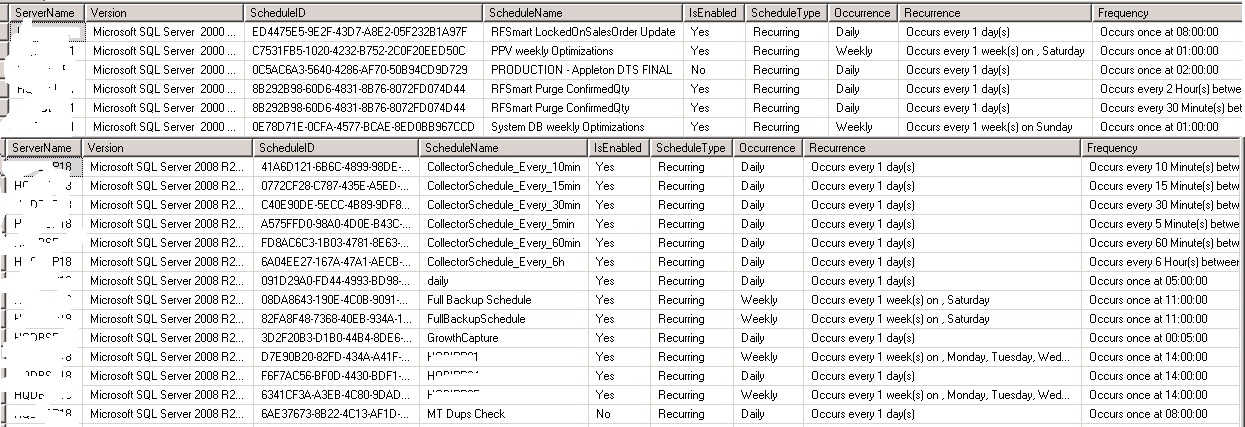
Output- 

SQLJobsDetails

Posted in SQL, T-SQL | Tagged , , , , | 5 Comments

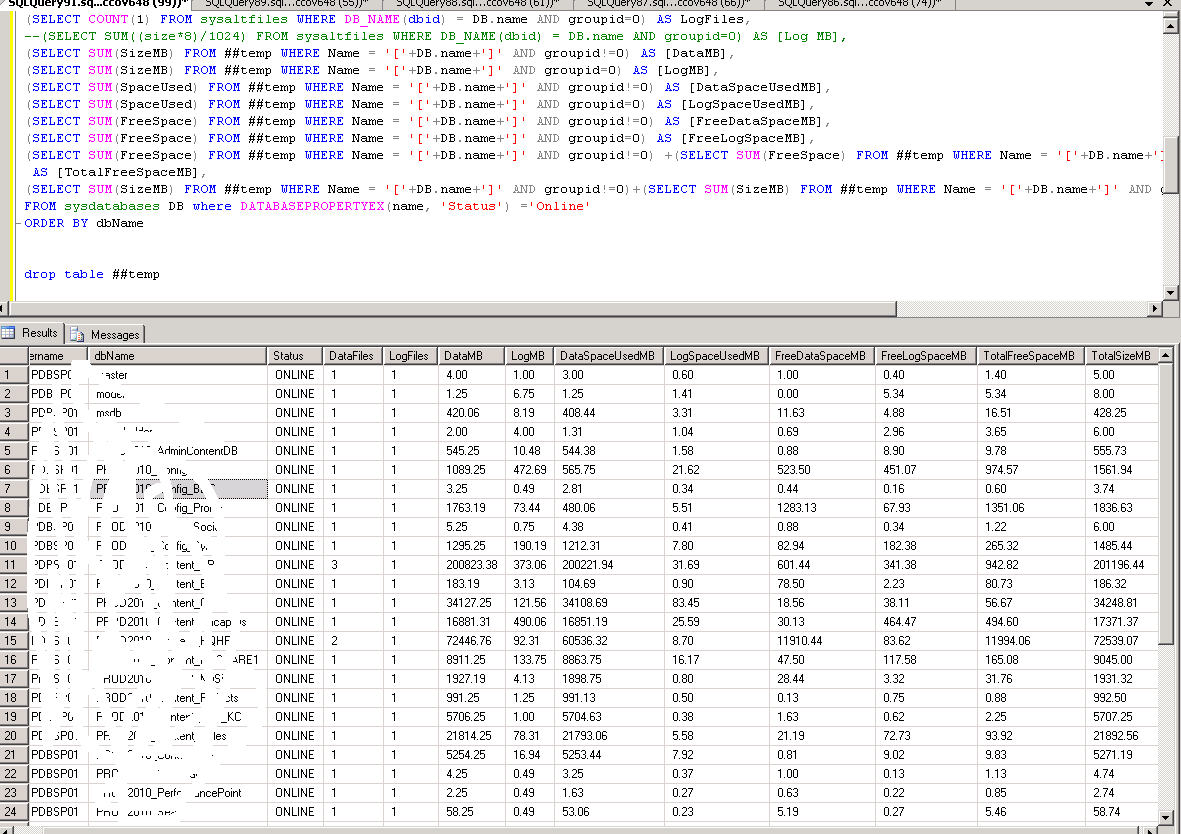
SQL – Find Database File Usage Details – 2000/05/08/R2

This post is to find the database file usage details of all databases of an instance. The query runs on all versions of sql 2000/2005/2008/R2 . The requirement is to use same query to be executed it across all version of SQL SERVER.  We can  also do this using dynamic SQL’s.

Here is the T-SQL which you can use to run on any version of SQL Server to fetch the result.

Download here –Database_File_Usage_Details

***************************

USE MASTER

Go

CREATE table ##temp
(
Name varchar(100),
groupid int,
SizeMB decimal(10,2),
SpaceUsed decimal(10,2),
FreeSpace decimal(10,2)
)

EXEC master..sp_MSForeachdb ‘
USE ?
BEGIN
insert into ##temp(Name,GroupId,SizeMB,SpaceUsed, FreeSpace)
SELECT ”[”+”?”+”]” as databasename,groupid
, CAST(size/128.0 as DECIMAL(10,2)) AS Size_in_MB
, CAST(FILEPROPERTY(name, ”SpaceUsed”)/128.0 as DECIMAL(10,2)) as Space_Used
, CAST(size/128.0-(FILEPROPERTY(name, ”SpaceUsed”)/128.0) AS DECIMAL(10,2)) AS Available_Space
FROM sysfiles
END

–select * from ##temp

SELECT @@SERVERNAME Servername,
CONVERT(VARCHAR(50), DB.name) AS dbName,
CONVERT(VARCHAR(10), DATABASEPROPERTYEX(name, ‘status’)) AS [Status],
(SELECT COUNT(1) FROM sysaltfiles WHERE DB_NAME(dbid) = DB.name AND groupid !=0 ) AS DataFiles,
–(SELECT SUM((size*8)/1024) FROM sysaltfiles WHERE DB_NAME(dbid) = DB.name AND groupid!=0) AS [Data MB],
(SELECT COUNT(1) FROM sysaltfiles WHERE DB_NAME(dbid) = DB.name AND groupid=0) AS LogFiles,
–(SELECT SUM((size*8)/1024) FROM sysaltfiles WHERE DB_NAME(dbid) = DB.name AND groupid=0) AS [Log MB],
(SELECT SUM(SizeMB) FROM ##temp WHERE Name = ‘[‘+DB.name+’]’ AND groupid!=0) AS [DataMB],
(SELECT SUM(SizeMB) FROM ##temp WHERE Name = ‘[‘+DB.name+’]’ AND groupid=0) AS [LogMB],
(SELECT SUM(SpaceUsed) FROM ##temp WHERE Name = ‘[‘+DB.name+’]’ AND groupid!=0) AS [DataSpaceUsedMB],
(SELECT SUM(SpaceUsed) FROM ##temp WHERE Name = ‘[‘+DB.name+’]’ AND groupid=0) AS [LogSpaceUsedMB],
(SELECT SUM(FreeSpace) FROM ##temp WHERE Name = ‘[‘+DB.name+’]’ AND groupid!=0) AS [FreeDataSpaceMB],
(SELECT SUM(FreeSpace) FROM ##temp WHERE Name = ‘[‘+DB.name+’]’ AND groupid=0) AS [FreeLogSpaceMB],
(SELECT SUM(FreeSpace) FROM ##temp WHERE Name = ‘[‘+DB.name+’]’ AND groupid!=0) +(SELECT SUM(FreeSpace) FROM ##temp WHERE Name = ‘[‘+DB.name+’]’ AND groupid=0)
AS [TotalFreeSpaceMB],
(SELECT SUM(SizeMB) FROM ##temp WHERE Name = ‘[‘+DB.name+’]’ AND groupid!=0)+(SELECT SUM(SizeMB) FROM ##temp WHERE Name = ‘[‘+DB.name+’]’ AND groupid=0) TotalSizeMB
FROM master.dbo.sysdatabases DB where DATABASEPROPERTYEX(name, ‘Status’) =’Online’
ORDER BY dbName

drop table ##temp

*******************************************************************************

Output –

Image

Posted in SQL, T-SQL | Tagged , , , , , | Leave a comment

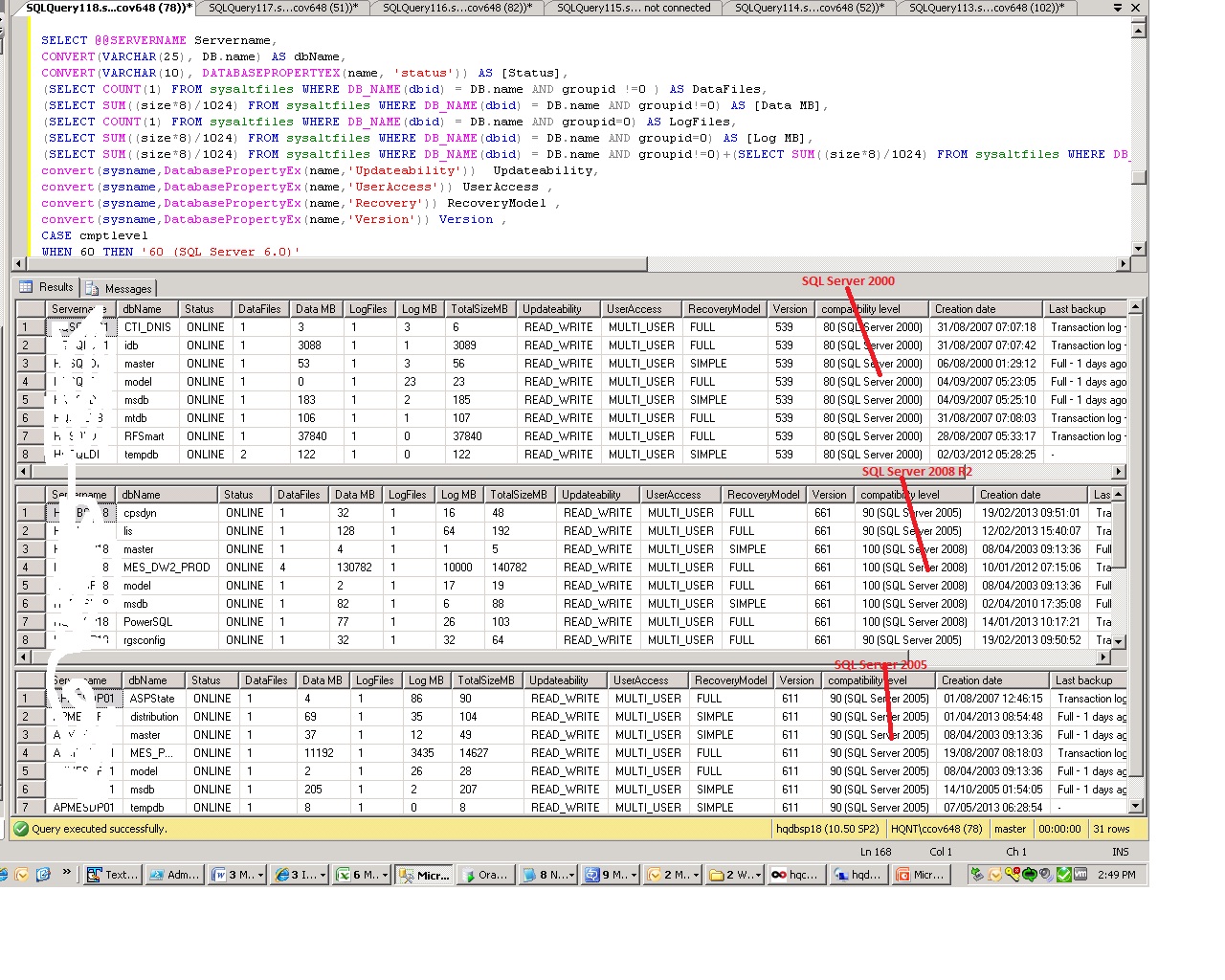
SQL – Query to find data,log,Total Size and other Useful information of all databases – SQL 2000/2005/2008/R2

I’ve encountered a situation where I need to find out the database file,log file, total size and other useful information about a database on SQL Server 2000/2005/2008/R2 versions. The requirement is to use same query and it has to be executed across all version of SQL SERVER.  We can  also do this using dynamic SQL’s.

Here is the T-SQL which you can use to run on any version of SQL Server to fetch the result.

USE MASTER
Go

SELECT @@SERVERNAME Servername,
CONVERT(VARCHAR(25), DB.name) AS dbName,
CONVERT(VARCHAR(10), DATABASEPROPERTYEX(name, ‘status’)) AS [Status],
(SELECT COUNT(1) FROM sysaltfiles WHERE DB_NAME(dbid) = DB.name AND groupid !=0 ) AS DataFiles,
(SELECT SUM((size*8)/1024) FROM sysaltfiles WHERE DB_NAME(dbid) = DB.name AND groupid!=0) AS [Data MB],
(SELECT COUNT(1) FROM sysaltfiles WHERE DB_NAME(dbid) = DB.name AND groupid=0) AS LogFiles,
(SELECT SUM((size*8)/1024) FROM sysaltfiles WHERE DB_NAME(dbid) = DB.name AND groupid=0) AS [Log MB],
(SELECT SUM((size*8)/1024) FROM sysaltfiles WHERE DB_NAME(dbid) = DB.name AND groupid!=0)+(SELECT SUM((size*8)/1024) FROM sysaltfiles WHERE DB_NAME(dbid) = DB.name AND groupid=0) TotalSizeMB,
convert(sysname,DatabasePropertyEx(name,’Updateability’)) Updateability,
convert(sysname,DatabasePropertyEx(name,’UserAccess’)) UserAccess ,
convert(sysname,DatabasePropertyEx(name,’Recovery’)) RecoveryModel ,
convert(sysname,DatabasePropertyEx(name,’Version’)) Version ,
CASE cmptlevel
WHEN 60 THEN ’60 (SQL Server 6.0)’
WHEN 65 THEN ’65 (SQL Server 6.5)’
WHEN 70 THEN ’70 (SQL Server 7.0)’
WHEN 80 THEN ’80 (SQL Server 2000)’
WHEN 90 THEN ’90 (SQL Server 2005)’
WHEN 100 THEN ‘100 (SQL Server 2008)’
END AS [compatibility level],
CONVERT(VARCHAR(20), crdate, 103) + ‘ ‘ + CONVERT(VARCHAR(20), crdate, 108) AS [Creation date],
ISNULL((SELECT TOP 1
CASE TYPE WHEN ‘D’ THEN ‘Full’ WHEN ‘I’ THEN ‘Differential’ WHEN ‘L’ THEN ‘Transaction log’ END + ‘ – ‘ +
LTRIM(ISNULL(STR(ABS(DATEDIFF(DAY, GETDATE(),Backup_finish_date))) + ‘ days ago’, ‘NEVER’)) + ‘ – ‘ +
CONVERT(VARCHAR(20), backup_start_date, 103) + ‘ ‘ + CONVERT(VARCHAR(20), backup_start_date, 108) + ‘ – ‘ +
CONVERT(VARCHAR(20), backup_finish_date, 103) + ‘ ‘ + CONVERT(VARCHAR(20), backup_finish_date, 108) +
‘ (‘ + CAST(DATEDIFF(second, BK.backup_start_date,
BK.backup_finish_date) AS VARCHAR(4)) + ‘ ‘+ ‘seconds)’
FROM msdb.dbo.backupset BK WHERE BK.database_name = DB.name ORDER BY backup_set_id DESC),’-‘) AS [Last backup]
FROM sysdatabases DB
ORDER BY dbName, [Last backup] DESC, NAME

Download the code here DB Useful Information

Output :-

Image

Posted in SQL, T-SQL | Tagged , , , | 10 Comments