SSAS Cube Backup strategies and Step by Step approach to setup and configure backup

There are different ways to take Cube database backups.

  • SQL Agent Job
    • XMLA script for backup
  • ROBOT job
    • ASCMD command
  • SSIS Package
    • SSIS package
  • AMO (Analysis Management Objects)
    • PowerShell Scripts

I feel AMO (Analysis Management Objects) does our job much easier. Different ways of taking cube backup is explained below. This is going to be a multi server script. I’ve executed this Power Shell scripts from my local PC which connects to remote server and place the backup files (*.abf) on its corresponding backup folder remotely (Default location For Eg:- F:\Program Files\Microsoft SQL Server\MSSQL.1\OLAP\Backup\<Servername>).

Pre-requisites:-

  • Load SQL modules if it’s not loaded automatically. Please refer my previous post Load SMO and AMO
  • Create a folder with a same name as of servername in a default backup location
  1. For example – Folder named AQBIPTO1 created under a default backup directory
  2. F:\Program Files\Microsoft SQL erver\MSSQL.1\OLAP\Backup\AQBIPT01\ . Its a combination of <Default backup directory location> +<Servername>

You can download complete code here SSAS_Backup

This is continuation of my previous post.

http://www.sqlservercentral.com/blogs/powersql-by-prashanth-jayaram/2013/05/15/ssas-find-cube-database-name-sizestatus-and-total-size-of-ssas-server/

Please do a complete testing on any of your test server.

Logical Flow
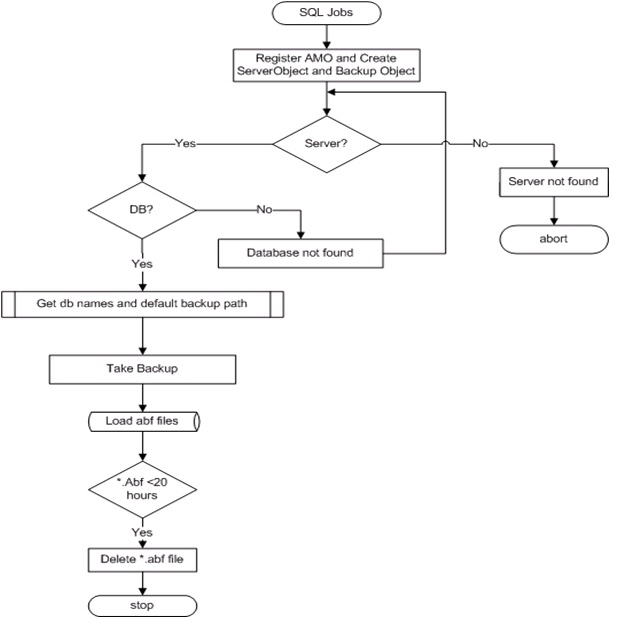
Logical Flow

First Method:  Cube Database Iteration

The cube database names are listed in c:\SSAS\CubeList.txt file and PowerShell script and traverse through each cube database for backup.

CubeList.txt contains the following the cube databases

ABC
DEF
GHI

PS C:\SSAS> .\SSAS1.PS1 <ServerName>

PS C:\SSAS> .\SSAS1.PS1 AQBIPT01

Copy and Paste the below code into SSAS1.PS1.

 ********************************************************

Param($ServerName=”localhost”)
$loadInfo = [System.Reflection.Assembly]::LoadWithPartialName(“Microsoft.AnalysisServices”) | Out-Null
## Add the AMO namespace
[Microsoft.AnalysisServices.BackupInfo]$serverBackup = New-Object ([Microsoft.AnalysisServices.BackupInfo])
[Microsoft.AnalysisServices.Server]$server = New-Object Microsoft.AnalysisServices.Server
$server.connect($ServerName)

If ($server.name -eq $null)
{
Write-Output (“Server ‘{0}’ not found” -f $ServerName)
break
}
$DBList = Get-Content “c:\SSAS\CubeList.txt”
Foreach($DBName in $DBList)
{
$DB = $server.Databases.FindByName($DBName)
if ($DB -eq $null)
{
Write-Output (“Database ‘{0}’ not found” -f $DBName)
}
else
{
Write-Output(“—————————————————————-“)
Write-Output(“Server : {0}” -f $Server.Name)
Write-Output(“Database: {0}” -f $DB.Name)
Write-Output(“DB State: {0}” -f $DB.State)
Write-Output(“DB Size : {0}MB” -f ($DB.EstimatedSize/1024/1024).ToString(“#,##0”))
Write-Output(“—————————————————————-“)

$BackupDestination=$server.ServerProperties.Item(“BackupDir”).value
$serverBackup.AllowOverwrite = 1
$serverBackup.ApplyCompression = 1
$serverBackup.BackupRemotePartitions = 1
if (-not $backupDestination.EndsWith(“\”))
{
$backupDestination += “\”
}
[string]$backupTS = Get-Date -Format “yyyyMMddHHmm”
$serverBackup.file = $backupDestination + $db.name + “_” + $backupTS + “.abf”
$serverBackup.file
$db.Backup($serverBackup)
if ($?) {“Successfully backed up ” + $db.Name + ” to ” + $serverBackup.File }
else {“Failed to back up ” + $db.Name + ” to ” + $serverBackup.File }
}
}
$server.Disconnect()

Second Method: Passing Cube Server and Database as a paramters

Call it through SSMS/SQL Job/PowerShell Console from any machine where server name and database names are passed as its parameters.

PS C:\SSAS> .\SSAS2.PS1 <ServerName> ‘<DatabaseName>’

PS C:\SSAS> .\SSAS2.PS1 AQBITP01 ‘PROD_OLAP’

 Copy and Paste code into SSAS2.PS1.

**************

# Add the AMO namespace
$loadInfo = [System.Reflection.Assembly]::LoadWithPartialName(“Microsoft.AnalysisServices”) | Out-Null
[Microsoft.AnalysisServices.BackupInfo]$serverBackup = New-Object ([Microsoft.AnalysisServices.BackupInfo])
[Microsoft.AnalysisServices.Server]$server = New-Object Microsoft.AnalysisServices.Server
$server.connect($ServerName)
if ($server.name -eq $null) {
Write-Output (“Server ‘{0}’ not found” -f $ServerName)
break
}

$DB = $server.Databases.FindByName($DBName)
if ($DB -eq $null) {
Write-Output (“Database ‘{0}’ not found” -f $DBName)
break
}

Write-Output(“—————————————————————-“)
Write-Output(“Server : {0}” -f $Server.Name)
Write-Output(“Database: {0}” -f $DB.Name)
Write-Output(“DB State: {0}” -f $DB.State)
Write-Output(“DB Size : {0}MB” -f ($DB.EstimatedSize/1024/1024).ToString(“#,##0”))
Write-Output(“—————————————————————-“)

$BackupDestination=$server.ServerProperties.Item(“BackupDir”).value
$serverBackup.AllowOverwrite = 1
$serverBackup.ApplyCompression = 1
$serverBackup.BackupRemotePartitions = 1
if (-not $backupDestination.EndsWith(“\”))
{
$backupDestination += “\”
}

[string]$backupTS = Get-Date -Format “yyyyMMddTHHmm”
$serverBackup.file = $backupDestination +$servername+’\’+ $db.name + “_” + $backupTS + “.abf”
$serverBackup.file
$db.Backup($serverBackup)
if ($?) {“Successfully backed up ” + $db.Name + ” to ” + $serverBackup.File }
else {“Failed to back up ” + $db.Name + ” to ” + $serverBackup.File }
$server.Disconnect()

********************************

Run the T-SQL on SSMS or SQL Job:

master..xp_cmdshell ‘PowerShell.exe c:\SSAS_Backup.PS1 AQBITP01 ”PROD_OLAP”’

SQL Job

STEP1:  master..xp_cmdshell ‘PowerShell.exe c:\SSAS_Backup.PS1 AQBITP01 ”PROD_OLAP”’

STEP 2: Delete backup files – Copy and Paste the below code

***********************

Function filedelete
{
Param($ServerName=”localhost”)
$loadInfo = [System.Reflection.Assembly]::LoadWithPartialName(“Microsoft.AnalysisServices”) | Out-Null
[Microsoft.AnalysisServices.BackupInfo]$serverBackup = New-Object ([Microsoft.AnalysisServices.BackupInfo])
[Microsoft.AnalysisServices.Server]$server = New-Object Microsoft.AnalysisServices.Server
$server.connect($ServerName)
if ($server.name -eq $null) {
Write-Output (“Server ‘{0}’ not found” -f $ServerName)
break
}
$BackupDestination=$server.ServerProperties.Item(“BackupDir”).value
if (-not $backupDestination.EndsWith(“\”))
{
$backupDestination += “\”
}

[string]$backupTS = Get-Date -Format “yyyyMMddTHHmm”
$serverBackup.file = $backupDestination +$servername+’\’+ $db.name + “_” + $backupTS + “.abf”
#write-host $serverBackup.file
$server.Disconnect()
$drive=$serverBackup.file.substring(0,1)
#write-host $drive
$Ppath=$backupDestination +$servername
#write-host $Ppath
$path=$Ppath | Measure-Object -Character |select characters
$len=$path.characters
#write-host $len
$path=$serverBackup.file.substring(2,$len-1)
#write-host $path
$file=get-ChildItem \\$servername\$Drive$\$path -Filter *.abf | Select-object LastWriteTime,directoryname,name | where-object {$_.LastWriteTime -lt [System.DateTime]::Now.Addhours(-20)}
#write-host $file
foreach($f in $file)
{
$filename=$f.directoryname+’\’+$f.name
write-output ‘File can be deleted’ $filename
remove-item $filename -Force
}
}

Filedelete HQBIPP01

********************************************

Output:-
—————————————————————-
Server : AQBITP01
Database: PROD_OLAP
DB State: Processed
DB Size : 2MB
—————————————————————-
F:\Program Files\Microsoft SQL Server\MSSQL.1\OLAP\Backup\PROD_OLAP_201305210819.
abf
Successfully backed up PROD_OLAP to F:\Program Files\Microsoft SQL Server\MSSQL.1
\OLAP\Backup\PROD_OLAP_201305210819.abf
NULL
Posted in SSAS | Tagged | 8 Comments

SQL- Setup and Configure Backup Report – Step by Step Approach – All listed SQL Instances

One of SQL enthusiast asked me to include the complete code and wanted to schedule a SQL job. I’m trying to give more information with this post also including Step by Step procedure to setup and configure backup report.

This is going to be a continuation of my previous post PART-2, data is pulled to centralized server table (TDATA_BackupDetails) from all SQL listed Instances. Now, you need to send an auto generated email to an intended administrators or scheduling a SQL job.

Pre-requisites are

  1. Enable XP_CMDShell 
  2. Mail Profile

Step by Step procedures to be done on centralized server is as follows

  1. Enable XP_CMDShell 
  2. List all SQL Instances in c:\Server.txt
  3. Table Creation TDATA_BackupDetails
  4. Copy and Paste T-SQL script in C:\BackupDetails.sql [Change @DatabaseName]
  5. Execute T-SQL’s [SSMS] – replace valid centralized server name Master..XP_CMDSHELL ‘for /f %j in (c:\server.txt ) do sqlcmd -S %j -i c:\BackupDetails.sql -E >> c:\backup.sql’                                                                                              GO                                                                                                      MASTER..XP_CMDSHELL ‘sqlcmd -S AQDBSQL01 -i c:\backup.sql -E’
  6. Data Validation                                                                                                                      select * from dbo.TDATA_BackupDetails where [DayssinceBackup]>1
  7. Prepare HTML Formatted data – Automatc Email [Change MailProfileName and receipients details – Find the code below STEP 2]
  8. SQL JOBS Steps ( If you think of creating a sql job)
  • STEP 1 – Replace AQDBSQL01 in the below code

TRUNCATE TABLE dbo.TDATA_BackupDetails
GO
Master..xp_cmdshell ‘del c:\backup.sql’
Go
Master..XP_CMDSHELL ‘for /f %j in (c:\server.txt ) do sqlcmd -S %j -i c:\BackupDetails.sql -E >> c:\backup.sql’
GO
MASTER..XP_CMDSHELL ‘sqlcmd -S AQDBSQL01 -i c:\backup.sql -E’

  • STEP 2: Change Profile and Receipients details

DECLARE @tableHTML NVARCHAR(MAX),
@td1 char(15),
@td2 char(15) ,
@td3 char(20) ,
@td4 char(15),
@td5 char(15),
@td6 char(15),
@td7 char(15),
@Loopstatus11 int,
@dmll nvarchar(max),
@dml2 nvarchar(max),
@Loopstatus1 int,
@RowId1 int,
@ProfileName varchar(100),
@receipients varchar(200)

/* Change Profile and Receipients details*/

SET @ProfileName =’Test’
SET @receipients=’pram@powersql.com;prasha.jayaram@PowerSQL.com’

CREATE TABLE #TLOG_BackupDetails(
[id] int identity(1,1),
[servername] [nvarchar](128) NULL,
[DB Name] [sysname] NOT NULL,
[Last BackUp Taken] varchar(50) NULL,
[Backup Size in MB] varchar(20) NULL,
[Days since Backup] varchar(20) NULL,
[User Name] [varchar](12) NULL
)

insert into #TLOG_BackupDetails( [servername], [DB Name], [Last BackUp Taken], [Backup Size in MB], [Days since Backup], [USER Name] )
SELECT
[servername], [DBName], [LastBackUpTaken],[BackupSizeinMB], [DayssinceBackup], [UserName]
from dbo.TDATA_BackupDetails where [DayssinceBackup]>0

SET @dmll=”
SET @dml2=”
SET @Loopstatus1=1
SET @RowId1=1
SET @tableHTML =
N'<H1>Database Backup Details </H1>’ +
N'<table border=”1″ cellpadding=”1″><tr>
[ServerName]
<th BGCOLOR=”RED”>[DB Name]</th>
<th BGCOLOR=”RED”>[Last BackUp Taken]</th>
<th BGCOLOR=”RED”>[Backup Size in MB]</th>
<th BGCOLOR=”RED”>[Days since Backup]</th>
<th BGCOLOR=”RED”>[User Name]</th>
</tr>’

While @Loopstatus1<>0
begin
select
@td1 =[ServerName],
@td2 =[DB Name],
@td3 =[Last BackUp Taken],
@td4 =[Backup Size in MB],
@td5 =[Days since Backup],
@td6 =[User Name]

from #TLOG_BackupDetails where id=@RowId1

if @@ROWCOUNT=0
begin
set @Loopstatus1=0
end
else
begin
set @dmll= @dml2+N”+@td1+N”+@td2+”+@td3+”+@td4+”+@td5+”+@td6+”
set @dml2=@dmll
set @dmll=”
end
set @RowId1=@RowId1+1
end

SET @tableHTML=@tableHTML+@dml2+'</table>’

print @tableHTML
if (exists (select * from #TLOG_BackupDetails))
begin
EXEC msdb.dbo.sp_send_dbmail
@profile_name = @ProfileName,
@recipients=@receipients,
@subject = ‘Backup Details Report’,
@body = @tableHTML,
@body_format = ‘HTML’;
end

DROP TABLE #TLOG_BackupDetails

Complete code is here SQL- AutoEmail – BackupReport

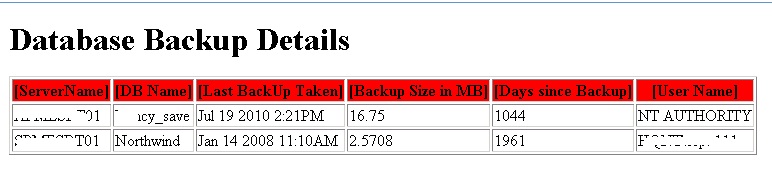
Output – Auto generated email below

Backup Report

Posted in SQL | Tagged , , , , , , | 7 Comments

SQL – SQL Server Script to Iterate and Pull Data from All SQL Instances – Database Backup

This Post is a continuation of my previous post. Many times, there is a difficulty in pulling the data to centralized server. As I’ve already mentioned in my previous post PART1,  I’m explaining how to pull the  DATABASE BACKUP information from all listed instance

In order to execute the below one you need to do a small change (Enable XP_CMDShell only on Centralized Server or where you are intended to schedule a sql job). In this case, below defined parameters needed to be changed with reference to your environment.

ServerName = ADBSQL01(Centralized Server)
DatabaseName= DBTest
TableName= TDATA_BackupDetails

The following steps will explain how to execute the script:

1)Create table to hold backup details

Use DBTest
Go
CREATE TABLE TDATA_BackupDetails
(
[id] int identity(1,1),
[servername] [nvarchar](128) NULL,
[DBName] [sysname] NOT NULL,
[LastBackUpTaken] varchar(50) NULL,
[BackupSizeinMB] varchar(20) NULL,
[DaysSinceBackup] varchar(20) NULL,
[UserName] [varchar](12) NULL
)

2) C:\Server.txt of ADBSQL01 Server holds all SQL Instances

3)The BackupDetails.sql file will contain the actual code. This file should be placed on your centralized server (ADBSQL01) on C: Drive. Copy and paste the below code in c:\BackupDetails.SQL

Note: – Change the Database Name in the below code. Dynamic SQL is in place to prepare Insert sql.

**********************

SET NOCOUNT ON

DECLARE
@SERVERNAME VARCHAR(15),
@DBNAME VARCHAR(100),
@LASTBACKUPTAKEN VARCHAR(20),
@BACKUPSIZEINMB VARCHAR(20),
@DAYSSINCEBACKUP VARCHAR(20),
@USERNAME VARCHAR(20),
@LOOPSTATUS_1 INT,
@ROWID_1 INT,
@DML NVARCHAR(4000),
@DatabaseName Varchar(50)
SET @DatabaseName=’DBTest’

CREATE TABLE #TLOG_BACKUPDETAILS
(
[ID] INT IDENTITY(1,1),
[SERVERNAME] [NVARCHAR](128) NULL,
[DBNAME][SYSNAME] NOT NULL,
[LASTBACKUPTAKEN] VARCHAR(50)NULL,
[BACKUPSIZEINMB] VARCHAR(20)NULL,
[DAYSSINCEBACKUP] VARCHAR(20)NULL,
[USERNAME] [VARCHAR](12)NULL
)
INSERT INTO #TLOG_BACKUPDETAILS([SERVERNAME],[DBNAME],[LASTBACKUPTAKEN],[BACKUPSIZEINMB],[DAYSSINCEBACKUP],[USERNAME])
SELECT
@@SERVERNAME [SERVERNAME],
T.NAME AS [DBNAME],
(COALESCE(CONVERT(DATETIME,MAX(U.BACKUP_FINISH_DATE),101),’NOTYETTAKEN’))AS [LASTBACKUPTAKEN],
(((COALESCE(CONVERT(REAL(256),MAX(U.BACKUP_SIZE),101),’NA’))/1024)/1024)AS [BACKUPSIZEINMB],
ABS((COALESCE(CONVERT(VARCHAR(10),MAX(DATEDIFF(D,GETDATE(),U.BACKUP_FINISH_DATE))),101)))AS [DAYSSINCEBACKUP],
(COALESCE(CONVERT(VARCHAR(12),MAX(U.USER_NAME),101),’NA’))AS [USERNAME]
FROM MASTER..SYSDATABASES T
INNER JOIN MSDB.dbo.BACKUPSET U
ON T.NAME=U.DATABASE_NAME
GROUP BY T.NAME
ORDER BY T.NAME
SET @LOOPSTATUS_1=1
SET @ROWID_1=1

WHILE(@LOOPSTATUS_1<>0)BEGIN

SET @DML=”

SELECT
@SERVERNAME=[SERVERNAME],
@DBNAME=[DBNAME],
@LASTBACKUPTAKEN=[LASTBACKUPTAKEN],
@BACKUPSIZEINMB=[BACKUPSIZEINMB],
@DAYSSINCEBACKUP=[DAYSSINCEBACKUP],
@USERNAME=[USERNAME]
FROM
#TLOG_BACKUPDETAILS
WHERE
(ID=@ROWID_1)

IF(@@ROWCOUNT=0)
BEGIN
SET @LOOPSTATUS_1=0
END
ELSE
BEGIN
SET @DML=@DML+’INSERT INTO [‘+@DatabaseName+’].dbo.TDATA_BACKUPDETAILS([SERVERNAME],[DBNAME],[LASTBACKUPTAKEN],[BACKUPSIZEINMB],[DAYSSINCEBACKUP],[USERNAME])VALUES(‘+””+@@SERVERNAME+””+’,’+””+@DBNAME+””+’,’+””+@LASTBACKUPTAKEN+””+’,’+””+@BACKUPSIZEINMB+””+’,’+””+@DAYSSINCEBACKUP+””+’,’+””+@USERNAME+””+’)’
END
PRINT @DML
SET @ROWID_1=@ROWID_1+1

END
PRINT @DML

DROP TABLE #TLOG_BACKUPDETAILS

**********************************

4)In the SQL Server Management Studio, connect to ADBSQL01 server. Under DBTest Database, Execute the below T-SQL’s.

Master..XP_CMDSHELL ‘for /f %j in (c:\server.txt ) do sqlcmd -S %j -i c:\BackupDetails.sql -E >> c:\backup.sql’
GO
MASTER..XP_CMDSHELL ‘sqlcmd -S ADBSQL01 -i c:\backup.sql -E’

Note: – First part of the above T-SQL gives you a list of Insert SQL Statement(backup.sql).

insert into DBTest.dbo.TDATA_BackupDetails([servername],[DBName],[LastBackUpTaken],[BackupSizeinMB],[DayssinceBackup],[UserName])values(‘AQDBSQL07′,’ReportServer’,’May22201310:00AM’,’5.375′,’0′,’NTAUTHORITY’)
insert into DBTest.dbo.TDATA_BackupDetails([servername],[DBName],[LastBackUpTaken],[BackupSizeinMB],[DayssinceBackup],[UserName])values(‘AQDBSQL11′,’WSS_UsageApplication_a66cb18ebff042f0a09666554c5901e7′,’May22 2013 10:01AM’,’207.25′,’7′,’NT AUTHORITY’)

Second Part does insertion all those SQL’s into DBTest.dbo.TDATA_BackupDetails.

5)Use SSMS and Query the table

USE DBTest

Go

select * from DBtest.dbo.TDATA_BackupDetails where [DayssinceBackup]>1

You can also send an automated email. Refer my below post for more information

https://sqlpowershell.wordpress.com/2013/04/22/sql-formatting-and-email-sending-reports-in-html-format-using-t-sql/#comments

Code is here SQL-Iteration

Thanks for reading my space and let me know if you need a code to send automated email.

Happy Learning!!!!

Posted in SQL, T-SQL | Tagged , , | 2 Comments

SQL – SQL Server Script to Iterate through All SQL Instances – Example Transaction Log Shrinking

There are many ways to execute SQL’s or T-SQL’s across listed SQL Instances. Most of us might have faced and handled this scenario. A script or SQL’s need to be executed across ‘N’ number of instances. This example which does just one way activity. In my upcoming post, I’ll explain how to pull and store the data on a centralized server.

I’ve enabled xp_cmdshell option so that OS commands can be execute through SSMS.

sp_configure ‘show advanced options’, 1;
GO
RECONFIGURE;
GO
sp_configure ‘xp_cmdShell’, 1;
GO
RECONFIGURE;
GO

This component is enabled where you are intended to run the script(Centralized Server).In this example, servernames are listed in C:\servers.txt and the T-SQL’s are in c:\TransactionLogShrink.sql which contains code to shrink the transaction log files.

After enabling XP_CMDSHELL and placing both the files on Centralized Server, open SSMS(Management Studio) and execute the below script

Input File:

List the servernames under Servers.txt

KPDBQ001
KPDBQ002

Script File:

Copy and paste the below content in TransactionLogShrink.sql. Make sure you run the script once in SSMS.

******************************************

DECLARE @DBName AS NVARCHAR(100),
@LogFileName AS NVARCHAR(100),
@exec_stmt nvarchar(625)

SET NOCOUNT ON
——————————————————————————-
–create the temporary table to hold the log file names
—————————————————————————–
CREATE TABLE #logfiles
(
dbname NVARCHAR(100),
filename NVARCHAR(100),
)

—————————————————————————–
–select all dbs, except for system dbs
—————————————————————————–

DECLARE curDBName CURSOR FOR
SELECT
[name]
FROM
master.sys.databases
WHERE
name NOT IN (‘master’, ‘tempdb’, ‘model’, ‘msdb’)
AND state_desc = ‘ONLINE’

——————————————————————————-
–add the log file name to the temporary table,groupid=0 is for logfile and 1 for datafile.
—————————————————————————–
OPEN curDBName
FETCH NEXT FROM curDBName INTO @DBName
WHILE @@FETCH_STATUS = 0
BEGIN
SELECT @exec_stmt = ‘INSERT INTO #logfiles
SELECT ”’ + @DBName + ”’ , name FROM ‘ + quotename(@DBName, N'[‘) + N’.dbo.sysfiles
WHERE groupid = 0′
EXECUTE (@exec_stmt)
FETCH NEXT FROM curDBName INTO @DBName
END
CLOSE curDBName
DEALLOCATE curDBName

–SELECT * FROM #logfiles
————————————————
–select all log filenames from the #logiles
————————————————-
DECLARE curLogName CURSOR FOR
SELECT
dbname, [filename]
FROM
#logfiles
—————————————————-
–shrink all log files
—————————————————–
OPEN curLogName
FETCH NEXT FROM curLogName INTO @DBName, @LogFileName
WHILE @@FETCH_STATUS = 0
BEGIN
SELECT @exec_stmt = ‘ USE ‘ + quotename(@DBName) + N’ DBCC SHRINKFILE (‘ + quotename(@LogFileName)+’)’
–print (@exec_stmt)
EXECUTE (@exec_stmt)
FETCH NEXT FROM curLogName INTO @DBName, @LogFileName
END
CLOSE curLogName
DEALLOCATE curLogName
—————————————-
–clean up the logfile table
—————————————-
DROP TABLE #logfiles

********************************************

Open SSMS and execute below T-SQL

Master..xp_cmdshell ‘for /f %j in (c:\servers.txt) do sqlcmd -S %j -i c:\Transaction.sql -E >>c:\ShrinkOutput.txt’

Output –

ShrinkOutput.txt

—————————————————————————————-

if ‘?’ <> ‘master’ and ‘?’ <> ‘msdb’ and ‘?'<>’tempdb’ and ‘?’ <> ‘model’ BEGIN USE [?]; SELECT ‘?’; DECLARE @LogFile varchar (30); SELECT @LogFile = name FROM dbo.sysfiles WHERE (status & 0x40) <> 0; dbcc shrinkfile (@LogFile); END

(1 rows affected)

———–
Placeholder
DbId FileId CurrentSize MinimumSize UsedPages EstimatedPages
—— ———– ———– ———– ———– ————–
5 2 128 128 128 128
DBCC execution completed. If DBCC printed error messages, contact your system administrator.

Posted in SQL, T-SQL | Tagged , , , , | 4 Comments

Bill Gate’s speech

One of my friend shared this content. I’m just sharing with you all.
Good one and I like it pretty much!!!!
Bill Gates recently gave a speech at a High School about eleven (11) things they did not and will not learn in school.

Rule 1 : Life is not fair – get used to it!

Rule 2 : The world doesn’t care about your self-esteem. The world will expect you to accomplish something BEFORE you feel good about yourself.

Rule 3 : You will NOT make $60,000 a year right out of high school. You won’t be a vice-president with a car phone until you earn both.

Rule 4 : If you think your teacher is tough, wait till you get a boss

Rule 5 : Flipping burgers is not beneath your dignity. Your Grandparents had a different word for burger flipping: They called it opportunity.

Rule 6 : If you mess up, it’s not your parents’ fault, so don’t whine about your mistakes, learn from them.

Rule 7 : Before you were born, your parents weren’t as boring as they are now. They got that way from paying your bills, cleaning your clothes and listening to you talk about how cool you thought you were:
 
So before you save the rain forest from the parasites of your parent’s generation, try delousing the closet in your own room..

Rule 8 : Your school may have done away with winners and losers, but life HAS NOT. In some schools, they have abolished failing grades and they’ll give you as MANY TIMES as you want to get the right answer.

*This doesn’t bear the slightest resemblance to ANYTHING in real life.

Rule 9 : Life is not divided into semesters. You don’t get summers off and very few employers are interested in helping you FIND YOURSELF.
*Do that on your own time.

Rule 10 : Television is NOT real life. In real life people actually have to leave the coffee shop and go to jobs.
 
Rule 11 : Be nice to nerds. Chances are you’ll end up working for one
Posted in Philosophy | Tagged | Leave a comment

SSAS – Find Cube Database Name, Size,Status and Total Size of SSAS Server

We are planning to take SSAS cube database backup since our backup tool does full file system backup in case of recovery, restoration is taking more time and hence as a first step we are started gathering the number of cubes,status and total size of cube databases .

SQLAS provider used for navigating the Analysis Management Object (AMO) hierarchy. You must import the SQLPS module before you can use the SQLAS provider and cmdlets. The SQLAS provider is an extension of the SQLServer provider. There are several ways to import the SQLPS module.

Please refer by earlier post to load SMO’s, if it’s not loaded.

http://www.sqlservercentral.com/blogs/powersql-by-prashanth-jayaram/2013/05/01/powersql-list-sql-server-instance-configuration-details-and-sending-an-automated-email/

Create a file SSAS1.PS1 and paste the below content

********************************************************
Param($ServerName=”localhost”)
$loadInfo = [Reflection.Assembly]::LoadWithPartialName(“Microsoft.AnalysisServices”)
$server = New-Object Microsoft.AnalysisServices.Server
$server.connect($ServerName)
if ($server.name -eq $null) {
Write-Output (“Server ‘{0}’ not found” -f $ServerName)
break
}

$sum=0
foreach ($d in $server.Databases )
{
Write-Output ( “Database: {0}; Status: {1}; Size: {2}MB” -f $d.Name, $d.State, ($d.EstimatedSize/1024/1024).ToString(“#,##0”) )
$sum=$sum+$d.EstimatedSize/1024/1024
}

$SizeGB=$Sum/1024

write-host ‘Sum of Database = ‘$sum ‘ MB’
Write-host ‘Total Size of Cube Databases =’ $SizeGB ‘ GB’

***************************************************************

Open PowerShell – Type PowerShell in command prompt

PS C:\> .\SSAS1.PS1 <serverName>

Or Command Prompt
Powershell.exe c:\ssas1.ps1 <ServerName>

PS E:\> .\ssas.ps1 TEST
Database: Daily; Status: Processed; Size: 2,180MB
Database: Test; Status: Processed; Size: 49MB
Database: PP04; Status: Processed; Size: 57MB
Database: Trans; Status: Processed; Size: 1,613MB
Database: Complaint; Status: Processed; Size: 313MB
Database: PI; Status: Processed; Size: 8,687MB
Database: PI_Jey; Status: Processed; Size: 8,807MB
Database: PI_Trng; Status: Processed; Size: 8,474MB
Database: LG; Status: Processed; Size: 56MB
Database: VPP; Status: PartiallyProcessed; Size: 7MB
Database: Assign; Status: Processed; Size: 1,551MB
Database: Cubes; Status: Processed; Size: 3,044MB
Database: Cube; Status: Processed; Size: 3,048MB
Database: Tele; Status: Processed; Size: 2MB
Database: Pricing; Status: Processed; Size: 2,140MB
Database: DMDB; Status: Unprocessed; Size: 0MB
Database: LG cube; Status: Processed; Size: 62MB
Database: Manual; Status: PartiallyProcessed; Size: 2MB
Database: Tutorial; Status: Processed; Size: 10MB
Database: DW ; Status: Processed; Size: 32MB
Database: OLAP; Status: Processed; Size: 86MB
Database: SSAS; Status: Unprocessed; Size: 0MB
Sum of Database = 40220.1397724152 MB
Total Size of Cube Databases = 39.2774802464992 GB

Posted in PowerShell, SSAS | Tagged , , | 4 Comments

We came across a scenario where database bak files being created from long time which are no more in use and hence cleanup those files since we’ve backup tool is in place. We’ve many *.BAK (database backup files) created across ‘N’ number of servers. We have decided to cleanup all *.bak files .  First we’ve listed all *.bak files  and validated it once and make sure which one is eligible for deletion. In this post, I’m just doing information gathering. To get a remote drive location, I’ve referred GetUNCpath function which is already posted in one of my previous blog.

The below code has three parts
1) Get the UNC path of each drive of a any server – get remote drive location
2) Test-Connection with the server – check for successful connection or not
3) Browse through each drive – Recursive search

Note:-

1)Input file =List.txt
2)Input Parameter = Extension (Any file extension BAK,SQL,PS1 etc:- In this case its BAK)
3)OutputFile =FileList.txt

The Server names are included in list.txt
aqvd002612
aqdb1812

*************************************

FUNCTION getUNCPath($infile)
{
$qualifier = Split-Path $infile -qualifier
$drive = $qualifier.substring(0,1)
$noqualifier = Split-Path $infile -noQualifier
“$drive`$$noqualifier”
}

FUNCTION Get-Files
{
Param([String]$extn)
FOREACH ($server in Get-Content List.txt)
{
if (Test-Connection -ComputerName $Server -Count 2 -Quiet )
{
$dp = Get-WmiObject win32_logicaldisk -ComputerName $server | Where-Object {$_.drivetype -eq 3}|select deviceid
foreach ($item in $dp)
{
$UNC=getUNCPath($item.deviceid)
$Path=”\\$Server\$UNC”
Write-host $path
Get-childitem $path -RECURSE –FORCE -ERRORACTION silentlycontinue *.$extn |select-object Name,DirectoryName,@{Name=”Size(MB)”;Expression={[math]::round($_.Length/1024/1024,3)}}, CreationTime,LastAccessTime,LastWriteTime |out-file -append c:\FileList.txt
}
}
else
{
Write-Warning “$Server seems dead not pinging”
}
}
}

**************************************************

The Function calling code is given below

PS C:\> Get-Files -extn bak

Output – FileList.txt

Name : MMetaService_3-27-2013.bak
DirectoryName : \\aqdb1812\C$
Size(MB) : 5.156
CreationTime : 3/27/2013 10:37:26 PM
LastAccessTime : 4/4/2013 10:26:12 AM
LastWriteTime : 3/27/2013 10:37:26 PM

Name : WSS_Content_3-5-2013.bak
DirectoryName : \\aqdb1812\C$
Size(MB) : 161.166
CreationTime : 3/15/2013 2:08:25 PM
LastAccessTime : 4/29/2013 2:03:31 PM
LastWriteTime : 3/16/2013 1:59:26 AM

Invalid ServerName in List.txt

PS C:\> Get-Files -extn bak
WARNING: aqvd002612 seems dead not pinging

Posted on by Prashanth Jayaram | Leave a comment

PowerSQL – SQL Inventory Generation – Email – High Level Details

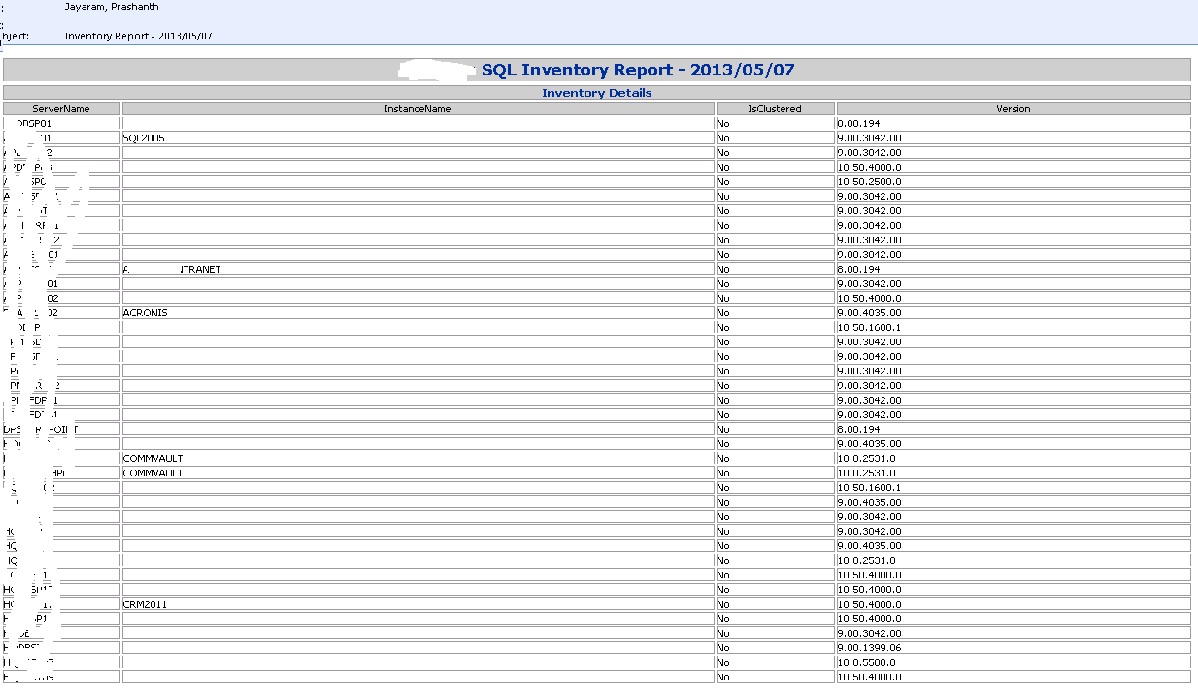
Inventory allows anyone to quickly and easily assess any environment. For few servers, answering  Inventory questions might not be so difficult.  But if you’re managing ‘N’ number of SQL Server instances then its going to be tedious job and you’re going to need an organized system for tracking this kind of information. Simplest and an easiest way to pull high level sql instance details are given below. There are two ways to retrieve the instance details

First Method – The sqlcmd utility is a command-line utility for ad hoc, interactive execution of Transact-SQL statements and scripts and for automating Transact-SQL scripting tasks

C:\>SQLCMD –L [-L list servers clean output]

Second Method– You need to change Emlst(Email List) and MailServer Parameters in the below code to get formatted HTML output.

Copy and Paste the below code Inventory.PS1 and run it

************************************************************

$MailServer=”aqmail01.PowerSQL.com”

$Emlst=”pjayaram@PowerSQL.com”

$Inventory = “Inventory.htm”

New-Item -ItemType file $Inventory -Force

# Function to write the HTML Header to the file
Function writeHtmlHeader
{
param($fileName)
$date = ( get-date ).ToString(‘yyyy/MM/dd’)
Add-Content $fileName “<html>”
Add-Content $fileName “<head>”
Add-Content $fileName “<meta http-equiv=’Content-Type’ content=’text/html; charset=iso-8859-1′>”
Add-Content $fileName ‘<title>SQL Inventory Report </title>’
add-content $fileName ‘<STYLE TYPE=”text/css”>’
add-content $fileName “<!–”
add-content $fileName “td {”
add-content $fileName “font-family: Tahoma;”
add-content $fileName “font-size: 11px;”
add-content $fileName “border-top: 1px solid #999999;”
add-content $fileName “border-right: 1px solid #999999;”
add-content $fileName “border-bottom: 1px solid #999999;”
add-content $fileName “border-left: 1px solid #999999;”
add-content $fileName “padding-top: 0px;”
add-content $fileName “padding-right: 0px;”
add-content $fileName “padding-bottom: 0px;”
add-content $fileName “padding-left: 0px;”
add-content $fileName “}”
add-content $fileName “body {”
add-content $fileName “margin-left: 5px;”
add-content $fileName “margin-top: 5px;”
add-content $fileName “margin-right: 0px;”
add-content $fileName “margin-bottom: 10px;”
add-content $fileName “”
add-content $fileName “table {”
add-content $fileName “border: thin solid #000000;”
add-content $fileName “}”
add-content $fileName “–>”
add-content $fileName “</style>”
Add-Content $fileName “</head>”
Add-Content $fileName “<body>”
add-content $fileName “<table width=’100%’>”
add-content $fileName “<tr bgcolor=’#CCCCCC’>”
add-content $fileName “<td colspan=’4′ height=’25’ align=’center’>”
add-content $fileName “<font face=’tahoma’ color=’#003399′ size=’4′><strong>SQL Inventory Report – $date</strong></font>”
add-content $fileName “</td>”
add-content $fileName “</tr>”
add-content $fileName “</table>”
}

# Function to write the HTML Header to the file
Function writeTableHeader
{
param($fileName)
Add-Content $fileName “<tr bgcolor=#CCCCCC>”
Add-Content $fileName “<td width=’10%’ align=’center’>ServerName</td>”
Add-Content $fileName “<td width=’50%’ align=’center’>InstanceName</td>”
Add-Content $fileName “<td width=’10%’ align=’center’>IsClustered</td>”
Add-Content $fileName “<td width=’10%’ align=’center’>Version</td>”
Add-Content $fileName “</tr>”
}

Function writeHtmlFooter
{
param($fileName)
Add-Content $fileName “</body>”
Add-Content $fileName “</html>”
}

Function writeDiskInfo
{
param($filename,$Servername,$Instance,$IsClustered,$Version)
Add-Content $fileName “<tr>”
Add-Content $fileName “<td>$servername</td>”
Add-Content $fileName “<td>$Instance</td>”
Add-Content $fileName “<td>$IsClustered</td>”
Add-Content $fileName “<td>$Version</td>”
Add-Content $fileName “</tr>”
}

Function sendEmail
{
param($from,$to,$subject,$smtphost,$htmlFileName)
[string]$receipients=”$to”
$body = Get-Content $htmlFileName
$body = New-Object System.Net.Mail.MailMessage $from, $receipients, $subject, $body
$body.isBodyhtml = $true
$smtpServer = $MailServer
$smtp = new-object Net.Mail.SmtpClient($smtpServer)
$smtp.Send($body)
}
writeHtmlHeader $Inventory
Add-Content $Inventory “<table width=’100%’><tbody>”
Add-Content $Inventory “<tr bgcolor=’#CCCCCC’>”
Add-Content $Inventory “<td width=’100%’ align=’center’ colSpan=4><font face=’tahoma’ color=’#003399′ size=’2′><strong> Inventory Details</strong></font></td>”
Add-Content $Inventory “</tr>”

writeTableHeader $Inventory

$dp = [System.Data.Sql.SqlDataSourceEnumerator]::Instance.GetDataSources()|select servername,Instancename, isclustered, version | where {$_.isclustered -notlike “” }|sort-object servername
foreach ($item in $dp)
{
if( $item.instancename -eq “”)
{
$item.instancename=”Default Instance”
}
Write-Host $item.servername $item.instancename $item.isClustered $item.Version
writeDiskInfo $Inventory $item.servername $item.instancename $item.isClustered $item.Version
}
Add-Content $Inventory “</table>”

writeHtmlFooter $Inventory
$date = ( get-date ).ToString(‘yyyy/MM/dd’)
sendEmail PoweSQL@PowerSQL.com “$emlst” “Inventory Report – $Date” $MailServer $Inventory

Output:-

third

Posted in PowerShell, SQL | Tagged , | Leave a comment

PowerSQL – Identify a Head of the Database Blocks and Generate Automated Alert across all listed SQL Instances

This is going to be a simplest way of capturing and sending some useful information via an email of ‘N’ number of servers. With a little modification, you can implement various database related automation and capture very useful information.

To Identify the SPID (Session ID) of a head of the blocking chain using SMO server object using method named EnumProcesses which lists all running processes in an instance. Once the SMO server object is instantiated, all you need to invoke is the EnumProcesses method.

Please refer by earlier post to load SMO’s, if it’s not loaded.

http://www.sqlservercentral.com/blogs/powersql-by-prashanth-jayaram/2013/05/01/powersql-list-sql-server-instance-configuration-details-and-sending-an-automated-email/

I’ve also used global variables for email sending option. First lets create a text file List.txt in which all instance names are stored and Change the MailServer, EmLst Parameters as per your configuration. Schedule a sql job to run it periodically so that an auto-generated alerts will be sent an intended administrators.

DBBlocks.ps1 – Copy and paste below content

************************************************************************

$MailServer=”aqmail01.PowerSQL.com”

$Emlst=”powersql@powersql.com”

$Dbblock = “dbblock.htm”

New-Item -ItemType file $Dbblock -Force

Function writeHtmlHeader
{
param($fileName)
$date = ( get-date ).ToString(‘yyyy/MM/dd’)
Add-Content $fileName “<html>”
Add-Content $fileName “<head>”
Add-Content $fileName “<meta http-equiv=’Content-Type’ content=’text/html; charset=iso-8859-1′>”
Add-Content $fileName ‘<title>Database Blocks Report</title>’
add-content $fileName ‘<STYLE TYPE=”text/css”>’
add-content $fileName “<!–”
add-content $fileName “td {”
add-content $fileName “font-family: Tahoma;”
add-content $fileName “font-size: 11px;”
add-content $fileName “border-top: 1px solid #999999;”
add-content $fileName “border-right: 1px solid #999999;”
add-content $fileName “border-bottom: 1px solid #999999;”
add-content $fileName “border-left: 1px solid #999999;”
add-content $fileName “padding-top: 0px;”
add-content $fileName “padding-right: 0px;”
add-content $fileName “padding-bottom: 0px;”
add-content $fileName “padding-left: 0px;”
add-content $fileName “}”
add-content $fileName “body {”
add-content $fileName “margin-left: 5px;”
add-content $fileName “margin-top: 5px;”
add-content $fileName “margin-right: 0px;”
add-content $fileName “margin-bottom: 10px;”
add-content $fileName “”
add-content $fileName “table {”
add-content $fileName “border: thin solid #000000;”
add-content $fileName “}”
add-content $fileName “–>”
add-content $fileName “</style>”
Add-Content $fileName “</head>”
Add-Content $fileName “<body>”
add-content $fileName “<table width=’100%’>”
add-content $fileName “<tr bgcolor=’#CCCCCC’>”
add-content $fileName “<td colspan=’7′ height=’25’ align=’center’>”
add-content $fileName “<font face=’tahoma’ color=’#003399′ size=’4′><strong>Database Blocks Report – $date</strong></font>”
add-content $fileName “</td>”
add-content $fileName “</tr>”
add-content $fileName “</table>”

}

# Function to write the HTML Header to the file
Function writeTableHeader
{
param($fileName)

Add-Content $fileName “<tr bgcolor=#CCCCCC>”
Add-Content $fileName “<td width=’10%’ align=’center’>SERVER</td>”
Add-Content $fileName “<td width=’50%’ align=’center’>SPID</td>”
Add-Content $fileName “<td width=’10%’ align=’center’>BLOCKING SPID</td>”
Add-Content $fileName “<td width=’10%’ align=’center’>DATABASE</td>”
Add-Content $fileName “<td width=’10%’ align=’center’>COMMAND</td>”
Add-Content $fileName “<td width=’10%’ align=’center’>STATUS</td>”
Add-Content $fileName “<td width=’10%’ align=’center’>LOGIN</td>”
Add-Content $fileName “<td width=’10%’ align=’center’>HOSTNAME</td>”
Add-Content $fileName “<td width=’10%’ align=’center’>CPU</td>”
Add-Content $fileName “<td width=’10%’ align=’center’>MEMUSAGE</td>”
Add-Content $fileName “</tr>”
}

Function writeHtmlFooter
{
param($fileName)

Add-Content $fileName “</body>”
Add-Content $fileName “</html>”
}

Function writeDBInfo
{
param($fileName,$server,$Spid,$BlockingSpid,$Database,$Command,$Status,$Login,$hst,$CPU,$Memusage)

Add-Content $fileName “<tr>”
Add-Content $fileName “<td>$Server</td>”
Add-Content $fileName “<td>$SPID</td>”
Add-Content $fileName “<td>$BLOCKINGSPID</td>”
Add-Content $fileName “<td>$DATABASE</td>”
Add-Content $fileName “<td>$COMMAND</td>”
Add-Content $fileName “<td>$Status</td>”
Add-Content $fileName “<td>$Login</td>”
Add-Content $fileName “<td>$hst</td>”
Add-Content $fileName “<td>$CPU</td>”
Add-Content $fileName “<td>$Memusage</td>”
#<td bgcolor=’#FF0000′ align=center>
Add-Content $fileName “</tr>”
}

Function sendEmail

{
param($from,$to,$subject,$smtphost,$htmlFileName)
[string]$receipients=”$to”
$body = Get-Content $htmlFileName
$body = New-Object System.Net.Mail.MailMessage $from, $receipients, $subject, $body
$body.isBodyhtml = $true
$smtpServer = $MailServer
$smtp = new-object Net.Mail.SmtpClient($smtpServer)
$smtp.Send($body)
}

writeHtmlHeader $Dbblock

#Use of Global Variable

$global:a=0

function increment {
$global:a++
}

foreach ($server in Get-Content List.txt)
{
$server = New-Object -TypeName Microsoft.SqlServer.Management.Smo.Server -ArgumentList $server
$blocks=$server.EnumProcesses() |Where {$_.BlockingSpid -ne 0 -and $_.spid -gt 50 }

if ($blocks -ne $NULL)
{
foreach ($db in $blocks)
{
Add-Content $Dbblock “<table width=’100%’><tbody>”
Add-Content $Dbblock “<tr bgcolor=’#CCCCCC’>”
Add-Content $Dbblock “<td width=’100%’ align=’center’ colSpan=10><font face=’tahoma’ color=’#003399′ size=’2′><strong> $server </strong></font></td>”
Add-Content $Dbblock “</tr>”
writeTableHeader $Dbblock
increment $global:a
write-host $Dbblock $server $db.Spid $db.BlockingSpid $db.Database $db.Command $db.Status $db.Login $db.host $db.cpu $db.Memusage
writeDBInfo $Dbblock $server $db.Spid $db.BlockingSpid $db.Database $db.Command $db.Status $db.Login $db.host $db.cpu $db.Memusage
}
}

Add-Content $Dbblock “</table>”
}

writeHtmlFooter $Dbblock

if ($global:a -ge 1)
{
$date = ( get-date ).ToString(‘yyyy/MM/dd’)
sendEmail powersql@powersql.com “$emlst” “Database Blocks Space Report – $Date” $MailServer $Dbblock
}

How to run the above file

– You can right click and execute

– Goto to PowerShell Console – .\DBBlocks.PS1

Output:-

second

Posted in PowerShell, SQL | Tagged , , | 1 Comment

PowerSQL – List SQL Server instance configuration details and sending an automated email

This article walks through how to list SQL Server configurable and non-configurable  instance settings using PowerShell and sending an automated email to a listed users. The  Function SendEmail has MailServerName as one of its parameter. Please change accordingly.The following code loads the SMO(SMO Server Objects) assemblies.
Import the SQLPS module, and create a new SMO Server object and Specify the DisableNameChecking parameter if you want to suppress the warning about Encode-Sqlname and Decode-Sqlname.

#import SQL Server module
PS:\>Import-Module SQLPS -DisableNameChecking

ErrorMessage –
Import-Module : The specified module ‘SQLPS’ was not loaded because no valid module file was found in any module directory.

Checkout for available modules using below code

PS:\>Get-Module -ListAvailable

If SQLPS is not there, Load the assemblies Manually using below given code.

Copy the code and load into PowerShell-ISE.exe and execute, If some of the modules are loaded already you may encounter some error. You can ignore those errors.

# Loads the SQL Server Management Objects (SMO)

********************************************************************
$ErrorActionPreference = “Stop”
$sqlpsreg=”HKLM:\SOFTWARE\Microsoft\PowerShell\1\ShellIds\Microsoft.SqlServer.Management.PowerShell.sqlps”
if (Get-ChildItem $sqlpsreg -ErrorAction “SilentlyContinue”)
{
throw “SQL Server Provider for Windows PowerShell is not installed.”
}
else
{
$item = Get-ItemProperty $sqlpsreg
$sqlpsPath = [System.IO.Path]::GetDirectoryName($item.Path)
}

$assemblylist = “Microsoft.SqlServer.Management.Common”,”Microsoft.SqlServer.Smo”,”Microsoft.SqlServer.Dmf “,”Microsoft.SqlServer.Instapi “,
“Microsoft.SqlServer.SqlWmiManagement “,”Microsoft.SqlServer.ConnectionInfo “,”Microsoft.SqlServer.SmoExtended “,”Microsoft.SqlServer.SqlTDiagM “,
“Microsoft.SqlServer.SString “,”Microsoft.SqlServer.Management.RegisteredServers “,”Microsoft.SqlServer.Management.Sdk.Sfc “,”Microsoft.SqlServer.SqlEnum “,
“Microsoft.SqlServer.RegSvrEnum “,”Microsoft.SqlServer.WmiEnum “,”Microsoft.SqlServer.ServiceBrokerEnum “,”Microsoft.SqlServer.ConnectionInfoExtended “,
“Microsoft.SqlServer.Management.Collector “,”Microsoft.SqlServer.Management.CollectorEnum”,”Microsoft.SqlServer.Management.Dac”,”Microsoft.SqlServer.Management.DacEnum”,
“Microsoft.SqlServer.Management.Utility”

foreach ($asm in $assemblylist)
{
$asm = [Reflection.Assembly]::LoadWithPartialName($asm)
}

Push-Location
cd $sqlpsPath
update-FormatData -prependpath SQLProvider.Format.ps1xml
Pop-Location

***********************************************

FUNCTION SendEmail
{
param($from,$to,$subject,$htmlFileName,$smtpServerName)
[string]$receipients=”$to”
$body = Get-Content $htmlFileName
$body = New-Object System.Net.Mail.MailMessage $from, $receipients, $subject, $body
$body.isBodyhtml = $true
$smtpServer = $smtpServerName
$smtp = new-object Net.Mail.SmtpClient($smtpServer)
$smtp.Send($body)
}

# Change sendEmail data as per your configuration

FUNCTION Load-ServerConfiguration
{
Param ([String]$instanceName)
$server = New-Object -TypeName Microsoft.SqlServer.Management.Smo.Server -ArgumentList $instanceName
$a = “<style>”
$a = $a + “BODY{background-color:peachpuff;}”
$a = $a + “TABLE{border-width: 1px;border-style: solid;border-color: black;border-collapse: collapse;}”
$a = $a + “TH{border-width: 1px;padding: 0px;border-style: solid;border-color: black;}”
$a = $a + “TD{border-width: 1px;padding: 0px;border-style: solid;border-color: black;}”
$a = $a + “</style>”

$server.Information.Properties |Select Name, Value | ConvertTo-HTML -head $a -body “<H2>Server Information</H2>” | Out-File -append F:\PowerSQL\Test.htm
$server.Settings.Properties |Select Name, Value | ConvertTo-HTML -head $a -body “<H2>Server Setting Information</H2>” | Out-File -append F:\PowerSQL\Test.htm
$server.UserOptions.Properties |Select Name, Value |ConvertTo-HTML -head $a -body “<H2>UserOption Information</H2>” | Out-File -append F:\PowerSQL\Test.htm
$server.Configuration.Properties |Select DisplayName, Description, RunValue, ConfigValue | ConvertTo-HTML -head $a -body “<H2>Configuration Information</H2>” | Out-File -append F:\PowerSQL\Test.htm

SendEmail prashanth@abc.com prashanth@abc.com “Server Configuration Report – $InstanceName” f:\powersql\test.htm mail01.abc.com
}

Note: Change Output file path in the above code as per your requirement.

Load-ServerConfiguration AQDB001

Output:

Server Information

Name Value
BuildNumber 2766
Edition Standard Edition (64-bit)
ErrorLogPath F:\Program Files\Microsoft SQL Server\MSSQL10.MSSQLSERVER\MSSQL\Log
HasNullSaPassword
IsCaseSensitive False
IsFullTextInstalled True
Language English (United States)
MasterDBLogPath F:\Program Files\Microsoft SQL Server\MSSQL10.MSSQLSERVER\MSSQL\DATA
MasterDBPath F:\Program Files\Microsoft SQL Server\MSSQL10.MSSQLSERVER\MSSQL\DATA
MaxPrecision 38
NetName AQDB001
OSVersion 5.2 (3790)
PhysicalMemory 6143
Platform NT x64
Processors 2
Product Microsoft SQL Server
RootDirectory E:\Program Files\Microsoft SQL Server\MSSQL10.MSSQLSERVER\MSSQL
VersionMajor 10
VersionMinor 0
VersionString 10.0.2766.0
Collation SQL_Latin1_General_CP1_CI_AS
EngineEdition 2
IsClustered False
IsSingleUser False
ProductLevel SP1
BuildClrVersionString v2.0.50727
CollationID 872468488
ComparisonStyle 196609
ComputerNamePhysicalNetBIOS AQDB001
ResourceLastUpdateDateTime 2/25/2010 4:37:39 PM
ResourceVersionString 10.00.2766
SqlCharSet 1
SqlCharSetName iso_1
SqlSortOrder 52
SqlSortOrderName nocase_iso

Server Setting Information

Name Value
AuditLevel Failure
BackupDirectory F:\Program Files\Microsoft SQL Server\MSSQL10.MSSQLSERVER\MSSQL\Backup
DefaultFile
DefaultLog G:\Program Files\Microsoft SQL Server\MSSQL10.MSSQLSERVER\MSSQL\Data
LoginMode Mixed
MailProfile
NumberOfLogFiles -1
PerfMonMode None
TapeLoadWaitTime -1

UserOption Information

Name Value
AbortOnArithmeticErrors False
AbortTransactionOnError False
AnsiNullDefaultOff False
AnsiNullDefaultOn False
AnsiNulls False
AnsiPadding False
AnsiWarnings False
ConcatenateNullYieldsNull False
CursorCloseOnCommit False
DisableDefaultConstraintCheck False
IgnoreArithmeticErrors False
ImplicitTransactions False
NoCount False
NumericRoundAbort False
QuotedIdentifier False

Configuration Information

DisplayName Description RunValue ConfigValue
recovery interval (min) Maximum recovery interval in minutes 5 5
allow updates Allow updates to system tables 0 0
user connections Number of user connections allowed 0 0
locks Number of locks for all users 0 0
open objects Number of open database objects 0 0
fill factor (%) Default fill factor percentage 0 0
disallow results from triggers Disallow returning results from triggers 0 0
nested triggers Allow triggers to be invoked within triggers 1 1
server trigger recursion Allow recursion for server level triggers 1 1
remote access Allow remote access 1 1
default language default language 0 0
cross db ownership chaining Allow cross db ownership chaining 0 0
max worker threads Maximum worker threads 0 0
network packet size (B) Network packet size 4096 4096
show advanced options show advanced options 1 1
remote proc trans Create DTC transaction for remote procedures 0 0
c2 audit mode c2 audit mode 0 0
default full-text language default full-text language 1033 1033
two digit year cutoff two digit year cutoff 2049 2049
index create memory (KB) Memory for index create sorts (kBytes) 0 0
priority boost Priority boost 0 0
remote login timeout (s) remote login timeout 20 20
remote query timeout (s) remote query timeout 600 600
cursor threshold cursor threshold -1 -1
set working set size set working set size 0 0
user options user options 0 0
affinity mask affinity mask 0 0
max text repl size (B) Maximum size of a text field in replication. 65536 65536
media retention Tape retention period in days 0 0
cost threshold for parallelism cost threshold for parallelism 5 5
max degree of parallelism maximum degree of parallelism 0 0
min memory per query (KB) minimum memory per query (kBytes) 1024 1024
query wait (s) maximum time to wait for query memory (s) -1 -1
min server memory (MB) Minimum size of server memory (MB) 500 500
max server memory (MB) Maximum size of server memory (MB) 5000 5000
query governor cost limit Maximum estimated cost allowed by query governor 0 0
lightweight pooling User mode scheduler uses lightweight pooling 0 0
scan for startup procs scan for startup stored procedures 1 1
awe enabled AWE enabled in the server 0 0
affinity64 mask affinity64 mask 0 0
affinity I/O mask affinity I/O mask 0 0
affinity64 I/O mask affinity64 I/O mask 0 0
transform noise words Transform noise words for full-text query 0 0
precompute rank Use precomputed rank for full-text query 0 0
PH timeout (s) DB connection timeout for full-text protocol handler (s) 60 60
clr enabled CLR user code execution enabled in the server 0 0
max full-text crawl range Maximum crawl ranges allowed in full-text indexing 4 4
ft notify bandwidth (min) Number of reserved full-text notifications buffers 0 0
ft notify bandwidth (max) Max number of full-text notifications buffers 100 100
ft crawl bandwidth (min) Number of reserved full-text crawl buffers 0 0
ft crawl bandwidth (max) Max number of full-text crawl buffers 100 100
default trace enabled Enable or disable the default trace 1 1
blocked process threshold (s) Blocked process reporting threshold 0 0
in-doubt xact resolution Recovery policy for DTC transactions with unknown outcome 0 0
remote admin connections Dedicated Admin Connections are allowed from remote clients 1 1
filestream access level Sets the FILESTREAM access level 0 0
optimize for ad hoc workloads When this option is set, plan cache size is further reduced for single-use adhoc OLTP workload. 0 0
access check cache bucket count Default hash bucket count for the access check result security cache 0 0
access check cache quota Default quota for the access check result security cache 0 0
Agent XPs Enable or disable Agent XPs 1 1
SQL Mail XPs Enable or disable SQL Mail XPs 0 0
Database Mail XPs Enable or disable Database Mail XPs 1 1
SMO and DMO XPs Enable or disable SMO and DMO XPs 1 1
Ole Automation Procedures Enable or disable Ole Automation Procedures 1 1
xp_cmdshell Enable or disable command shell 1 1
Ad Hoc Distributed Queries Enable or disable Ad Hoc Distributed Queries 1 1
Replication XPs Enable or disable Replication XPs 0 0

Reference :http://technet.microsoft.com/en-us/library/hh245202.aspx

Posted in PowerShell, SQL | Tagged , | 1 Comment