MongoDB -Access different databases and Collections

You can use db.getSiblingDB() method to access another database without switching the database.

To List Collections of PP database and query collection named “restaurants”

db.getSiblingDB('PP').getCollectionNames()

The PP Database has three collections

  1. first
  2. restaurants
  3. second

Accessing PP database temporarily from Test database

screen1

To access ‘restaurants’ collection of PP database

db.getSiblingDB('PP').restaurants.find().pretty();
OR
db.getSiblingDB('PP').restaurants.findOne();

screen2

Output:-

screen4

Posted in MongoDB | Tagged , , , , , , | Leave a comment

XenApp/XenDesktop 7.6 FP3 VDA Deployment Issue

During the upgrade to XenApp 7.6 FP3 VDA encountered the following message.

Pic1

Pic2

I was wondered on seeing this popup to restart the server during the upgrade. After restarting the server for couple of times I was encountered with the same popup window. Well , after further investigation found there is one registry key which was the cause for this issue…

HKEY_LOCAL_MACHINE\SYSTEM\CurrentControlSet\Control\Session Manager\PendingFileRenameOperations

Have navigated to the above mentioned registry path and deleted the contents from the Reg key PendingFileRenameOperations which fixed the issue and completed the upgrade process.

Note- During any installation if we need to bypass the restart activity we can follow the above mentioned procedure. This key will not be available,If there are no pending operations.


Posted in Citrix, XenApp VDA, XenDesktop VDA | Tagged , , | Leave a comment

Install MongoDB 3.2 on Windows

We can install MongoDB as a windows service. The steps are given below

Prerequisite –

Install Hotfix kb2731284 on the MongoDB Server on Windows Box

STEP1 – Download MongoDB

Download the latest release of MongoDB from http://www.mongodb.org/downloads and select the Mongo package based on an OS version

Have downloaded the 64 bit mongodb-win32-x86_64-3.2.0-signed.msi

STEP 2 – Create a folder c:\data\db

MongoDB requires a folder to store db files. The default location is c:\data\db

STEP 3 –

Double click the MSI package and use the default path

STEP 4 – Go to services manager and start the Mongodb service

STEP 5 –  Go to cmd prompt and browse till bin folder and type mongo to start the services

Mongodb_connection

Note: Forefront client security was blocking the executable hence the service was not starting. I have stopped it to start the service.

Posted in MongoDB | Tagged , | 2 Comments

2015 in review

The WordPress.com stats helper monkeys prepared a 2015 annual report for this blog.

Here’s an excerpt:

The concert hall at the Sydney Opera House holds 2,700 people. This blog was viewed about 48,000 times in 2015. If it were a concert at Sydney Opera House, it would take about 18 sold-out performances for that many people to see it.

Click here to see the complete report.

Posted in GENERAL | Leave a comment

Learn How to Insert Data From Stored Procedure Into Table?

Stored Procedures are considered most efficient way for calling and retrieving data and hence users always look forward to encapsulate logic in it so that it can be called when needed. While encapsulating data in Stored Procedure, it is also important to know how to retrieve data they return. Now, the question is how to insert data from stored procedure into table? It can be a simple task when the datatypes and columns are known, but when these datatypes are not known, it can get difficult. This blog discusses about two methods using which users can know how to insert data from Stored Procedure into Table. One method will describe a method where table is already available and one is where table is created in run time. This blog will highlight both of these procedures and users can utilize the one, which is required.

Step 1: Create A Stored Procedure

The first step of this discussion will be creation of Stored Procedure. Below mentioned script can be used for this.

Create procedure

Below mentioned script can be used to execute this stored procedure;

Get Database Name

Step 2: Insert Data from Stored Procedure into Table

Scenario 1: When schema is known and table is already created.

When the schema of Stored Procedure resultset is known the table can be created and executed using following code.

Insert Data From Stored Procedure

Caveats: This process can be an easy task but the only issue with this operation is if the Stored Procedure returns less or more columns than defined, it will show an error.

Scenario 2: When schema is not known and Table is created at runtime.

In this case, the table has to be populated according to the stored Procedure in Run time. In such case, resultset of the Stored Procedure is not known. Following code can be executed for such scenario;

Select Into

Caveat: This method can get more difficult and works well when users are not aware of column names. In case this method is throwing errors, enable ad hoc distributed queries. This can be done through execution of below mentioned query;

Show Advance Option

Conclusion

In this way, the data from stored procedure can be inserted to table in SQL Server. These methods can be implemented for different scenarios and the data from Stored Procedure can be inserted to Table by creating Table prior to execution or while run-time.

Posted in SQL | Tagged , , , , , | Leave a comment

SQL to generate Asset Information – Configuration Manager SCCM 2012

SELECT   DISTINCT  s.Netbios_Name0 AS ComputerName,  
            s.Operating_System_Name_and0 AS OSName,  
            pr.Name0 AS ProcessorTypeSpeed,  
            pr.Manufacturer0 Manufacturer, 
            pr.NumberOfCores0 Cores, 
            pr.NumberOfLogicalProcessors0 LgicalProcessorCount, 
            case when pr.DataWidth0=64 then '64 bit' else '32 bit' end DataWidth, 
            m.TotalPhysicalMemory0/1024.00 AS MemoryMB,  
            GS1.TotalVirtualMemorySize0 VirtualMemory, 
            GS1.TotalVisibleMemorySize0 VisibleMemory, 
            ip.IPAddress0,  
            T1.COL AS TotalDriveSize, 
            LastBootUpTime0, 
            DATEDIFF(Day,GS1.LastBootUpTime0, GETDATE()) AS [Days since last boot]           
FROM v_R_System_Valid s  
       INNER JOIN v_GS_PROCESSOR pr ON s.ResourceID = pr.ResourceID 
       INNER JOIN v_GS_COMPUTER_SYSTEM gs ON s.ResourceID = gs.ResourceID  
       INNER JOIN v_GS_NETWORK_ADAPTER ON s.ResourceID = v_GS_NETWORK_ADAPTER.ResourceID  
       INNER JOIN v_GS_X86_PC_MEMORY m ON s.ResourceID = m.ResourceID 
       INNER JOIN v_GS_NETWORK_ADAPTER_CONFIGURATION ip ON s.ResourceID = ip.ResourceID 
      -- INNER JOIN v_GS_LOGICAL_DISK AS ld ON s.ResourceID = ld.ResourceID  
       INNER JOIN  
       ( SELECT RESOURCENAME,  
       col 
FROM  
(  
        SELECT DISTINCT TAB.Netbios_Name0 RESOURCENAME,  
            (  
            SELECT COL.deviceid0 +' '+ cast(COL.Size0/1024.00 AS varchar(20))+' ' 
            FROM v_GS_LOGICAL_DISK COL   
            WHERE   
                COL.ResourceID = TAB.ResourceID AND COL.DriveType0=3 
             FOR XML PATH ('')  
            ) COL  
FROM v_R_System_Valid TAB  
 )T  
 where T.COL is NOT NULL  
 ) T1 on T1.RESOURCENAME=s.Netbios_Name0 
       INNER JOIN V_GS_OPERATING_SYSTEM GS1 on GS1.ResourceID=s.ResourceID 
WHERE  
            s.Operating_System_Name_and0 LIKE '%Windows NT Server%' 
     AND  
       ip.IPAddress0 IS NOT NULL AND ip.DefaultIPGateway0 IS NOT NULL        
Posted in SCCM, SQL, T-SQL | Tagged , | Leave a comment

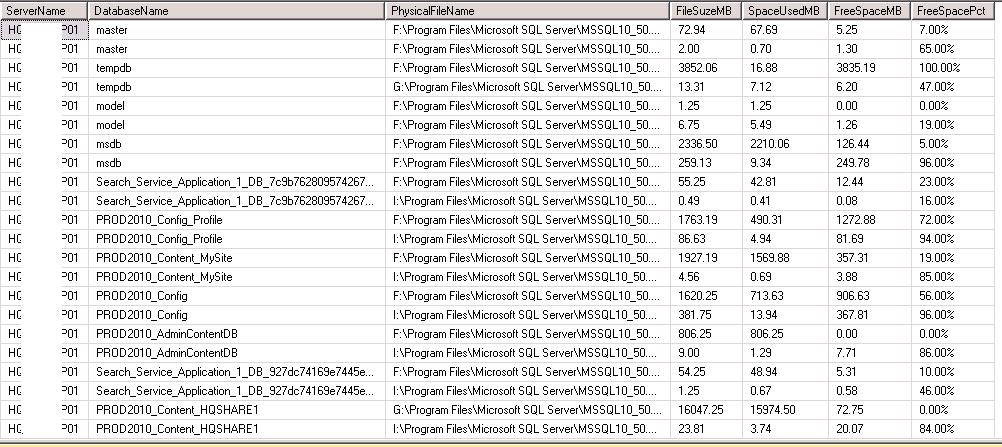
Use FILEPROPERTY to find free space in all the database

The use of SpaceUsed property of the FILEPROPERTY function gives how much space is used also we can derive lot of other attributes of it such as free space and percentage of free space.

For other versions of SQL you can refer the below SQL.

DECLARE @command VARCHAR(5000)   
DECLARE @DBSpaceInfo TABLE   
( ServerName VARCHAR(100),   
DatabaseName VARCHAR(100),   
PhysicalFileName NVARCHAR(520),   
FileSizeMB DECIMAL(10,2),   
SpaceUsedMB DECIMAL(10,2),   
FreeSpaceMB DECIMAL(10,2), 
FreeSpacePct varchar(8) 
) 
 
SELECT @command = 'Use [' + '?' + '] SELECT   
@@servername as ServerName,   
' + '''' + '?' + '''' + ' AS DatabaseName   , name 
    , convert(decimal(12,2),round(a.size/128.000,2)) as FileSizeMB 
    , convert(decimal(12,2),round(fileproperty(a.name,'+''''+'SpaceUsed'+''''+')/128.000,2)) as SpaceUsedMB 
    , convert(decimal(12,2),round((a.size-fileproperty(a.name,'+''''+'SpaceUsed'+''''+'))/128.000,2)) as FreeSpaceMB, 
    CAST(100 * (CAST (((a.size/128.0 -CAST(FILEPROPERTY(a.name,' + '''' + 'SpaceUsed' + '''' + ' ) AS int)/128.0)/(a.size/128.0)) AS decimal(4,2))) AS varchar(8)) + ' + '''' + '%' + '''' + ' AS FreeSpacePct 
from sys.database_files a' 
 
INSERT INTO @DBSpaceInfo 
EXEC sp_MSForEachDB @command   
 
SELECT * from @DBSpaceInfo 

For SQL 2000 you can refer the below sql  using sysfiles system table.

DECLARE @command VARCHAR(5000)   
DECLARE @DBInfo TABLE   
( ServerName VARCHAR(100),   
DatabaseName VARCHAR(100),   
PhysicalFileName NVARCHAR(520),   
FileSizeMB DECIMAL(10,2),   
SpaceUsedMB DECIMAL(10,2),   
FreeSpaceMB DECIMAL(10,2), 
FreeSpacePct varchar(8) 
) 
 
SELECT @command = 'Use [' + '?' + '] SELECT   
@@servername as ServerName,   
' + '''' + '?' + '''' + ' AS DatabaseName   , filename 
    , convert(decimal(12,2),round(a.size/128.000,2)) as FileSizeMB 
    , convert(decimal(12,2),round(fileproperty(a.name,'+''''+'SpaceUsed'+''''+')/128.000,2)) as SpaceUsedMB 
    , convert(decimal(12,2),round((a.size-fileproperty(a.name,'+''''+'SpaceUsed'+''''+'))/128.000,2)) as FreeSpaceMB, 
    CAST(100 * (CAST (((a.size/128.0 -CAST(FILEPROPERTY(a.name,' + '''' + 'SpaceUsed' + '''' + ' ) AS int)/128.0)/(a.size/128.0)) AS decimal(4,2))) AS varchar(8)) + ' + '''' + '%' + '''' + ' AS FreeSpacePct 
from dbo.sysfiles a' 
 
INSERT INTO @DBInfo 
EXEC sp_MSForEachDB @command   
 
SELECT * from @DBInfo

space

Posted in databases_files, FileProperty, sp_msforeachDB, SQL, sysfiles | Tagged , | Leave a comment

T-SQL – Find Number of Rows of Database(s) tables Using Undocumented Procedure – sp_MSforeachdb and sp_MSforeachtable

Added few more examples

Prashanth Jayaram's avatarPrashanth Jayaram

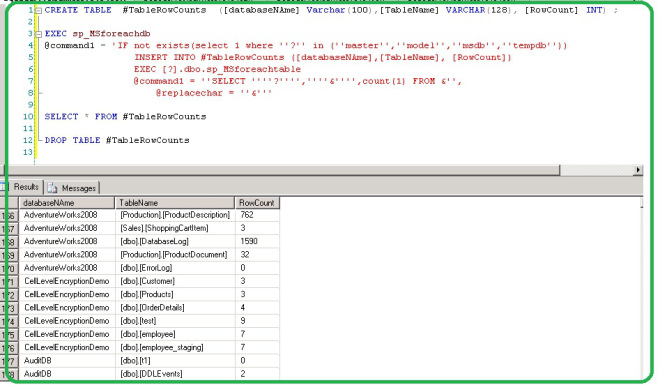
On Technet forum, Op was looking for a way to get table cardinality for all databases in an instance.  There are many ways to get the result. This post gives you an idea and SQL in which undocumented SP’s being called  “sp_MSforeachdb and sp_MSforeachtable”.

The above undocumented SP’s  iterate through each database and each table of a SQL instance

Download SQL :- UndocumentSPToGetNoOfRowsAllDatabases

SQL:-

CREATE TABLE  #TableRowCounts  ([databaseNAme] Varchar(100),[TableName] VARCHAR(128), [RowCount] INT) ;

EXEC sp_MSforeachdb
@command1 = 'IF not exists(select 1 where ''?'' in (''master'',''model'',''msdb'',''tempdb''))
INSERT INTO #TableRowCounts ([databaseNAme],[TableName], [RowCount])
EXEC [?].dbo.sp_MSforeachtable @command1 = ''SELECT ''''?'''',''''&'''',count(1) FROM &'',@replacechar = ''&'''

SELECT * FROM #TableRowCounts
					
DROP TABLE #TableRowCounts	

Note:-The above query is expensive. Please use at your risk

Output-

TableCount-spMSforeachdb&table

The use of IF and Like clause with sp_MSforeachtable

EXEC [sp_MSforeachtable] @command1=N'
IF (N''?'' =''[dbo].[log]'')
BEGIN
 PRINT N''?''
 SELECT COUNT(*) from ? 
END'

EXEC [sp_MSforeachtable] @command1=N' IF (N''?'' LIKE N''%Resource%]'') BEGIN PRINT N''?'' SELECT ''?'' TABLENAME,COUNT(*)…

View original post 102 more words

Posted in SQL, T-SQL | Leave a comment

How to Replace Multiple Strings in a File using PowerShell

Replace the Data Source and Initial Catalog values of WebConfig.XML

Content of XML file

<Configuration ConfiguredType=”Property” Path=”\Package.Connections[ConnStaging].Properties[ConnectionString]” ValueType=”String”>
<ConfiguredValue>Data Source=localhost;Initial Catalog=Stage;Integrated Security=SSPI; Connection Timeout = 10</ConfiguredValue>
</Configuration>

webConfig

PARAM(
[String]$DatabaseName='DCTarget',
[String]$XML='c:\webconfig.XML',
[String]$DatabaseServer='DataCenterDB01')
[string]$db = 'Catalog='+ $DatabaseName
[string]$dbs = 'Source='+ $DatabaseServer
(Get-Content $XML) | 
Foreach-Object {
$_ -replace "Catalog=([A-Za-z0-9_]+)", $db -replace "Source=([A-Za-z0-9_]+)", $dbs } | Set-Content $XML

webConfig1

The above code can be used to modify the content of any files or even copy the modified content to new file

$Sourcefile = 'c:\filename.txt'
$desfile =  'c:\Newfilename.txt'
(Get-Content $Sourcefile) | Foreach-Object {
    $_ -replace 'Prashanth', 'Jayaram' `
       -replace 'SQL', 'PowerShell' 
    } | Set-Content $destFile

webConfig2

Posted in PowerShell, String handling | Tagged , , | Leave a comment

T-SQL – How to get the Financial Quarter details of a date field

declare @table table
(
[Paid Date] date
)

insert into @table
values('20150102'),('20150512'),('20150830'),('20151231'),('20141230')

;WITH Quarters AS (
   SELECT Q = 'Q1', MonthBegin = 1, MonthEnd = 3 UNION
   SELECT Q = 'Q2', MonthBegin = 4, MonthEnd = 6 UNION
   SELECT Q = 'Q3', MonthBegin = 7, MonthEnd = 9 UNION
   SELECT Q = 'Q4', MonthBegin = 10, MonthEnd = 12
)
SELECT
   [paid date],[Quarter] = 'FSY'+CONVERT(VARCHAR(4), DATEPART(yyyy, CONVERT(DATETIME, [paid date]))) + '_' + q.Q
FROM
@table
  INNER JOIN Quarters q ON
      DATEPART(m, CONVERT(DATETIME, [paid date])) >= q.MonthBegin AND
      DATEPART(m, CONVERT(DATETIME, [paid date])) <= q.MonthEnd;

Output

QuaterDetails


Posted in SQL | Tagged , , , , | 4 Comments