Automate SQL Server Database Restoration using bacpac with PowerShell or Batch techniques

Data is the key to your organization’s future, but if it’s outdated, irrelevant, or hidden then it’s no good. Maintenance and administration of databases take a lot of work. As database administrators, we often tend to automate most of these repetitive tasks. A database refresh is one of the most common tasks performed by most of the administrators as part of their daily routine.

Today, database refreshes are quite frequent because of Continuous Integration (CI) and Continuous Deployment (CD). In most of the cases, testing requires a separate but current production dataset to ensure the validity of the desired result.

In today’s world, we rely more on third-party tools to perform a Backup and Restore of databases. With many advanced tools and techniques, this is a pretty straightforward approach. Think of the real-world scenarios where customers rely on the native SQL Tools and techniques. Creating automated database refresh tasks regularly will have a huge impact on the quality of the release management cycles and would save a lot of time for the database administrators.

There are many ways to automate this, some of which are:

  • SQLCMD
  • PowerShell
  • SqlPackage

In this article, we about the following:

  • Details of Sqlcmd
  • The use of the cross-platform tool, Sqlpackage
  • Automation using Windows batch scripting
  • And more…

Using sqlcmd provides flexible ways to execute T-SQL and SQL script files. As its available on Linux, Windows, and Mac, this command line utility plays a vital role in managing the database restore operations in a DevOps pipeline.

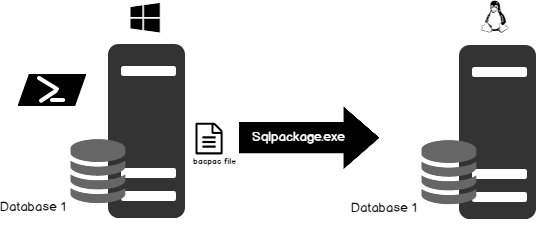
PowerShell script to automatically create a bacpac file and restore the database using the created bacpac, using SqlPackage.exe

This section deals with the preparation of a PowerShell script to automate database restoration using the SqlPackage tool which is part of the SQL Server Data Tools suite.

The first step is to prepare and set the environment variables. The SqlPackage tool is installed under C:\Program Files (x86)\Microsoft SQL Server\140\DAC\bin. The script uses sqlcmd and SqlPackage tool; make sure that the path variable is updated accordingly.

  1. The input parameter section lists the source, target SQL databases instance and folder for extracting the bacpac file
  2. Create the bacpac file using export action type
  3. Select the latest bacpac file for further database restoration action
  4. Drop the destination database using the sqlcmd command
  5. Restore the database using import action type.
 

Continue reading sqlpackage

Happy Learning!
 

Posted in SQL Server Backup | Tagged , , | Leave a comment

SQL Server: Database snapshots vs Database backups

In the article, we’ll walk through the concepts to understand database snapshots, and their benefits and limitations. This article will help you decide when to use a database snapshot, and when to use a backup. In some cases, the database relying on database backup and restore operation is not a viable option. Let’s dig into the concepts of database snapshots and see how it differs from a database backup.

Database snapshots are like a view of a database as it was at a certain point in time. It is a read-only copy of the data and the state of the pages, which are made possible using a pointer file called the sparse file. A snapshot contains the original version of pages, and changes in the source since the snapshot were created. However, remember that this is not a full copy of the database.

Snapshots are typically used for purposes of audits and reporting. Another use for snapshot backups is that multiple snapshots can be created for a database, and these can be taken at different points in time. This helps with period-over-period analyses.

It is important to understand that database snapshots are directly dependent on the source database. Therefore, snapshots can never substitute your regular backup and restore strategy. For instance, if an entire database is lost, it would mean its source files are inconsistent. If the source files are unavailable, snapshots cannot refer to them, and so, snapshot restoration would be impossible.

Snapshots can be created using the CREATE DATABASE command along with the AS SNAPSHOT option. A snapshot always starts with a near-zero size. This is because a snapshot store changes to the database since the snapshot was created. As changes in the database occur, the snapshot starts to grow, and may even see significant variation in size. Therefore, it is always recommended to keep an eye on them to avoid low-disk-space alerts.

The database snapshot feature is made available in all editions starting with SQL Server 2016 SP1.

Feature Enterprise Standard Web Express with Advanced Services Express
Database snapshot Yes Yes Yes Yes Yes

Points to note

  1. SQL Server Management Studio does not provide a graphical interface for creating snapshots; the only way to create them is using TSQL commands.
  2. The snapshot file name accepts arbitrary file extensions.
  3. SQL Server does not support backup operations over sparse files. In other words, sparse files cannot be backed up.
  4. A database snapshot appears to never change, because read operations on a database snapshot always access the original data pages, regardless of where it resides.
  5. After a page has been updated, a read operation on the snapshot still accesses the original page from the source database, and only the modified pages from the sparse file, also known as the side file.
  6. DBCC commands use an internal reference of database snapshots to validate the required transactional consistency of the database.
  7. When we start DBCC CHECKDB, a hidden database snapshot is created. There is no control, however, over these files, since these are created as alternate streams of the files.
  8. Alternate streams are not used since SQL Server 2014. And the database snapshot is created at the same location as the existing database.
  9. The database snapshots don’t reserve any space; the growth of the snapshot is directly proportional to the transaction rates that occur on the source database.
  10. The mechanism of reverting the database snapshot doesn’t work on an offline or a corrupted database. Also, reverting doesn’t work if any of the source files that were online when the database snapshot is created are offline during reversion.
  11. A database snapshot primarily depends on the side file for each of the data files in the source database. These side files are known as sparse files. Space allocations for these sparse files are made only for the modified portion of the data in the corresponding database file. It doesn’t include an allocation for the remaining portions of the source database—only the changes.
  12. The side page table stores indicator bits which represent data validity and include an in-memory bit map.
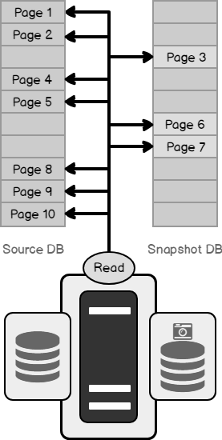
  13. During a read operation, a database snapshot always accesses the original data pages, regardless of where it resides. In the example below, the data read operation is performed on pages 1 through 10. However, if pages 3, 6 and 7 are the only ones that have changed, the pages 1, 2, 4, 5, 8, 9, 10 are read from the source database, and pages 3, 6, 7 are read from the sparse files.

Continue Reading database-snapshots-vs-database-backups


Posted in SQL Server Backup | Tagged , | Leave a comment

SQL Server database Backup and Restore strategies

One of the most important roles of a database administrator is to constantly protect the integrity of the databases and maintain the ability to recover quickly in case of a failure. In light of this, it’s critically important to have a backup-and-recovery strategy in place in order to be ready for an emergency.

A key responsibility of a database administrator is to ensure that a database is available whenever it’s needed, and prepare for various scenarios wherein the availability or the performance is impacted. Therefore, if a database, for whatever reason, gets corrupted, gets dropped, gets accidentally deleted, or goes into an unusable state, it is a database administrator’s responsibility to bring the database back up in a working state with little to no loss as per the defined service level agreements or government policies.

Database administrators must be prepared to deal with disaster recovery scenarios. One way of doing that is by testing SQL Server backup and restore strategies at regular intervals. This ensures seamless recovery of data. And seamless recovery means a quick recovery of systems with minimal or no data loss. Of course, a database administrator’s responsibility is also to safeguard data from the various data failures.

While designing the backup and restore plan, we need to consider the disaster recovery planning with reference to specific needs of business and the environment. For example, how do we recover from a case of multiple data failures across three prime locations in the environment? How long would it take to recover the data and how long would the system be down? What amount of data loss can the organization tolerate?

Another important point that database administrators have to concentrate on is the nature of the storage of data. This directly impacts the usefulness as well as the efficiency of the backup-and-restore process.

There are plenty of advanced techniques available such as Clustering, AlwaysOn, LogShipping and Mirroring that help ensure higher availability but still disaster recovery is all about having a well-defined and tested backup-and-restore process.

Points to consider defining good backup strategy including the:

  1. frequency at which data changes
  2. online transaction processing
  3. frequency of the schema changes
  4. frequency of change in the database configuration
  5. data loading patterns
  6. nature of the data itself

further reading  Backup and Restore Strategy

Happy Learning!

Please share your thoughts in the comment section…..


Posted in Backup and Restore | Tagged , , | Leave a comment

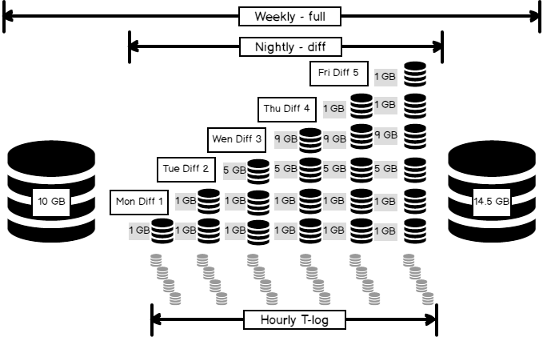
Overview of SQL Server Backup Types

SQL Server backups, in itself, is a vast subject; so vast, there are multiple books written about them. In this article, however, we are going to focus on the types of backups that are available to us, and understand how to pick what we need, and what aspects we base that decision on. This understanding would, in turn, help us decide our backup-and-restore strategy.

Following are the most common types of backups available in SQL Server:

  1. Full
  2. Differential
  3. Transaction log
  4. Tail Log backup

There are other backup types available as well:

  1. Copy-only backup
  2. File backups
  3. Partial backups.

Full backups

A full backup, as the name implies, backs up everything. It is the foundation of any kind of backup. This is a complete copy, which stores all the objects of the database: Tables, procedures, functions, views, indexes etc. Having a full backup, you will be able to easily restore a database in exactly the same form as it was at the time of the backup.

A full backup creates a complete backup of the database as well as part of the transaction log so the database can be recovered. This allows for the simplest form of database restoration since all of the contents are contained in one single backup.

A full backup must be done at least once before any of the other types of backups can be run—this is the foundation for every other kind of backup.

continue reading Backup Types


Happy Learning!


Posted in SQL | Tagged , , , , , , | Leave a comment

Understanding database recovery models in SQL Server

A recovery model is a database configuration option that determines the type of backup that one could perform and provides the ability to restore the data or recover it from a failure.

The recovery model decides how the transaction log of a database should be maintained and protects the data changes in a specific sequence, which may later be used for a database restore operation.

Types of recovery models

All SQL Server database backup, restore, and recovery operations are based on one of three available recovery models:

  • SIMPLE
  • FULL
  • BULK_Logged

SIMPLE

The SIMPLE recovery model is the simplest among the available models. It supports full, differential, and file level backups. Transaction log backups are not supported. The log space is reused whenever the SQL Server background process checkpoint operation occurs. The inactive portion of the log file is removed and is made available for reuse.

Point-in-time and page restore are not supported, only the restoration of the secondary read-only file is supported.

Reasons to choose the simple database recovery model

  1. Most suited for Development and Test databases
  2. Simple reporting or application database, where data loss is acceptable
  3. The point-of-failure recovery is exclusively for full and differential backups
  4. No administrative overhead

It supports:

  1. Full backup
  2. Differential backup
  3. Copy-Only backup
  4. File backup
  5. Partial backup


Continue reading Understanding database recovery models in SQL Server

Happy Learning!


Posted in SQL Server Backup | Tagged , , , , , | Leave a comment

SQL Server 2017 on Linux in the Azure portal

SQL Server 2017 now is considered as a hybrid database enterprise solution as it expands its market and is ported to other operating system platforms. It also includes mainstream support for Linux machines. The Cloud makes the life of administrator much easier, now it’s no longer daunting task to configure the SQL Server instance. The easiest way to explore SQL Server on Linux is to provision a virtual machine through Microsoft Azure portal – portal.azure.com. The Linux azure virtual machine will come pre-configured with Linux and SQL Server 2017.

Background

Azure SQL Database is the Microsoft platform-as-a-service (PaaS) database offering. It is scalable and offers a predictable performance; each database is isolated. In addition, Azure SQL databases provide monitoring and alerting as well as failover options. With the on-premise SQL Server, the DBAs are engaged in managing all the upgrades and patching. For instance, when we start using Azure SQL databases, Microsoft manages everything for us. 

Prerequisites

If you don’t have an Azure account, you can create a free 30-day trial to test things out.

Prepare Linux VM for SQL Installation

Once you sign up for a free trial version, the first screen you see is the dashboard. It summarizes the current setup with all the default values.

On the dashboard, follow the steps to create a VM machine:

  • Click the New button to create a new resource.
  • In the search box, type in SQL Server 2017 to list all the SQL Server 2017 VMs
  • Select Free SQL Server License: SQL Server 2017 Developer on Red Hat Enterprise Linux 7.4
  • Go through the full description. You will need to run the command to configure SQL Server. This is going to be important, so make a note of this text here.
  • At the very bottom of the screen, press the Create button to start the process

Continue reading SQL Server 2017 on Linux in the Azure portal

Happy Learning!


Posted in SQL AZURE, SQL On Linux, SQL Server 2017 | Tagged , , | Leave a comment

Default and Custom Widgets in SQL Server Operations Studio

There are already a number of articles and blog posts that reveal the benefits of the SQL Operations Studio tool. The demand created across the software and the related tools are relatively unimaginable than ever before. The trend and growth will continue to increase in the upcoming days.

The graphical representation is in the vogue today. Visualizing data helps us to better understand this and to make decisions. It’s no wonder that data visualization continues to attract a growing number of users. The development of any toolset could provide opportunities to speed up the software development lifecycle process.

This article demonstrates the advantages of using custom SQL queries or complex T-SQL to provide a great insight into the database and explains how one can use this insight to build custom widgets. In this case, the SQL Operations Studio Widget is a customized piece of the code to personalize the SQL Server Dashboard for effective management of SQL instances.

The more time you spend working with the tool, the more you realize that this intelligent light-weight cross-platform application can create interesting things.

In this article, you will learn the following:

  • Introduction to SQL Operations Studio
  • How to run a custom SQL query and view it as a chart
  • How to use default and custom widgets
  • Various panes and options in SSOS
  • Explain the different chart options
  • Create a custom insight
  • Details to define a custom widget step by step
  • And more…

Custom Widgets in SQL Ops Studio

Wrapping Up

In this article, we discussed how to configure a various default database and server widget insights. Also, the article highlights the steps to add a custom SQL as a part of the dashboard. We saw how simple it is to define and customize the dashboard. While SSMS is still the de-facto tool compatible with SQL Server instances, it’s more of an integrated environment. When you just want to play with SQL or create light widgets, SQL Operations Studio has several advantages over the SQL Server Management Studio.

As it’s available on Linux and easy to be integrated with PowerShell, it’s becoming a promising SQL toolset for many developers and administrators alike.

What do you think? Give it a download if you haven’t, and feel free to comment below.


Posted in SQL Ops Studio, Uncategorized | Tagged , , | Leave a comment

SQL Server DevOps Tools

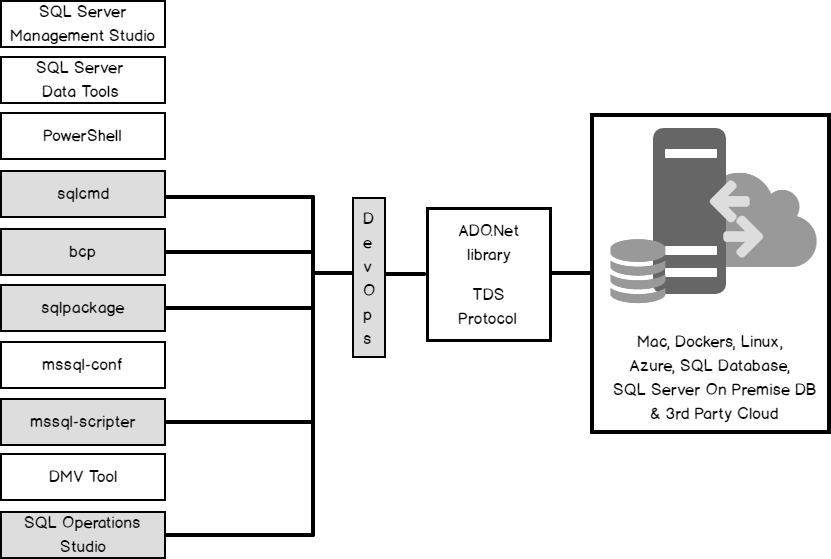
This article is part of the SQL Server Tools series, aimed at giving you an idea of the available tools and techniques to build applications using SQL Server tools. The first article of the series covers the rudimentary DevOps concepts and discusses on a high level, the overview of SQL Server tools that can be piped for DevOps operations.

In this article, I will explore various SQL tools. I will be discussing in detail about each of the following tools in the upcoming articles:

  1. Sqlcmd
  2. Bcp
  3. SqlPackage
  4. MSSQL-Scripter
  5. SQL Operations Studio

For the first installment of this new series, I will give you an overview of DevOps and highlight how SQL Server tools help.

The recent trends under the umbrella of DevOps (Development and Operations) led to the birth of various new techniques to fulfill the complexities of today’s needs through Continuous Integration (CI) and Continuous Deployment (CD) over a wide range of diverse enterprise applications. DevOps is a combination of two teams — development as well as operations — and it’s a whole new value stream for delivery. There is a direct correlation between automation of software delivery processes and success with customers.

We’ll introduce ourselves to these tools in this article, and dive deeper into each of them in upcoming articles.

Further reading

SQL Server DevOps Tools

Please share your thoughts in the comments section. I would love to hear and learn from you as well.

Happy Learning!!


Posted in SQL Server DevOps | Tagged , , , , | Leave a comment

SQL Server Data Management Life Cycle

This is the second article in the “Backup and Restore (or Recovery) in SQL Server” stairway series (see the full TOC below). This article deals with the different phases of data management life cycle and it encompasses the following topics:

  1. Introduction to data corruption
  2. Defining data corruption and its causes
  3. Discussion on the impact of data corruption
  4. Explaining data prevention mechanisms
  5. Data protection
  6. And more…

Introduction to Data Corruption

Data is said to be corrupted when it attains an undesirable state different from the original data. Data corruption also refers to data errors that can occur during any of the stages of data writing, data processing or even reading, at the storage, or during transmission.

We all know that at the very core, data is nothing but a series of 1s and 0s. When data is written, what actually happens is that the 1s and 0s are written to the destination. This sequence of 1s and 0s is interpreted during the data reading operation, giving it some meaning. If these bits don’t get written in the intended sequence, the data is said to have been corrupted.

Small data means smaller sequences and relatively lower chances of corruption. When the amount of data increases, the chances of corruption also increases. The chances are particularly high when data generation is high, and the subsequent storage operations hit unprecedented rates.

Some of the most common reasons for data corruption include hardware or software issues with regard to I/O subsystems.

Causes of Data Corruption

  • Hardware issues or failures
  • Memory issues
  • Power failure or outages
  • I/O subsystem
    • SAN controllers
    • RAID controllers
    • Disk drivers
    • Bad sectors on the disks
  • Operating System errors
  • Virus attacks
  • Antivirus, defraggers, even data encryption,
  • SQL Server bugs
  • Human errors
  • Improper shutdown
  • Hard reset

Further reading SQL Server Data Management Life Cycle

Please share your thoughts in the comments section. I would love to hear and learn from you as well.

Thanks for reading my space!


Posted in SQL | Tagged , , , , , , | Leave a comment

Experiment with SQL Server and DBFS on Linux

Given that Microsoft now considers Linux a ‘first-class citizen’, SQL Server 2017 offers native support for Linux. It is engineered to be cross-platform, and that’s good news for Linux administrators and open source developers. Microsoft’s support for Linux (and open source in general), has come into clearer focus, and the company’s mission now seems to be all about bringing its tools to wherever its users are.

Microsoft has been known for proprietary software, and this openness to the open source community came as a surprise; the development is quite recent, and one in the right direction. SQL Server has had a myriad of GUI and CLI tools. These tools have also, along with SQL Server itself, have become cross-platform. These tools are almost equally as good on Linux as Windows, and they help effectively manage, develop, and administer SQL Server. Some of the tools are:

  • SSMS
  • Sqlcmd
  • Bcp
  • Sqlpackage
  • Mssql-conf
  • Mssql-scripter
  • DMV tool
  • SQL Operations Studio
  • MSSQL-Cli
  • SQL Extension for VS code

At first, it seems like a myriad of them. Taking one piece at a time helps with understanding the tools. Let us try to classify these tools based on what they are useful for:

Further reading

SQL Server and DBFS

Highlights

  • Support for Custom Query execution
  • Data can be viewed as JSON
  • Bash supports utilities such as cut, grep, sed, and awk, etc.
  • Projection of the live/real-time DMV data
  • Cross-platform tools which work on both SQL Server on Windows as well as SQL Server on Linux
  • DBFS is available for Ubuntu, RedHat Enterprise Linux, and CentOS as of writing this article.

Happy Learning!


Posted in SQL | Tagged , , , | 1 Comment