T-SQL :- How to Search String in all Stored Procedures across All User Defined Databases

There are many different ways to accomplish this tasks.

Download LinkΒ https://gallery.technet.microsoft.com/T-SQL-How-to-Search-String-a1704fc6

The below examples uses undocumented sp’s to loop through all the user defined database to search the SP’s using given string

CREATE TABLE  #ProcSearch  (databaseName VARCHAR(100),ROUTINE_CATALOG varchar(50),ProcName VARCHAR(128),RoutineType varchar(100),CreateDate date)


DECLARE @command varchar(1000) 
SELECT @command = 'IF ''?'' NOT IN(''master'', ''model'', ''msdb'', ''tempdb'') BEGIN USE ? 
INSERT INTO #ProcSearch
SELECT ''?'',ROUTINE_CATALOG, ROUTINE_NAME, ROUTINE_TYPE, CREATED FROM INFORMATION_SCHEMA.ROUTINES WHERE ROUTINE_DEFINITION LIKE ''%Index_Name%'' AND (ROUTINE_TYPE=''PROCEDURE'' or ROUTINE_TYPE=''FUNCTION''); 
END' 
EXEC sp_MSforeachdb @command

SELECT * FROM #ProcSearch

DROP TABLE #ProcSearch

index2

The below SQLΒ uses SearchString as a parameter also it uses syscomments system view

CREATE TABLE #ProcSearch ([databaseNAme] Varchar(100),ProcName VARCHAR(128))

DECLARE @command varchar(1000) 
Declare @SearchString varchar(100)='Index_Name'
SELECT @command = 'IF ''?'' NOT IN(''master'', ''model'', ''msdb'', ''tempdb'') BEGIN USE ? 
INSERT INTO #ProcSearch ([databaseNAme],[ProcName])
SELECT ''?'', OBJECT_NAME(id) as ROUTINE_CATALOG FROM syscomments WHERE [text] LIKE ''%'+@SearchString+'%'' AND OBJECTPROPERTY(id, ''IsProcedure'') = 1 GROUP BY OBJECT_NAME(id)
END' 
EXEC sp_MSforeachdb @command

SELECT * FROM #ProcSearch

index1

Reference Thread

https://social.msdn.microsoft.com/Forums/sqlserver/en-US/857d9754-ac24-4acb-b402-e52d028bb81a/linked-servers-migration?forum=sqlgetstarted#9c7fec83-610d-4ec6-9b27-9f685031b571

Posted in SQL, T-SQL | Tagged , , , , , | Leave a comment

T-SQL – Read CSV files using OpenRowSet

We can directly access a CSV file using T-SQL.

Input file

ReadInput

Configure server to run Ad Hoc Distributed Queries

sp_configure 'Ad Hoc Distributed Queries',1
GO
reconfigure
GO

Check for Microsoft Access Driver on your system

driver

SQL

select 
[hour],
UserID,
[ReportLaunch]
from openrowset('MSDASQL'
,'Driver={Microsoft Access Text Driver (*.txt, *.csv)}'
,'select * from C:\blog\input.CSV')

OR

select
[hour],
UserID,
[ReportLaunch]
from openrowset('MSDASQL'
,'Driver={Microsoft Access Text Driver (*.txt, *.csv)}; 
DBQ=C:\blog\' 
,'select * from "input.CSV"') T

OR

select
[hour],
UserID,
[ReportLaunch]
from openrowset('MSDASQL'
 ,'Driver={Microsoft Access Text Driver (*.txt, *.csv)}; 
 DefaultDir=C:\blog\' 
 ,'select * from "input.CSV"') T

Output:-

outpuDriver


Reference Link

https://social.msdn.microsoft.com/Forums/sqlserver/en-US/ded961b1-f386-4780-91e7-0527271032ec/convert-data-into-xml-format?forum=transactsql#c8d8a2a6-42a7-496a-abdd-31442e4bb598

Β 

Posted in SQL, Uncategorized | Tagged , , , , , , | 4 Comments

T-SQL – Query to get Distinct,Sorted, Comma Separated values in to a variable

CREATE  TABLE  #temp(name char(3))

INSERT INTO #temp VALUES ('CD')
,('AB')
,('LM')
,('BC')
,('GH')
,('KJ')
,('AB')

DECLARE @cols AS NVARCHAR(MAX);

SELECT @COLS =  substring(list, 1, len(list) - 1)
FROM   (SELECT list = 
          (SELECT DISTINCT name + ','
           FROM  #temp
           ORDER BY name + ','
         FOR XML PATH(''), TYPE).value('.', 'nvarchar(MAX)')) AS T

SELECT @COLS

DROP TABLE #temp

CSV_Values

Posted in T-SQL | Tagged , , , | 10 Comments

T-SQL – Find Number of Rows of Database(s) tables Using Undocumented Procedure – sp_MSforeachdb and sp_MSforeachtable

On Technet forum, Op was looking for a way to getΒ table cardinality for all databases in an instance. Β There are many ways to get the result.Β This post gives you an idea and SQL in which undocumented SP’s being calledΒ Β “sp_MSforeachdb and sp_MSforeachtable”.

The above undocumented SP’s Β iterate through each database and each table ofΒ a SQL instance

Download SQL :-Β UndocumentSPToGetNoOfRowsAllDatabases

SQL:-

CREATE TABLE  #TableRowCounts  ([databaseNAme] Varchar(100),[TableName] VARCHAR(128), [RowCount] INT) ;

EXEC sp_MSforeachdb
@command1 = 'IF not exists(select 1 where ''?'' in (''master'',''model'',''msdb'',''tempdb''))
INSERT INTO #TableRowCounts ([databaseNAme],[TableName], [RowCount])
EXEC [?].dbo.sp_MSforeachtable @command1 = ''SELECT ''''?'''',''''&'''',count(1) FROM &'',@replacechar = ''&'''

SELECT * FROM #TableRowCounts
					
DROP TABLE #TableRowCounts	

Note:-The above query is expensive. Please use at your risk

Output-

TableCount-spMSforeachdb&table

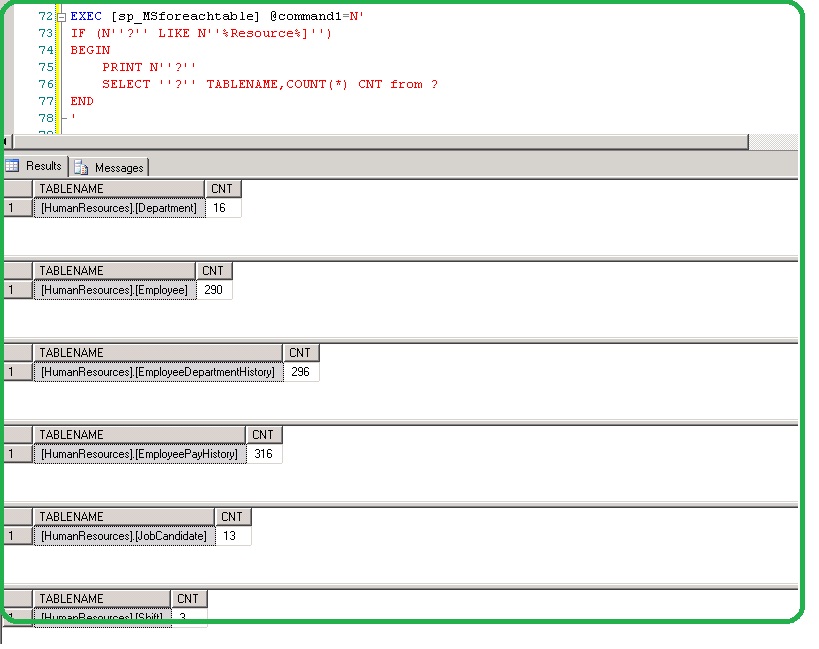
The use of IF and Like clause with sp_MSforeachtable

EXEC [sp_MSforeachtable] @command1=N'
IF (N''?'' =''[dbo].[log]'')
BEGIN
 PRINT N''?''
 SELECT COUNT(*) from ? 
END'

EXEC [sp_MSforeachtable] @command1=N'
IF (N''?'' LIKE N''%Resource%]'')
BEGIN
 PRINT N''?''
 SELECT ''?'' TABLENAME,COUNT(*) CNT from ? 
END
'

ms_foreachtable1

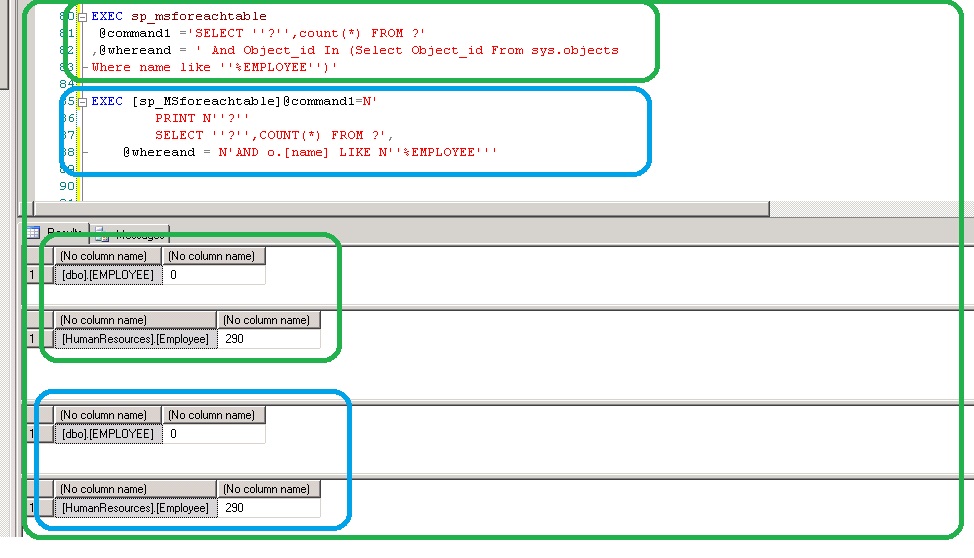
The use ofΒ @whereand parameter to filter any object withΒ sp_MSforeachtable

EXEC sp_msforeachtable
 @command1 ='SELECT ''?'',count(*) FROM ?'
,@whereand = ' And Object_id In (Select Object_id From sys.objects
Where name like ''%EMPLOYEE%'')'

OR

EXEC [sp_MSforeachtable]@command1=N'
 PRINT N''?''
 SELECT ''?'',COUNT(*) FROM ?',
 @whereand = N'AND o.[name] LIKE N''%EMPLOYEE%'''

ms_foreachtable2

Example to rebuild ALL indexes of ALL tables of given databasesΒ using sp_MSforachdb and sp_MSforachtable

EXEC sp_msforeachdb @command1='
use };
if ''}'' in (''Employee'', ''CellLevelEncryptionDemo'')
begin
print ''}''
exec sp_MSforeachtable @command1=''
ALTER INDEX all ON ? rebuild WITH (FILLFACTOR = 90, sort_in_tempdb = ON);
''
end 
', @replacechar = '}'
Posted in sp_MSforeachtable, SQL, T-SQL | Tagged , , , , , , , , , , | 1 Comment

SQL- Querying XML attributes from XML Column

Read XML column attributes in to two columns DimType and Dimvalue Β from the below example also retrieve the data matching values[DimTypes (WIDTH or Height)].

‘<dimensions>

<dimension name=”width” Β value=”12.77″/>

<dimension name=”height” Β value=”0.14″/>

<dimension name=”depth” Β Β Β Β  value=”12.92″/>

</dimenstions>’

Download SQL :- Β https://gallery.technet.microsoft.com/SQL-Querying-XML-f700bbb0

Β SQL:-

DECLARE @xml XML
SELECT @xml = 
'<dimensions>
  <dimension name="height" value="0.14" /> 
  <dimension name="width"  value="12.77"/> 
</dimensions>'

SELECT  x.v.value('@name[1]', 'VARCHAR(100)') AS dimtype ,
        x.v.value('@value[1]', 'VARCHAR(100)') AS dimvalue
FROM    @xml.nodes('/dimensions/dimension') x(v)

second1

create table #demo (field1 xml)
insert into #demo (field1) 
values ('<dimensions>
  <dimension name="height" value="0.14" /> 
  <dimension name="width"  value="12.77"/> 
</dimensions>')

SELECT  x.v.value('@name[1]', 'VARCHAR(100)') AS dimtype ,
        x.v.value('@value[1]', 'VARCHAR(100)') AS dimvalue
from #demo
cross apply field1.nodes('/dimensions/dimension') x(v)

first1

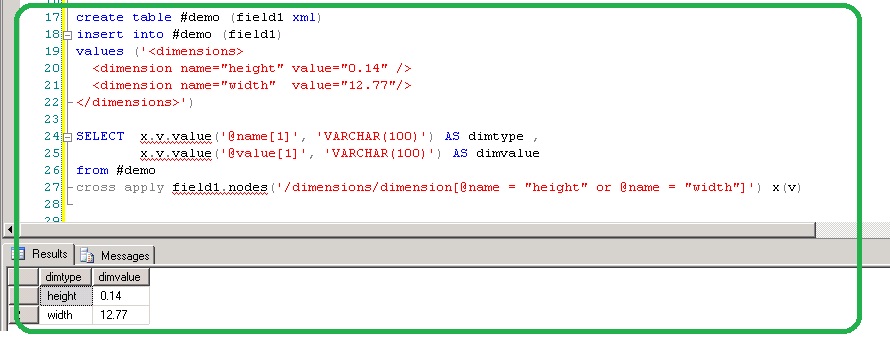
Select data for DimType “height and Width”

DECLARE @xml XML
SELECT @xml = 
'<dimensions>
  <dimension name="height" value="0.14" /> 
  <dimension name="width"  value="12.77"/> 
   <dimension name="depth"   value="12.92"/>
</dimensions>'

SELECT  x.v.value('@name[1]', 'VARCHAR(100)') AS dimtype ,
        x.v.value('@value[1]', 'VARCHAR(100)') AS dimvalue
FROM    @xml.nodes('/dimensions/dimension[@name = "height" or @name = "width"]') x(v)

third1

Using Temp table and Join –

create table #demo (field1 xml)
insert into #demo (field1) 
values ('<dimensions>
 <dimension name="height" value="0.14" /> 
 <dimension name="width" value="12.77"/> 
</dimensions>')

SELECT x.v.value('@name[1]', 'VARCHAR(100)') AS dimtype ,
 x.v.value('@value[1]', 'VARCHAR(100)') AS dimvalue
from #demo
cross apply field1.nodes('/dimensions/dimension[@name = "height" or @name = "width"]') x(v)

fourth1

Using SQL Where Clause to fetch dimension type data ‘HEIGHT’ orΒ ‘WIDTH’

CREATE TABLE #demo (field1 xml)
INSERT INTO #demo (field1) 
values ('<dimensions>
  <dimension name="height" value="0.14" /> 
  <dimension name="width"  value="12.77"/> 
  <dimension name="depth"   value="12.92"/>
</dimensions>')

select * from #demo

select 
dimtype,
dimvalue
FROM
(
SELECT  x.v.value('@name[1]', 'VARCHAR(100)') AS dimtype ,
        x.v.value('@value[1]', 'VARCHAR(100)') AS dimvalue
from #demo
cross apply field1.nodes('/dimensions/dimension') x(v)
)T
where
T.dimtype in('height','width')
Posted in SQL XML | Tagged , , , | Leave a comment

T-SQL to Display Weekends Between two Dates

Different ways to find the weekend between two given dates. The SQL requires @begindate and @endate paramteters to be entered in the below SQL

Download T-SQLΒ WeekendBetweenTwoValidDates

DECLARE @beginDate Date='20150101',
		@endDate Date='20150131'


DECLARE @Calendar Table
(CalendarDate Date Primary key, IsWeekend Bit)

WHILE @beginDate <= @endDate
BEGIN
INSERT INTO @Calendar
SELECT
@beginDate As CalendarDate
,(Case When DATEPART(Weekday, @beginDate) In (7, 1) Then 1 Else 0 End) As IsWeekend
Set @beginDate = DateAdd(Day, 1, @beginDate)
End

SELECT CalendarDate From @Calendar Where IsWeekend = 1

OnΒ SQL 2012 orΒ higher version you can use choose function.

http://msdn.microsoft.com/en-us/library/hh213019.aspx

DECLARE @beginDate Date='20150101',
 @EndDate Date='20150131'


Declare @Calendar Table
(CalendarDate Date Primary key, IsWeekend varchar(20))

While @beginDate <= @endDate
Begin
Insert Into @Calendar
SELECT 
@beginDate As CalendarDate,
CHOOSE(DATEPART(dw, @beginDate), 'WEEKEND','Weekday',
'Weekday','Weekday','Weekday','Weekday','WEEKEND') 
Set @beginDate = DateAdd(Day, 1, @beginDate) 
End

Select CalendarDate From @Calendar where IsWeekend='WEEKEND'

Using Number table

Declare @beginDate date = '20150101', @endDate date = '20150131'

SELECT 
DATEADD(dd, Number, @beginDate)
from
(
SELECT
 (a.Number * 256) + b.Number AS Number
FROM 
 (
 SELECT number
 FROM master..spt_values
 WHERE 
 type = 'P'
 AND number <= 255
 ) a (Number),
 (
 SELECT number
 FROM master..spt_values
 WHERE 
 type = 'P'
 AND number <= 255
 ) b (Number)
)T
Where
Number >= 0
and DATEADD(dd, Number, @beginDate) <= @endDate
and DATEPART(dw, DATEADD(dd, Number, @beginDate)) in ( 1, 7 )

Ouput:-

Weekend_Between_Two_Dates

Posted in T-SQL | Tagged , , , , , , , , | 2 Comments

T-SQL – How to find Next Business day from a given date

There are many methods to find next businessΒ day. One common wayΒ is to use of calendar table. Β This post is to get anΒ output using T-SQL OrΒ UDF function.

Download T-SQL Β NextBusinessDay

The details are given below

The script can be executed by feeding Input values to SQL. In the below example @dt parameter accepts input value.

DECLARE @dt datetime='20150113'
SELECT DATEADD(dd,CASE WHEN DATEDIFF(dd,0,@dt)%7 > 3 THEN 7-DATEDIFF(dd,0,@dt)%7 ELSE 1 END,@dt)

NextWorkingDay1

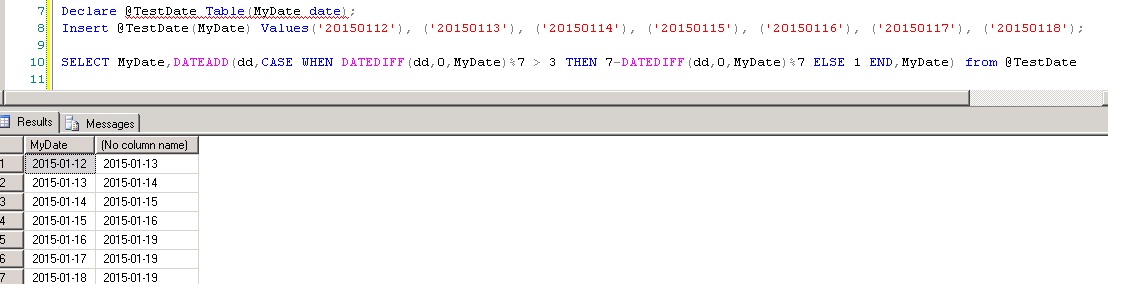
The following methods the input is fed from Table.

Method 1: T-SQL

Declare @TestDate Table(MyDate date);
Insert @TestDate(MyDate) Values('20150112'), ('20150113'), ('20150114'), ('20150115'), ('20150116'), ('20150117'), ('20150118');

Select MyDate, DateAdd(day, Case DateDiff(day, '19000101', MyDate) % 7 When 4 Then 3 When 5 Then 2 Else 1 End, MyDate) As NextWeekDay
From @TestDate;

NextWorkingDay2

Method 2: T-SQL

Declare @TestDate Table(MyDate date);
Insert @TestDate(MyDate) Values('20150112'), ('20150113'), ('20150114'), ('20150115'), ('20150116'), ('20150117'), ('20150118');

SELECT MyDate,DATEADD(dd,CASE WHEN DATEDIFF(dd,0,MyDate)%7 > 3 THEN 7-DATEDIFF(dd,0,MyDate)%7 ELSE 1 END,MyDate) from @TestDate

NextWorkingDay3

Method 3 : UDF

CREATE FUNCTION dbo.UF_GetWorkingDay(@givenDate DATETIME)
RETURNS DATETIME
AS
BEGIN
 DECLARE @workingDate DATETIME
 IF (DATENAME(dw , @givenDate) = 'Friday')
 BEGIN
 SET @workingDate = DATEADD(day, 3, @givenDate)
 END
 ELSE IF (DATENAME(dw , @givenDate) = 'Saturday')
 BEGIN
 SET @workingDate = DATEADD(day, 2, @givenDate)
 END
 ELSE 
 BEGIN
 SET @workingDate = DATEADD(day, 1, @givenDate)
 END
 RETURN @workingDate
END

Declare @TestDate Table(MyDate date);
Insert @TestDate(MyDate) Values('20150112'), ('20150113'), ('20150114'), ('20150115'), ('20150116'), ('20150117'), ('20150118');
select MyDate,dbo.UF_GetWorkingDay(Mydate) from @TestDate

NextWorkingDay4

Posted in T-SQL | Tagged , , , , , , , | 1 Comment

SQL – Split delimited columns using XML Or UDF function

The requirement is to convert the delimited column into rows

Input data and required output details are given below

Eno Ename Esloc EDept
1 ABC NJ 10,20,30,40,50

Output:-

Eno Ename Esloc EDept
1 ABC NJ 10
1 ABC NJ 20
1 ABC NJ 30
1 ABC NJ 40
1 ABC NJ 50

Download the ScriptΒ Split Delimited Column using XML Or UDF

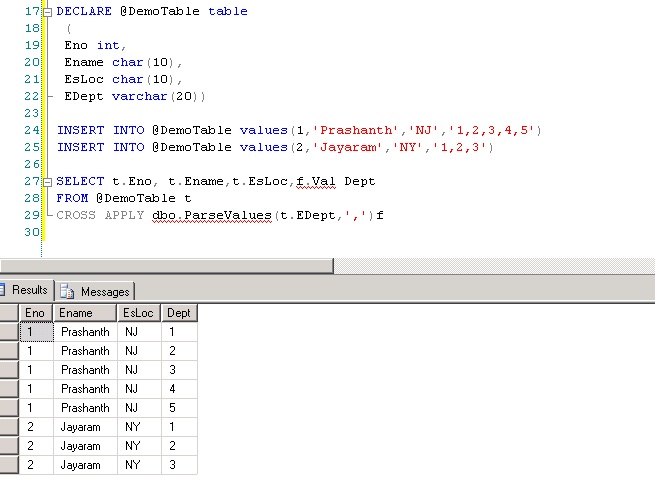
T-SQL -Split a delimited column data using XML

DECLARE @DemoTable table
 (
 Eno int,
 Ename char(10),
 EsLoc char(10),
 EDept varchar(20))
 
INSERT INTO @DemoTable values(1,'Prashanth','NJ','1,2,3,4,5')
INSERT INTO @DemoTable values(2,'Jayaram','NY','1,2,3')

SELECT A.ENo, A.EName , A.EsLoc,
 Split.a.value('.', 'VARCHAR(100)') AS Dept 
 FROM (SELECT ENo,EName,EsLoc,
 CAST ('<M>' + REPLACE(EDept, ',', '</M><M>') + '</M>' AS XML) AS String 
 FROM @DemoTable) AS A CROSS APPLY String.nodes ('/M') AS Split(a);

XML

OR

Using UDF-

Reference Link :-Β http://visakhm.blogspot.in/2010/02/parsing-delimited-string.htmlΒ 

CREATE FUNCTION ParseValues
(@String varchar(8000), @Delimiter varchar(10) )
RETURNS @RESULTS TABLE (ID int identity(1,1), Val varchar(8000))
AS
BEGIN
DECLARE @Value varchar(100)
WHILE @String is not null
BEGIN
SELECT @Value=CASE WHEN PATINDEX('%'+@Delimiter+'%',@String) >0 THEN LEFT(@String,PATINDEX('%'+@Delimiter+'%',@String)-1) ELSE @String END, @String=CASE WHEN PATINDEX('%'+@Delimiter+'%',@String) >0 THEN SUBSTRING(@String,PATINDEX('%'+@Delimiter+'%',@String)+LEN(@Delimiter),LEN(@String)) ELSE NULL END
INSERT INTO @RESULTS (Val)
SELECT @Value
END
RETURN
END

DECLARE @DemoTable table
 (
 Eno int,
 Ename char(10),
 EsLoc char(10),
 EDept varchar(20))
 
INSERT INTO @DemoTable values(1,'Prashanth','NJ','1,2,3,4,5')
INSERT INTO @DemoTable values(2,'Jayaram','NY','1,2,3')

SELECT t.Eno, t.Ename,t.EsLoc,f.Val Dept
FROM @DemoTable t
CROSS APPLY dbo.ParseValues(t.EDept,',')f

Output:-

XML-1

Posted in SQL, T-SQL | Tagged , , , , , | Leave a comment

2014 in review

The WordPress.com stats helper monkeys prepared a 2014 annual report for this blog.

Here’s an excerpt:

The concert hall at the Sydney Opera House holds 2,700 people. This blog was viewed about 50,000 times in 2014. If it were a concert at Sydney Opera House, it would take about 19 sold-out performances for that many people to see it.

Click here to see the complete report.

Posted in GENERAL | Tagged | Leave a comment

T-SQL – How to Find Number of Words in a Given String

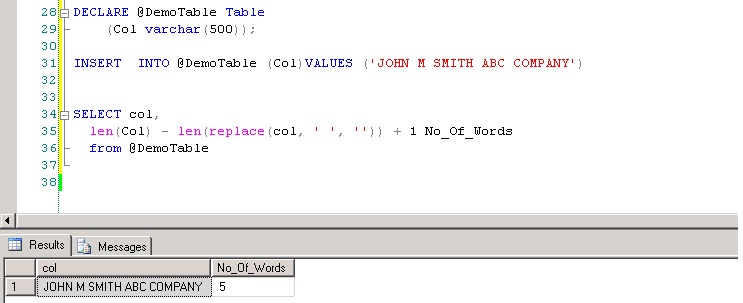
TSQL: To find number of words in a given string

Download the codeΒ https://gallery.technet.microsoft.com/T-SQL-How-to-Find-Number-533b6b39

DECLARE @DemoTable Table
    (Col varchar(500));

INSERT  INTO @DemoTable (Col)VALUES ('JOHN M SMITH ABC COMPANY')
 

SELECT col,
  len(Col) - len(replace(col, ' ', '')) + 1 No_Of_Words
  from @DemoTable

No_Of_Words

When the string has more spaces

DECLARE @DemoTable Table
Β  Β  (Col varchar(500));

INSERT Β INTO @DemoTable (Col)VALUES ('JOHN Β  Β  M SMITH ABC Β  Β  Β COMPANY asd Β  ')
Β 

SELECT col,
Β  len((replace(replace(replace(col,' ','<>'),'><',''),'<>',' '))) - len(replace((replace(replace(replace(col,' ','<>'),'><',''),'<>',' ')),' ','')) + 1 No_Of_Words
Β  from @DemoTable

Output:-

No_Of_Words_1

When the string has tabs,Β spaces and carriage return

DECLARE @DemoTable Table
    (Col varchar(500));

INSERT  INTO @DemoTable (Col)
VALUES ('JOHN		 M SMITH ABC COMPANY 
LLC  
USA')

SELECT col,
  len((replace(replace(replace(REPLACE(REPLACE(col,char(13),''),char(9),''),' ','<>'),'><',''),'<>',' '))) - len(replace((replace(replace(replace(REPLACE(REPLACE(col,char(13),''),char(9),''),' ','<>'),'><',''),'<>',' ')),' ','')) + 1 No_Of_Words
  from @DemoTable

Output:-

No_Of_Words_3

Posted in SQL | 4 Comments