Capturing Database(s) and Table Usage stats – sp_spaceused simulation using DMVs

For more Information refer Technet Article

Introduction

sp_spaceused is one of the system stored procedure used frequently by many DBA’s that reveals amount of space used by database/tables. This procedure can be executed either by passing parameters or no parameters. The objective of this stored procedure is to measure the amount of space consumed by database or tables.

Objective

This article demonstrates a simple process that saves database usage information in a single result set. This is a simulation of sp_spaceused using DMV’s. It gives db usage information of all dbs in a single result set also the output includes two more extra columns which tells data and log file size. You can also customize the code to capture db usage information for specific databases. The process is useful in monitoring DB growth over time and lets you see what databases are growing rapidly also help in estimating future growth and disk space requirements. The SQL output can be stored in a table which allows us to estimate future growth and helps in forecasting the disk space requirement over time. In some cases the results are not accurate and it requires update system views.

SP_SPACEUSED  – DATABASE

The most common usage for sp_spaceused is to measure the amount of spaced used for a database. In order to perform this, execute the procedure with no parameters

USE <DatabaseName>
GO
sp_spaceused
For Example:-
USE EMPLOYEE
GO
sp_spaceused

This output will be displayed two result sets and it returns the following information

First:-

  • Current database name
  • Current database size
  • Unallocated space

Second:-

  • Reserved space
  • Space used by data
  • Space used by indexes
  • Unused space

First Result set:

  • database_name: Name of the current database
  • database_size: Size of the current database in MegaBytes
  • database_size = data files+log files
  • unallocated space: Space in the database that has not been reserved for database objects

Second Result set:

  • reserved: Total amount of space allocated by objects in the database
  • data: Total amount of space used by data
  • index_size: Total amount of space used by indexes
  • unused: Total amount of space reserved for objects in the database, but not yet used

SP_SPACEUSED  – TABLE

If procedure is called with valid object, single result set is returned for the specific object and it displays the number of rows, disk space reserved, and disk space used by a table, indexed views.

USE <Database Name>
GO
sp_spaceused [[ @objname = ] 'objname' ]
For Example:-
USE EMPLOYEE
GO
sp_spaceused 'Production.ProductInventory'

It returns the following information

  • Name of the Table
  • No of rows of the table
  • Reserved space
  • Space used by data
  • Space used by indexes
  • Unused space

  • name : Table name
  • rows :  Number of rows of the given table
  • reserved : Total amount of reserved space [data + index]
  • data :  Amount of space used by table
  • index_size : Amount of space used by table indexes
  • Unused : Total amount of space reserved for table but no yet used

Permission

Permission to execute sp_spaceused is granted to the public role. Only members of the db_owner fixed database role can specify the @updateusage parameter.

SQL

The output  gives db usage information of all dbs in a single result set also the output includes two more extra columns which gives data and log file sizes

–Displaying the usage details of all the databases.

DECLARE @allocation_table table
(
      dbname sysname,
      reservedpages bigint,
      usedpages bigint,
      pages bigint
)
INSERT INTO @allocation_table
EXEC sp_MSforeachdb N'IF EXISTS
(
     SELECT 1 FROM SYS.DATABASES WHERE name = ''?'' AND  NAME NOT IN(''master'',''msdb'',''model'',''tempdb'') and STATE=0
    --customize to monitor specific databases
     --SELECT 1 FROM SYS.DATABASES WHERE name = ''?'' AND  NAME IN(''EMPLOYEE'') and STATE=0 
)
BEGIN
     SELECT
        ''?'',
            SUM(a.total_pages) as reservedpages,
            SUM(a.used_pages) as usedpages,
            SUM(
                CASE
                    -- XML-Index and FT-Index internal tables are not considered "data", but is part of "index_size"
                    When it.internal_type IN (202,204,211,212,213,214,215,216) Then 0
                    When a.type <> 1 Then a.used_pages
                    When p.index_id < 2 Then a.data_pages
                    Else 0
                END
            ) as pages
        from ?.sys.partitions p join ?.sys.allocation_units a on p.partition_id = a.container_id
        left join ?.sys.internal_tables it on p.object_id = it.object_id
END';
SELECT
        -- from first result set of 'exec sp_spacedused'
        db_name(sf.database_id) as [database_name]
        ,ltrim(str((convert (dec (15,2),sf.dbsize) + convert (dec (15,2),sf.logsize)) * 8192 / 1048576,15,2) + ' MB')as [database_size]
        ,ltrim(str((case when sf.dbsize >= pages.reservedpages then
            (convert (dec (15,2),sf.dbsize) - convert (dec (15,2),pages.reservedpages))
            * 8192 / 1048576 else 0 end),15,2) + ' MB') as [unallocated space]
        -- from second result set of 'exec sp_spacedused'
        ,ltrim(str(pages.reservedpages * 8192 / 1024.,15,0) + ' KB') as [reserved]
        ,ltrim(str(pages.pages * 8192 / 1024.,15,0) + ' KB') as data
        ,ltrim(str((pages.usedpages - pages.pages) * 8192 / 1024.,15,0) + ' KB') as index_size
        ,ltrim(str((pages.reservedpages - pages.usedpages) * 8192 / 1024.,15,0) + ' KB') as unused
        -- additional columns data and Log Size
        ,ltrim(str((convert (dec (15,2),sf.dbsize)) * 8192 / 1048576,15,2) + ' MB'as dbsize
        ,ltrim(str((convert (dec (15,2),sf.logsize)) * 8192 / 1048576,15,2) + ' MB'as logsize
    FROM (
        select
            database_id,
            sum(convert(bigint,case when type = 0 then size else 0 end)) as dbsize,
            sum(convert(bigint,case when type <> 0 then size else 0 end)) as logsize
        from sys.master_files
        group by database_id
    ) sf,
    (
    SELECT
            dbname,
            reservedpages,
            usedpages,
            pages
            FROM @ALLOCATION_TABLE
     ) pages
  WHERE DB_NAME(sf.database_id)=pages.dbname

Customized code for specific database

Change the below shown line from an above given code for any customization. For example, the code below ran against EMPLOYEE database also the below screen show comparison of outputs from DMV’s v/s sp_spaceused

Capturing details in a permanent table of databases using DMV’s

   The database usage information that we gather contains guidelines to help you plan and configure the storage and SQL Server database

This process defined in three steps

  • Create permanent table
  • Execute the SQL
  • Display the result

/******************************************************************************************************
The table  tb_SpaceUsed is created to gather the details periodically
******************************************************************************************************/

CREATE TABLE tb_SpaceUsed
(
Database_Name sysname,
database_sizeMB decimal(7,2),
Unallocated_SpaceMB decimal(7,2),
reservedKB bigint,
dataKB bigint,
Index_SizeKB bigint,
unusedKB bigint,
dbSizeMB decimal(7,2),
logSizeMB decimal(7,2),
logdate int default(CONVERT(varchar(10), getdate(),112))
)
/******************************************************************************************************
 --@allocation_table variable is used to gather allocation units details of all the databases
******************************************************************************************************/
DECLARE @allocation_table table
(
      dbname sysname,
      reservedpages bigint,
      usedpages bigint,
      pages bigint
)
INSERT INTO @allocation_table
EXEC sp_MSforeachdb N'IF EXISTS
(
    SELECT 1 FROM SYS.DATABASES WHERE name = ''?'' AND  NAME NOT IN(''master'',''msdb'',''model'',''tempdb'') and STATE=0
    --customize to monitor specific databases
    --SELECT 1 FROM SYS.DATABASES WHERE name = ''?'' AND  NAME IN(''EMPLOYEE'') and STATE=0 
)
BEGIN
     SELECT
        ''?'',
            SUM(a.total_pages) as reservedpages,
            SUM(a.used_pages) as usedpages,
            SUM(
                CASE
                    -- XML-Index and FT-Index internal tables are not considered "data", but is part of "index_size"
                    When it.internal_type IN (202,204,211,212,213,214,215,216) Then 0
                    When a.type <> 1 Then a.used_pages
                    When p.index_id < 2 Then a.data_pages
                    Else 0
                END
            ) as pages
        from ?.sys.partitions p join ?.sys.allocation_units a on p.partition_id = a.container_id
        left join ?.sys.internal_tables it on p.object_id = it.object_id
END';
/******************************************************************************************************
--Inserting the db usage information to tb_SpaceUsed table
******************************************************************************************************/
INSERT INTOtb_SpaceUsed(Database_Name,database_sizeMB,Unallocated_SpaceMB,reservedKB,dataKB,Index_SizeKB,unusedKB,dbSizeMB,logSizeMB)
SELECT
        -- from first result set of 'exec sp_spacedused'
        db_name(sf.database_id) as [database_name]
        ,ltrim(str((convert (dec (15,2),sf.dbsize) + convert (dec (15,2),sf.logsize)) * 8192 / 1048576,15,2) ) as[database_size]
        ,ltrim(str((case when sf.dbsize >= pages.reservedpages then
            (convert (dec (15,2),sf.dbsize) - convert (dec (15,2),pages.reservedpages))
            * 8192 / 1048576 else 0 end),15,2) ) as [unallocated space]
        -- from second result set of 'exec sp_spacedused'
        ,ltrim(str(pages.reservedpages * 8192 / 1024.,15,0) ) as [reserved]
        ,ltrim(str(pages.pages * 8192 / 1024.,15,0) ) as data
        ,ltrim(str((pages.usedpages - pages.pages) * 8192 / 1024.,15,0) ) as index_size
        ,ltrim(str((pages.reservedpages - pages.usedpages) * 8192 / 1024.,15,0) ) as unused
        -- additional columns data and Log Size
        ,ltrim(str((convert (dec (15,2),sf.dbsize)) * 8192 / 1048576,15,2) )  as dbsize
        ,ltrim(str((convert (dec (15,2),sf.logsize)) * 8192 / 1048576,15,2))  as logsize
    FROM (
        select
   database_id,
            sum(convert(bigint,case when type = 0 then size else 0 end)) as dbsize,
            sum(convert(bigint,case when type <> 0 then size else 0 end)) as logsize
        from sys.master_files
        group by database_id
    ) sf,
    (
    SELECT
            dbname,
            reservedpages,
            usedpages,
            pages
            FROM @ALLOCATION_TABLE
      ) pages
  WHERE DB_NAME(sf.database_id)=pages.dbname

/******************************************************************************************************
— Displaying Output
******************************************************************************************************/

select * from tb_SpaceUsed

OUTPUT:-

SQL 2000

The below code can be used to get sp_spaceused output in single result set for SQL 2000 instances. The code is a written from a clone of sp_spaceused stored procedure with dynamic sql.

/*
 Create temp TABLEs before any DML to ensure dynamic
 We need to CREATE a temp TABLE to do the calculation.
 reserved: sum(reserved) WHERE indid in (0, 1, 255)
 DATA: sum(dpages) WHERE indid < 2 + sum(used) WHERE indid = 255 (text)
 indexp: sum(used) WHERE indid in (0, 1, 255) - DATA
 unused: sum(reserved) - sum(used) WHERE indid in (0, 1, 255)
*/
---------------------------------------------------------------------------------------------------
-- Desc. :  created a automated script to log's all space details of different database.
---------------------------------------------------------------------------------------------------
DECLARE @pages INT
DECLARE @dbname sysname
DECLARE @dbsize DEC(15,0)
DECLARE @logsize DEC(15)
DECLARE @bytesperpage DEC(15,0)
DECLARE @pagesperMB  DEC(15,0)
DECLARE @DML1 nvarchar(2000)
DECLARE @DML2 nvarchar(200)
DECLARE @DML3 nvarchar(200)
DECLARE @DML4 nvarchar(200)
DECLARE @DML5 nvarchar(200)
DECLARE @DML6 nvarchar(200)
DECLARE @DML7 nvarchar(200)
DECLARE @DML8 nvarchar(200)
DECLARE @DML9 nvarchar(200)
DECLARE @DML10 nvarchar(200)
DECLARE @DML11 nvarchar(200)
DECLARE @DML12 nvarchar(1000)
DECLARE @DML13 nvarchar(4000)
DECLARE @LoopStatus int
DECLARE @RowId int
DECLARE @dbname_1 varchar(100)
DECLARE @DML14 varchar(2000)
SET @DML14='
DECLARE @pages INT,@dbname sysname,@dbsize DEC(15,0),@logsize DEC(15),@bytesperpage DEC(15,0),@pagesperMB  DEC(15,0),
@DML1 nvarchar(2000),@DML2 nvarchar(200),@DML3 nvarchar(200),@DML4 nvarchar(200),@DML5 nvarchar(200),@DML6 nvarchar(200),
@DML7 nvarchar(200),@DML8 nvarchar(200),@DML9 nvarchar(200),@DML10 nvarchar(200),@DML11 nvarchar(200),@DML12 nvarchar(800),
@DML13 nvarchar(2000),@LoopStatus int,@RowId int,@dbname_1 varchar(100)'
CREATE TABLE #growthRate
(
SlNo int identity(1,1) primary key,
DatabaseName varchar(25),
Databasesize DECIMAL(10,2),
UnallocatedSpace DECIMAL(10,2),
Reserved INT,
Data INT,
Indexsize INT,
unused INT
)
CREATE TABLE #spt_space
(
 rows  INT NULL,
 reserved DEC(15) NULL,
 DATA  DEC(15) NULL,
 indexp  DEC(15) NULL,
 unused  DEC(15) NULL
)
CREATE TABLE #Database_List
(
id int identity(1,1) PRIMARY KEY,
DatabaseName VARCHAR(200)
)
INSERT INTO #Database_List VALUES('pubs')
INSERT INTO #Database_List VALUES('Load')
INSERT INTO #Database_List VALUES('Hist')
--INSERT INTO #Database_List VALUES('Tempdb')
SET @dbsize=1
SET @logsize=1
SET @bytesperpage=1
SET @pagesperMB=1
SET @pages=1
SET @LoopStatus=1
SET @RowId=1
 WHILE( @LoopStatus<>0)
 BEGIN
  SELECT @dbname_1=DatabaseName FROM #Database_List WHERE id=@RowId
  IF @@ROWCOUNT=0
  BEGIN
    SET @LoopStatus=0
  END
  ELSE
  BEGIN
      TRUNCATE TABLE #spt_space
      SET @DML2='SELECT @dbsize = sum(convert(DEC(15),size)) FROM dbo.sysfiles WHERE (status & 64 = 0)'+CHAR(13)
      SET @DML3='SELECT @logsize = sum(convert(DEC(15),size))FROM dbo.sysfiles WHERE (status & 64 <> 0)'+CHAR(13)
      SET @DML4='SELECT @bytesperpage  = low
        FROM master.dbo.spt_values
        WHERE number = 1 and type = ''E'''+CHAR(13)
      SET @DML5='SELECT @pagesperMB = 1048576 / @bytesperpage'+char(13)
      SET @DML6='INSERT INTO #spt_space (reserved) SELECT sum(convert(DEC(15),reserved)) FROM sysindexes  WHERE indidin (0, 1, 255)'+CHAR(13)
      SET @DML7='SELECT @pages = sum(convert(DEC(15),dpages)) FROM sysindexes  WHERE indid < 2'+CHAR(13)
      SET @DML8='SELECT @pages = @pages + ISNULL(sum(convert(DEC(15),used)), 0) FROM sysindexes  WHERE indid = 255'+CHAR(13)
      SET @DML9='
      UPDATE #spt_space
      SET DATA =@pages'+CHAR(13)
      SET @DML10='
      UPDATE #spt_space
      SET indexp = (SELECT sum(convert(DEC(15),used)) FROM sysindexes WHERE indid in (0, 1, 255)) - DATA'+CHAR(13)
      SET @DML11='
      UPDATE #spt_space
      SET unused = reserved  - (SELECT sum(convert(DEC(15),used))
      FROM sysindexes WHERE indid in (0, 1, 255))'+CHAR(13)
      SET @DML12='
      INSERT INTO #growthRate(DatabaseName,Databasesize ,UnallocatedSpace,Reserved,Data,Indexsize,unused)
      SELECT
        DatabaseName = db_name(),
        DatabaseSize = ltrim(str((@dbsize + @logsize) / @pagesperMB,15,2)),
        unallocatedspace = ltrim(str((@dbsize - (SELECT sum(convert(DEC(15),reserved))FROM sysindexes  WHERE indid in(0, 1, 255))) / @pagesperMB,15,2)),
        Reserved = ltrim(str(reserved * d.low / 1024,15,0)),
        Data = ltrim(str(DATA * d.low / 1024,15,0)),
        IndexSize = ltrim(str(indexp * d.low / 1024,15,0)),
        Unused = ltrim(str(unused * d.low / 1024,15,0))
      FROM
        #spt_space, master.dbo.spt_values d
      WHERE
        d.number = 1 AND d.type = ''E'''
      SET @DML1='USE'+' '+@dbname_1+ char(13)+ char(13)+@DML14+char(13)+Char(13)
      SET @DML13=@DML1+@DML2+@DML3+@DML4+@DML5+@DML6+@DML7+@DML8+@DML9+@DML10+@DML11+@DML12
      EXEC sp_executesql @DML13
      END
SET @RowId=@RowId+1
END
SELECT * FROM #growthRate
DROP TABLE #spt_space
DROP TABLE #growthRate
DROP TABLE #Database_List

Displaying all user defined table usage information

  This process is useful in monitoring table growth over time and lets you see what tables are growing rapidly also help in estimating future growth and disk space requirements. The SQL output can be stored in a table which allows us to estimate future growth and helps in forecasting the disk space requirement over time.

USE <DBNAME>
GO
DECLARE @PageSize float
select @PageSize=v.low/1024.0 from master.dbo.spt_values v where v.number=1 and v.type='E'
SELECT
object_Name(i.object_id) as [name]
,p.rows
,Convert(varchar(50),@PageSize * SUM(total_pages)) + ' KB' as [reserved]
,Convert(varchar(50),@PageSize * SUM(CASE WHEN a.type <> 1 THEN a.used_pages WHEN p.index_id < 2 THEN a.data_pages ELSE0 END)) + ' KB' as [data]
,Convert(varchar(50),@PageSize * SUM(a.used_pages - CASE WHEN a.type <> 1 THEN a.used_pages WHEN p.index_id < 2 THENa.data_pages ELSE 0 END)) +  ' KB' as [index_size]
,Convert(varchar(50),@PageSize * SUM(total_pages-used_pages)) +  ' KB' as [unused]
FROM sys.indexes as i
JOIN sys.partitions as p ON p.object_id = i.object_id and p.index_id = i.index_id
JOIN sys.allocation_units as a ON a.container_id = p.partition_id
JOIN sys.tables t ON i.object_id=t.object_id
Where i.type<=1 and a.type=1
and
t.type='U' and is_ms_shipped=0
GROUP BY i.object_id,p.rows

OUTPUT:-

Conclusion

  • Capture the database and table usage data which ease out to asses on-going demand and leaves out room for future growth
  • Better understanding of data and file growth at granular level
  • Easily analyze the growth trend for various pattern such as linear, non-linear and Exponential growth
  • We can estimate the requirement and do a better forecasting
  • One place to get sp_spaceused output into single result set for all SQL version

Reference

Posted in SQL | Tagged , | Leave a comment

SQL – How to Find Missing Sequence in a table

Problem statement:-

 A table with identity column have ‘n’ rows in that few rows are deleted. How to find which rows are deleted?

Download code :- MissingRows

Solution:-

create table MissingRowDemo (a int);

insert into MissingRowDemo values (7001);
insert into MissingRowDemo values (7002);
insert into MissingRowDemo values (7004);
insert into MissingRowDemo values (7005);
insert into MissingRowDemo values (7006);
insert into MissingRowDemo values (7010);
  

WITH Missing (missnum, maxid)
AS
(
 SELECT  (select min(a) missnum from MissingRowDemo) , (select max(a) from MissingRowDemo)
 UNION ALL
 SELECT missnum + 1, maxid FROM Missing
 WHERE missnum < maxid
)
SELECT missnum
FROM Missing
LEFT OUTER JOIN MissingRowDemo tt on tt.a = Missing.missnum
WHERE tt.a is NULL
OPTION (MAXRECURSION 0);

Output:-

MissingRows

Posted in Uncategorized | 5 Comments

Capturing DB Usage stats – sp_spaceused simulation using DMV’s.

SP_SPACEUSED

sp_spaceused is one of the system stored procedure used frequently by many dba’s that reveals amount of space used by database/tables. This procedure can be executed either by passing parameters or no parameters. The objective of this stored proc is to measure the amount of space consumed by database or tables.

OBJECTIVE

This article demonstrates a simple process that saves database usage information in a single result set. This is a simulation of sp_spaceused using DMV’s. It gives db usage information of all dbs. You can also customize the code to capture db usage information for specific databases.

The process is useful in monitoring DB growth over time and lets you see what databases are growing rapidly also help in estimating future growth and disk space requirements. The SQL output can be stored in a table which allows us to estimate future growth and helps in forecasting the disk space requirement over time. In some cases the results are not accurate and it requires update system views.

Download the code :-

SQL CODE

Please refer the below link for more information :-

capturing-all-db-s-dbtable-usage-stats-sp-spaceused-simulation-using-dmvs

SQL

--Displaying the usage details of all the databasesDECLARE @allocation_table table 
( 
      dbname sysname, 
      reservedpages int, 
      usedpages int, 
      pages int 
) 
 
INSERT INTO @allocation_table 
EXEC sp_MSforeachdb N'IF EXISTS 
( 
   SELECT 1 FROM SYS.DATABASES WHERE name = ''?'' AND  NAME NOT IN(''master'',''msdb'',''model'',''tempdb'') and STATE=0 
    --customize to monitor specific databases 
   -- SELECT 1 FROM SYS.DATABASES WHERE name = ''?'' AND  NAME IN(''EMPLOYEE'') and STATE=0   
) 
BEGIN 
     SELECT 
        ''?'', 
            SUM(a.total_pagesas reservedpages, 
            SUM(a.used_pagesas usedpages, 
            SUM( 
                CASE 
                    -- XML-Index and FT-Index internal tables are not considered "data", but is part of "index_size" 
                    When it.internal_type IN (202,204,211,212,213,214,215,216Then 0 
                    When a.type <> 1 Then a.used_pages 
                    When p.index_id < 2 Then a.data_pages 
                    Else 0 
                END 
            ) as pages 
        from ?.sys.partitions p join ?.sys.allocation_units a on p.partition_id = a.container_id 
        left join ?.sys.internal_tables it on p.object_id = it.object_id 
END'; 
 
 
SELECT 
        -- from first result set of 'exec sp_spacedused' 
        db_name(sf.database_idas [database_name] 
        ,ltrim(str((convert (dec (15,2),sf.dbsize) + convert (dec (15,2),sf.logsize)) * 8192 / 1048576,15,2) + ' MB'as [database_size] 
        ,ltrim(str((case when sf.dbsize >= pages.reservedpages then 
            (convert (dec (15,2),sf.dbsize) - convert (dec (15,2),pages.reservedpages)) 
            * 8192 / 1048576 else 0 end),15,2) + ' MB'as [unallocated space] 
        -- from second result set of 'exec sp_spacedused' 
        ,ltrim(str(pages.reservedpages * 8192 / 1024.,15,0) + ' KB'as [reserved] 
        ,ltrim(str(pages.pages * 8192 / 1024.,15,0) + ' KB'as data 
        ,ltrim(str((pages.usedpages - pages.pages) * 8192 / 1024.,15,0) + ' KB'as index_size 
        ,ltrim(str((pages.reservedpages - pages.usedpages) * 8192 / 1024.,15,0) + ' KB'as unused 
        -- additional columns data and Log Size 
        ,ltrim(str((convert (dec (15,2),sf.dbsize)) * 8192 / 1048576,15,2) + ' MB')  as dbsize 
        ,ltrim(str((convert (dec (15,2),sf.logsize)) * 8192 / 1048576,15,2) + ' MB')  as logsize 
    FROM ( 
        select 
                  database_id, 
            sum(convert(bigint,case when type = 0 then size else 0 end)) as dbsize, 
            sum(convert(bigint,case when type <> 0 then size else 0 end)) as logsize 
        from sys.master_files 
        group by database_id 
    ) sf, 
    ( 
    SELECT 
            dbname, 
            reservedpages, 
            usedpages, 
            pages 
            FROM @ALLOCATION_TABLE 
      ) pages 
  WHERE DB_NAME(sf.database_id)=pages.dbname  

Capturing details in a permanent table of all databases using DMV’s

   The information that we gather contains guidelines to help you plan and configure the storage and SQL Server database

SQL

  
--Storing allocation details of all the databases. 
 
--The table  tb_SpaceUsed is created to gather the details peroidically   
 
CREATE TABLE tb_SpaceUsed 
( 
Database_Name sysnamedatabase_sizeMB decimal(7,2), 
Unallocated_SpaceMB decimal(7,2), 
reservedKB intdataKB intIndex_SizeKB intunusedKB intdbSizeMB decimal(7,2), 
logSizeMB decimal(7,2), 
logdate int default(CONVERT(varchar(10), getdate(),112)) 
) 
 
--@allocation_table variable is used to gather allocation units details of all the databases 
 
DECLARE @allocation_table table 
( 
    dbname sysname, 
    reservedpages int, 
    usedpages int, 
    pages int 
) 
INSERT INTO @allocation_table 
EXEC sp_MSforeachdb N'IF EXISTS  
( 
    SELECT 1 FROM SYS.DATABASES WHERE name = ''?'' AND  NAME NOT IN(''master'',''msdb'',''model'',''tempdb'') and STATE=0 
    --customize to monitor specific databases  
    --SELECT 1 FROM SYS.DATABASES WHERE name = ''?'' AND  NAME IN(''EMPLOYEE'') and STATE=0    
) 
BEGIN 
     SELECT 
        ''?'', 
            SUM(a.total_pagesas reservedpages, 
            SUM(a.used_pagesas usedpages, 
            SUM( 
                CASE 
                    -- XML-Index and FT-Index internal tables are not considered "data", but is part of "index_size" 
                    When it.internal_type IN (202,204,211,212,213,214,215,216Then 0 
                    When a.type <> 1 Then a.used_pages 
                    When p.index_id < 2 Then a.data_pages 
                    Else 0 
                END 
            ) as pages 
        from ?.sys.partitions p join ?.sys.allocation_units a on p.partition_id = a.container_id 
        left join ?.sys.internal_tables it on p.object_id = it.object_id 
END'; 
 
--Inserting the db usage information to tb_SpaceUsed table 
 
SELECT  
        -- from first result set of 'exec sp_spacedused'  
        db_name(sf.database_idas [database_name] 
        ,ltrim(str((convert (dec (15,2),sf.dbsize) + convert (dec (15,2),sf.logsize)) * 8192 / 1048576,15,2) ) as [database_size] 
        ,ltrim(str((case when sf.dbsize >= pages.reservedpages then 
            (convert (dec (15,2),sf.dbsize) - convert (dec (15,2),pages.reservedpages))  
            * 8192 / 1048576 else 0 end),15,2) ) as [unallocated space] 
 
        -- from second result set of 'exec sp_spacedused'  
        ,ltrim(str(pages.reservedpages * 8192 / 1024.,15,0) ) as [reserved] 
        ,ltrim(str(pages.pages * 8192 / 1024.,15,0) ) as data 
        ,ltrim(str((pages.usedpages - pages.pages) * 8192 / 1024.,15,0) ) as index_size 
        ,ltrim(str((pages.reservedpages - pages.usedpages) * 8192 / 1024.,15,0) ) as unused 
 
        -- additional columns data and Log Size 
        ,ltrim(str((convert (dec (15,2),sf.dbsize)) * 8192 / 1048576,15,2) )  as dbsize 
        ,ltrim(str((convert (dec (15,2),sf.logsize)) * 8192 / 1048576,15,2))  as logsize 
    FROM ( 
        select  
            database_id, 
            sum(convert(bigint,case when type = 0 then size else 0 end)) as dbsize, 
            sum(convert(bigint,case when type <> 0 then size else 0 end)) as logsize 
        from sys.master_files 
        group by database_id 
    ) sf, 
    ( 
    SELECT  
        dbname, 
        reservedpages, 
        usedpages, 
        pages 
        FROM @ALLOCATION_TABLE 
      ) pages  
  WHERE DB_NAME(sf.database_id)=pages.dbname 
  
 --Displaying the output  
  
 select * from tb_SpaceUsed
 
Posted in SQL | Tagged , , | 2 Comments

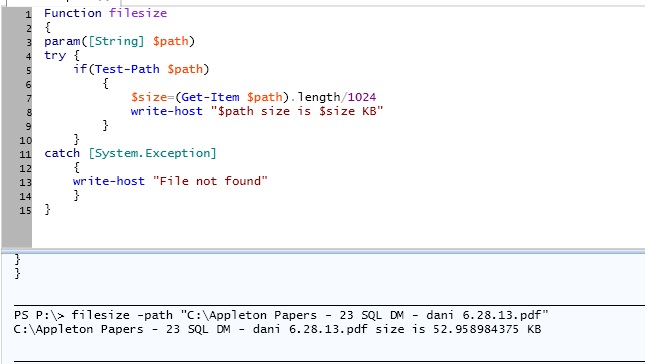
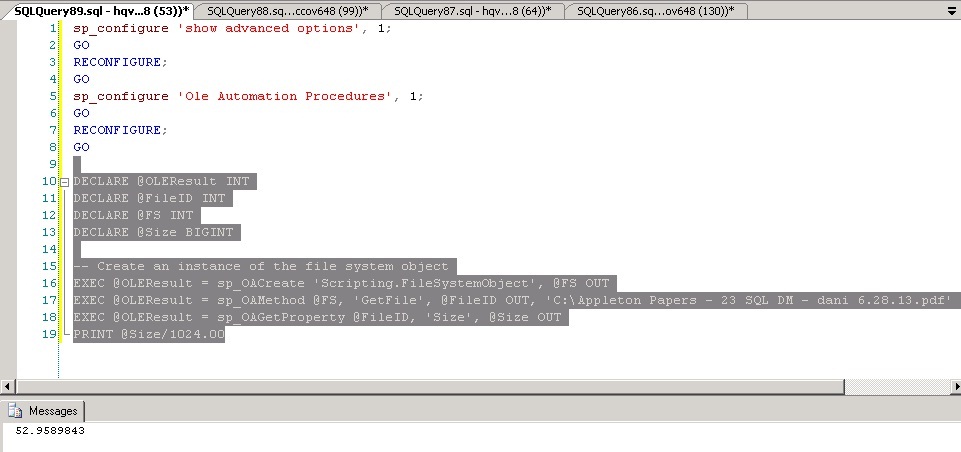
Determine size of the file using T-SQL/Powershell/Ole Objects

There are many ways to find the filesize.

This post is all about identifing the filesize using T-SQL,Instantiating OLE Objects and PowerShell. The requirement is to retrieve the size of the specified file.

The return value is going to a floating point value. The details and script are given below

Download the code:- https://gallery.technet.microsoft.com/Determine-size-of-the-file-72f48e3a

T-SQL:

SQL
Edit|Remove
declare @line varchar(255) 
declare @path varchar(255) 
declare @command varchar(255) 
 
create table #output (line varchar(255)) 
 
set @path = 'C:\Appleton Papers - 23 SQL DM - dani 6.28.13.pdf' 
set @command = 'dir "' + @path +'"' 
 
insert into #output 
exec master.dbo.xp_cmdshell @command 
 
select @line = ltrim(replace(substring(line, charindex(')', line)+1,len(line)), ',''')) 
from #output where line like '%File(s)%bytes' 
 
print cast(replace(@line,'bytes','') as float)/1024 
drop table #output

filesize1

 PowerShell:-

PowerShell
Edit|Remove
Function filesize 
{ 
param([String] $path) 
try { 
if(Test-Path $path) 
{ 
$size=(Get-Item $path).length/1024 
write-host "$path size is $size KB" 
} 
} 
catch [System.Exception] 
{ 
write-host "File not found" 
} 
} 
PS P:\> filesize -path "C:\Appleton Papers - 23 SQL DM - dani 6.28.13.pdf"

filesize3

Instantiate OLE Objects

You can refer the below link for more information

http://msdn.microsoft.com/en-us/library/ms175079.aspx

PowerShell
Edit|Remove
sp_configure 'show advanced options'1; 
GO 
RECONFIGURE; 
GO 
sp_configure 'Ole Automation Procedures'1; 
GO 
RECONFIGURE; 
GO 
 
DECLARE @OLEResult INT 
DECLARE @FileID INT 
DECLARE @FS INT 
DECLARE @Size BIGINT 
 
-- Create an instance of the file system object 
EXEC @OLEResult = sp_OACreate 'Scripting.FileSystemObject', @FS OUT 
EXEC @OLEResult = sp_OAMethod @FS, 'GetFile', @FileID OUT, 'C:\Appleton Papers - 23 SQL DM - dani 6.28.13.pdf' 
EXEC @OLEResult = sp_OAGetProperty @FileID, 'Size', @Size OUT 
print @Size/1024.00

filesize3

Posted in PowerShell, SQL, T-SQL | Tagged , , , , , | Leave a comment

T-SQL – Scripting Stored Procedure to Create backup copy on same database

This post is one of the request from OP.

Download SQL  Backup SP in the same database

The probelm statement 1:-

Create a backup copy of a group of stored procedures on the same database.  Using TSQL I need to find all stored procedures that meet a criteria (WHERE pr.name = ‘%_SomeSuffix’) and create that same procedure in the same database with a different name (‘%_SomeSuffix_BAK).

DECLARE @sql nvarchar(maxDECLARE @Name varchar(100)='AdventureWorks2008' 
 DECLARE c CURSOR FOR  
  SELECT      
        replace(mod.definition,pr.name,pr.name+'_BAK'FROM sys.procedures pr 
INNER JOIN sys.sql_modules mod ON pr.object_id = mod.object_id 
WHERE pr.Is_MS_Shipped = 0 AND pr.name LIKE '%PROC_RowCount' 
 
OPEN c 
 
FETCH NEXT FROM c INTO @sql 
 
WHILE @@FETCH_STATUS = 0  
BEGIN 
   SET @sql = REPLACE(@sql,'''','''''') 
   SET @sql = 'USE [' + @Name + ']; EXEC(''' + @sql + ''')' 
 
   EXEC(@sql) 
 
   FETCH NEXT FROM c INTO @sql 
END              
 
CLOSE c 
DEALLOCATE c 

The probelm statement 2:-

Create a backup copy of a group of stored procedures on the same database.  Using TSQL I need to find all stored procedures that meet a criteria (WHERE definition = ‘%_SomeSuffix’) and create that same procedure in the same database with a different name (ProcName_BAK).

uspGetBillOfMaterials has the following search pattern in the definition

WITH[BOM_cte]

DECLARE @sql nvarchar(maxDECLARE @Name varchar(100)='AdventureWorks2008' 
 DECLARE c CURSOR FOR  
SELECT   
        replace(mod.definition,pr.name,pr.name+'_BAK'FROM sys.procedures pr 
INNER JOIN sys.sql_modules mod ON pr.object_id = mod.object_id 
WHERE pr.Is_MS_Shipped = 0 AND mod.definition  LIKE '%WITH [BOM_cte]%' 
 
OPEN c 
 
FETCH NEXT FROM c INTO @sql 
 
WHILE @@FETCH_STATUS = 0  
BEGIN 
   SET @sql = REPLACE(@sql,'''','''''') 
   SET @sql = 'USE [' + @Name + ']; EXEC(''' + @sql + ''')' 
 
   EXEC(@sql) 
 
   FETCH NEXT FROM c INTO @sql 
END              
 
CLOSE c 
DEALLOCATE c 
 Output
Posted in SQL, T-SQL | Tagged , , , | Leave a comment

SQL – List Primary key and Concatenate composite Keys into a single row separed by comma

The following query lists all the Primary keys of all the table. 

OP has requested to list all PK and composite PKs and concatenate all it’s composite PK column values into a single row separated by comma hence this post.

 
SELECT TAB.TABLE_NAME,COL.COLUMN_NAME  
FROM 
    INFORMATION_SCHEMA.TABLE_CONSTRAINTS TAB,  
    INFORMATION_SCHEMA.CONSTRAINT_COLUMN_USAGE COL  
WHERE  
    COL.CONSTRAINT_NAME = TAB.CONSTRAINT_NAME 
    AND COL.TABLE_NAME = TAB.TABLE_NAME 
    AND CONSTRAINT_TYPE = 'PRIMARY KEY' 


 In the above screenshot  the invoices and PK_TEST table has composite PK’s. Query to get the Composite PKs in a single row separated by comma
 
SELECT TABLENAME, 
       LEFT(COL,LEN(COL)-1) AS COLUMN_NAME 
FROM 
( 
        SELECT DISTINCT TAB.TABLE_NAME TABLENAME, 
            ( 
            SELECT COL.COLUMN_NAME +','  AS [text()] 
            FROM INFORMATION_SCHEMA.CONSTRAINT_COLUMN_USAGE COL  
            WHERE  
                COL.CONSTRAINT_NAME = TAB.CONSTRAINT_NAME AND COL.TABLE_NAME = TAB.TABLE_NAME AND CONSTRAINT_TYPE = 'PRIMARY KEY' 
             FOR XML PATH ('') 
            ) COL 
FROM INFORMATION_SCHEMA.TABLE_CONSTRAINTS TAB 
 )T 
 where T.COL is NOT NULL 


Posted in SQL | Tagged , , , | 3 Comments

USING SQL & POWERSHELL – Different Methods to List Databases WITH Recovery Models

USING POWERSHELL TO LIST SQLSERVER USER DATABASES WITH RECOVERY MODELS

One of op requested to list all the user defined databases where it has been configured with simple recovery model across ‘N’ servers.There are many ways to achieve the requirement. 

You can query sys.databases with sqlcmd utility to list all the details

SQL
select name,recovery_model_desc from sys.databases where database_id > 4 and recovery_model_desc='SIMPLE'
SQL
Master..xp_cmdshell 'for /f %j in (c:\servers.txt ) do sqlcmd -S %j  
-Q "select name,recovery_model_desc from sys.databases where database_id > 4 and recovery_model_desc=''SIMPLE''"  
-E'
 Download the code: –
 

Output:-

OR

Using Powershell

The function Get-RecoveryModel has three input parameters

  1. InputFile – List contains all the servers
  2. Recoverymodel – type of the recovery model that you want to do a search
  3. Database Flag – (TRUE OR FALSE – Include or exclude system databases )
PowerShell Script
<#  
.SYNOPSIS  
    USING POWERSHELL TO LIST SQLSERVER USER DATABASES WITH SIMPLE RECOVERY 
.DESCRIPTION  
    The function call requires three parameters Inputfile, RecoveryModel(Full,simple,bulklogged) and Database flag ($TRUE=System Database,$FALSE=User Database)  
.EXAMPLE 
    1.PS:\>Get-RecoveryModel -InputFile F:\PowerSQL\Server.txt -RecoveryModel "SIMPLE" -DatabaseFlag $FALSE 
    2.PS:\>Get-RecoveryModel -InputFile F:\PowerSQL\Server.txt -RecoveryModel "FULL" -DatabaseFlag $TRUE     
.NOTES  
    Author     : Powershellsql@gmail.com 
.LINK  
    https://sqlpowershell.wordpress.com/ 
#>  
  
  
Function Get-RecoveryModel 
{ 
param( 
    $InputFile, 
    $RecoveryModel, 
    $DatabaseFlag 
) 
 
[System.Reflection.Assembly]::LoadWithPartialName("Microsoft.SqlServer.SMO"| Out-Null 
  
 ForEach ($instance in Get-Content $InputFile) 
{ 
       $s = New-Object ('Microsoft.SqlServer.Management.Smo.Server'$instance 
       $dbs=$s.Databases| where {$_.RecoveryModel -like "$RecoveryModel" -and  $_.IsSystemObject -eq $DatabaseFlag } 
       $dbs | select @{Name="ServerName"; Expression = {$Instance}}, Name, RecoveryModel 
} 
} 
 

Function call:-

PS:\>Get-RecoveryModel -InputFile F:\PowerSQL\Server.txt -RecoveryModel "SIMPLE" -DatabaseFlag $FALSE 
PS:\>Get-RecoveryModel -InputFile F:\PowerSQL\Server.txt -RecoveryModel "FULL" -DatabaseFlag $TRUE     
 Converting the output to HTML
$OutputFile = "F:\PowerSQL\RecoveryModel.htm" 
$ServerList = "F:\PowerSQL\Server.txt" 
 
$a = "" 
$a = $a + "BODY{background-color:peachpuff;}" 
$a = $a + "TABLE{border-width: 1px;border-style: solid;border-color: black;border-collapse: collapse;}" 
$a = $a + "TH{border-width: 1px;padding: 0px;border-style: solid;border-color: black;background-color:thistle}" 
$a = $a + "TD{border-width: 1px;padding: 0px;border-style: solid;border-color: black;background-color:palegoldenrod}" 
$a = $a + "" 
 
Function Get-RecoveryModel 
{ 
param( 
    $InputFile, 
    $RecoveryModel, 
    $DatabaseFlag 
) 
 
[System.Reflection.Assembly]::LoadWithPartialName("Microsoft.SqlServer.SMO"| Out-Null 
  
 ForEach ($instance in Get-Content $InputFile) 
{ 
       $s = New-Object ('Microsoft.SqlServer.Management.Smo.Server'$instance 
       $dbs=$s.Databases| where {$_.RecoveryModel -like "$RecoveryModel" -and  $_.IsSystemObject -eq $DatabaseFlag } 
       $dbs | select @{Name="ServerName"; Expression = {$Instance}}, Name, RecoveryModel 
} 
} 
 
Get-RecoveryModel -InputFile $ServerList -RecoveryModel "SIMPLE" -DatabaseFlag $FALSE|ConvertTo-HTML -head $a -body "<H2>Database Recovery Model Information</H2>" | Out-File $OutputFile 
 
Output:-


Posted in Uncategorized | 3 Comments

PowerShell- Monitoring Group Of Services on Group of Servers with Alternate Credential

This post explains how to monitor a multiple services on a group of servers with alternate credentials.

This script will allow you to read a list of servers from the input file and use credentials to connect remote/DMZ servers to pull service status information for a set of specific services and send services status information to all intended recipients

Get-Service cmdlet don’t accept credentials parameter hence I’ve used win32_service win32 class which accepts the credential parameter. You need to comment or uncomment the required portion of code.

Most of the time it’s not good practice to hard code the credentials. In that case you might need encrypt the password and use the secured code in the script. You need to run the below Powershell script to pull the encrypted password to c:\SecurePassword.txt and copy code in the script.

$password = read-host -prompt "Enter your Password"  
$secure = ConvertTo-SecureString $password -force -asPlainText  
ConvertFrom-SecureString $secure |Out-File c:\SecurePassword.txt
 In the below example, Test@2013##) password is encrypted and it’s content is shown below

There are some instance where you are OK to store the password in the script itself.

Refer the below screenshot and change the code according to your requirement

The Get-ServiceStatusReport

  1. Credential to connect to DMZ server
  2. HTML Ouptut
  3. Email Address validation

The Function Get-ServiceStatusReport contains five parameters

  1. ComputerList – List of Servers
  2. ServiceName – Name of Services separated by comma
  3. SMTPMail – SMTP mail address
  4. FromID – Valid Email ID
  5. ToID – Valid Email ID

Download the code

http://gallery.technet.microsoft.com/PowerShell-Group-Of-d0010648

Sample Call:-

Get-ServiceStatusReport -ComputerList C:\servers.txt -includeService  “Dfs”,”Dhcp” -To <pjayaram@app.com> -From <pjayaram@app.com> -SMTPMail <SMTPMail>

Output:-

You can also refer the below link if you want to run the script with default account

PowerShell- Monitoring Multiple Services On Multiple Servers Using Win

PowerShell
<# 
The Function Get-ServiceStatusReport contains five parameters 
 
ComputerList – List of Servers 
ServiceName – Name of Services separated by comma 
SMTPMail – SMTP mail address 
FromID – Valid Email ID 
ToID – Valid Email ID 
 
Sample Call:- 
 
Get-ServiceStatusReport  
-ComputerList C:\servers.txt  
-includeService  "Dfs","Dhcp"  
-To <pjayaram@app.com> 
-From <pjayaram@app.com> 
-SMTPMail <SMTPMail> 
#> 
 
Function Get-ServiceStatusReport 
{ 
param( 
[String]$ComputerList,[String[]]$includeService,[String]$To,[String]$From,[string]$SMTPMail 
) 
 
$script:list = $ComputerList 
  
$ServiceFileName"c:\ServiceFileName.htm" 
 
New-Item -ItemType file $ServiceFilename -Force 
 
 
# Enter the Credentials details 
<# 
$password = read-host -prompt "Enter your Password"  
write-host "$password is password"  
$secure = ConvertTo-SecureString $password -force -asPlainText  
ConvertFrom-SecureString $secure |Out-File c:\SecurePassword.txt 
#> 
 
#Replace the $encrypted value from the contents of c:\SecurePassword.txt  
 
$encrypted = "01000000d08c9ddf0115d1118c7a00c04fc297eb01000000efa85d14f32d8648a2d335e29d3f57f6b"  
$user = "testwint"  
$password = ConvertTo-SecureString -string $encrypted  
$Credentials = new-object -typename System.Management.Automation.PSCredential -argumentlist $user,$password 
 
<# Hard code the the Credentials details 
 
$User = “testcog” 
$Pass = ConvertTo-SecureString “testasd#%)” -AsPlainText -Force 
#contain the username and password in a variable 
$Credentials = New-Object -TypeName System.Management.Automation.PSCredential -ArgumentList $User,$Pass 
 
#> 
 
# Function to write the HTML Header to the file 
Function writeHtmlHeader 
{ 
param($fileName$date = ( get-date ).ToString('yyyy/MM/dd'Add-Content $fileName "<html>" 
Add-Content $fileName "<head>" 
Add-Content $fileName "<meta http-equiv='Content-Type' content='text/html; charset=iso-8859-1'>" 
Add-Content $fileName '<title>Service Status Report </title>' 
add-content $fileName '<STYLE TYPE="text/css">' 
add-content $fileName  "<!--" 
add-content $fileName  "td {" 
add-content $fileName  "font-family: Tahoma;" 
add-content $fileName  "font-size: 11px;" 
add-content $fileName  "border-top: 1px solid #999999;" 
add-content $fileName  "border-right: 1px solid #999999;" 
add-content $fileName  "border-bottom: 1px solid #999999;" 
add-content $fileName  "border-left: 1px solid #999999;" 
add-content $fileName  "padding-top: 0px;" 
add-content $fileName  "padding-right: 0px;" 
add-content $fileName  "padding-bottom: 0px;" 
add-content $fileName  "padding-left: 0px;" 
add-content $fileName  "}" 
add-content $fileName  "body {" 
add-content $fileName  "margin-left: 5px;" 
add-content $fileName  "margin-top: 5px;" 
add-content $fileName  "margin-right: 0px;" 
add-content $fileName  "margin-bottom: 10px;" 
add-content $fileName  "" 
add-content $fileName  "table {" 
add-content $fileName  "border: thin solid #000000;" 
add-content $fileName  "}" 
add-content $fileName  "-->" 
add-content $fileName  "</style>" 
Add-Content $fileName "</head>" 
Add-Content $fileName "<body>" 
 
add-content $fileName  "<table width='100%'>" 
add-content $fileName  "<tr bgcolor='#CCCCCC'>" 
add-content $fileName  "<td colspan='4' height='25' align='center'>" 
add-content $fileName  "<font face='tahoma' color='#003399' size='4'><strong>Service Stauts Report - $date</strong></font>" 
add-content $fileName  "</td>" 
add-content $fileName  "</tr>" 
add-content $fileName  "</table>" 
 
} 
 
# Function to write the HTML Header to the file 
Function writeTableHeader 
{ 
param($fileName) 
 
Add-Content $fileName "<tr bgcolor=#CCCCCC>" 
Add-Content $fileName "<td width='10%' align='center'>ServerName</td>" 
Add-Content $fileName "<td width='50%' align='center'>Service Name</td>" 
Add-Content $fileName "<td width='10%' align='center'>status</td>" 
Add-Content $fileName "</tr>" 
} 
 
Function writeHtmlFooter 
{ 
param($fileName) 
 
Add-Content $fileName "</body>" 
Add-Content $fileName "</html>" 
} 
 
Function writeDiskInfo 
{ 
param($filename,$Servername,$name,$Statusif$status -eq "Stopped") 
{ 
 Add-Content $fileName "<tr>" 
 Add-Content $fileName "<td bgcolor='#FF0000' align=left ><b>$servername</td>" 
 Add-Content $fileName "<td bgcolor='#FF0000' align=left ><b>$name</td>" 
 Add-Content $fileName "<td bgcolor='#FF0000' align=left ><b>$Status</td>" 
 Add-Content $fileName "</tr>" 
} 
else 
{ 
Add-Content $fileName "<tr>" 
 Add-Content $fileName "<td >$servername</td>" 
 Add-Content $fileName "<td >$name</td>" 
 Add-Content $fileName "<td >$Status</td>" 
Add-Content $fileName "</tr>" 
} 
 
} 


writeHtmlHeader $ServiceFileName 
 Add-Content $ServiceFileName "<table width='100%'><tbody>" 
 Add-Content $ServiceFileName "<tr bgcolor='#CCCCCC'>" 
 Add-Content $ServiceFileName "<td width='100%' align='center' colSpan=3><font face='tahoma' color='#003399' size='2'><strong> Service Details</strong></font></td>" 
 Add-Content $ServiceFileName "</tr>" 
 
 writeTableHeader $ServiceFileName 
 
 
#Change value of the following parameter as needed 
 
$InlcudeArray=@() 
 
 
#List of programs to include 
 
#$InlcudeArray = $inlcudeService 
 
Foreach($ServerName in (Get-Content $script:list)) 
{ 
$service = Get-WMIObject Win32_Service -computer $ServerName -credential $Credentials 
if ($Service -ne $NULL) 
{ 
foreach ($item in $service) 
 { 
 #$item.DisplayName 
 Foreach($include in $includeService)  
     {                        
 write-host $inlcude                                     
 if(($item.Name).Contains($include-eq $TRUE) 
    { 
    Write-Host  $item.MachineName $item.name $item.Status  
    writeDiskInfo $ServiceFileName $ServerName $item.name $item.Status  
    } 
    } 
 } 
} 
} 
     
 
Add-Content $ServiceFileName "</table>"  
 
writeHtmlFooter $ServiceFileName 
 
function Validate-IsEmail ([string]$Email) 
{ 
                 
                return $Email -match "^(?("")("".+?""@)|(([0-9a-zA-Z]((\.(?!\.))|[-!#\$%&'\*\+/=\?\^`\{\}\|~\w])*)(?<=[0-9a-zA-Z])@))(?(\[)(\[(\d{1,3}\.){3}\d{1,3}\])|(([0-9a-zA-Z][-\w]*[0-9a-zA-Z]\.)+[a-zA-Z]{2,6}))$" 
} 
 
 
Function sendEmail   
{  
param($from,$to,$subject,$smtphost,$htmlFileName)   
[string]$receipients="$to" 
$body = Get-Content $htmlFileName  
$body = New-Object System.Net.Mail.MailMessage $from$receipients$subject$body  
$body.isBodyhtml = $true 
$smtpServer = $MailServer 
$smtp = new-object Net.Mail.SmtpClient($smtphost$validfrom= Validate-IsEmail $from 
if($validfrom -eq $TRUE) 
{ 
$validTo= Validate-IsEmail $to 
if($validTo -eq $TRUE) 
{ 
$smtp.Send($body) 
write-output "Email Sent!!" 
 
} 
} 
else 
{ 
write-output "Invalid entries, Try again!!" 
} 
} 
 
$date = ( get-date ).ToString('yyyy/MM/dd') 
 
sendEmail -from $From -to $to -subject "Service Status - $Date" -smtphost $SMTPMail -htmlfilename $ServiceFilename 
 
}
Posted in Uncategorized | 1 Comment

PowerShell – Perfmon Counters into CSV File – Multiple remote servers

Introduction

This script can be used for exporting specified performance counter values from multiple remote target servers to CSV file. The challenge is to gather the specific counter information and append it to CSV file with Powershell2.0.

Performance counters

The script will pull the below mentioned counter values

  • Processor (_total)\% processor time
  • system\processor queue length
  • Memory\Available MBytes
  • Memory\% committed bytes in use
  • PhysicalDisk (*)\Current Disk Queue Length
  • PhysicalDisk (*)\Avg. Disk sec/Transfer
  • PhysicalDisk (*)\% Disk Time
  • PhysicalDisk (*)\Disk Read Bytes/sec
  • PhysicalDisk (*)\Disk Write Bytes/sec
  • Network Interface (*)\Bytes Total/sec

 Scenarios

IT Administrators may want to analyze the performance the servers with the help of perfmon counters information’s.

 Prerequisites

  • The source machine should have PowerShell 2.0 installed

Download the code:- http://gallery.technet.microsoft.com/PowerShell-Perfmon-0f013da8

Script

You can use this script in following ways:

1. Download the script.

2. Open the script file with Notepad or any other script editors (preferably Windows PowerShell ISE)

3.  Change the Input file path and Output file if required other than the default location as shown in below screenshot.

4. Counters can be selected based on your requirement by changing the below code

5. Save the file then run the script via PowerShell in “Run as administrator” mode.


 You can run this script manually or by scheduler task


How to create a scheduler task:

1. Open “Task Scheduler” (Goto START—RUN —Type Tasks and hit enter)

2. Click “Create task”

3. Pick a name, and choose “Run whether user is logged on or not”


Choose “Triggers” Tab, Click “New”

5. Specify option you like, and then click “OK” to create a trigger


Choose “Actions” tab, Click “New”

7. Copy following command to “Program/script” textbox, click C:\Windows\System32\WindowsPowerShell\v1.0\powershell.exe

8Enter the path of the saved script file in “Add arguments (optionally)” textbox

As per the screenshot I saved the file under C:\Perform_script.ps1 hence I updated the add arguments text box as

C:\Perform_script.ps1; exit” 


Code:


<# 
# Script: Get-CounterStats 
# Author: Prashanth and Praveen 
# Comments: This script will collect the specific counters value from the multiple target machines/servers  
which will be used to analayze the performance of target servers. 
#> 


#Define Input and output filepath 
 
$servers=get-content "C:\servers.txt" 
$outfile="C:\perfmon.csv" 
 
################################################################################################################ 
 
 
################################################################################################################ 
 
 
#Actual script starts here  
 
function Global:Convert-HString {       
[CmdletBinding()]             
 Param              
   ( 
    [Parameter(Mandatory=$false, 
               ValueFromPipeline=$true, 
               ValueFromPipelineByPropertyName=$true)] 
    [String]$HString 
   )#End Param 
 
Begin  
{ 
    Write-Verbose "Converting Here-String to Array" 
}#Begin 
Process  
{ 
    $HString -split "`n" | ForEach-Object { 
     
        $ComputerName = $_.trim() 
        if ($ComputerName -notmatch "#") 
            { 
                $ComputerName 
            }     
         
         
        } 
}#Process 
End  
{ 
    # Nothing to do here. 
}#End 
 
}#Convert-HString 
 
 
#Function to have the customized output in CSV format 
function Export-CsvFile { 
[CmdletBinding(DefaultParameterSetName='Delimiter', 
  SupportsShouldProcess=$true, ConfirmImpact='Medium')] 
param( 
[Parameter(Mandatory=$true, ValueFromPipeline=$true, 
           ValueFromPipelineByPropertyName=$true)] 
[System.Management.Automation.PSObject] 
${InputObject}, 
 
[Parameter(Mandatory=$true, Position=0)] 
[Alias('PSPath')] 
[System.String] 
${Path}, 
 
#region -Append  
[Switch${Append}, 
#endregion  
 
[Switch${Force}, 
 
[Switch${NoClobber}, 
 
[ValidateSet('Unicode','UTF7','UTF8','ASCII','UTF32','BigEndianUnicode','Default','OEM')] 
[System.String] 
${Encoding}, 
 
[Parameter(ParameterSetName='Delimiter', Position=1)] 
[ValidateNotNull()] 
[System.Char] 
${Delimiter}, 
 
[Parameter(ParameterSetName='UseCulture')] 
[Switch${UseCulture}, 
 
[Alias('NTI')] 
[Switch${NoTypeInformation}) 
 
begin 
{ 
# This variable will tell us whether we actually need to append 
# to existing file 
$AppendMode = $false 
 
 try { 
  $outBuffer = $null 
  if ($PSBoundParameters.TryGetValue('OutBuffer', [ref]$outBuffer)) 
  { 
      $PSBoundParameters['OutBuffer'] = 1 
  } 
  $wrappedCmd = $ExecutionContext.InvokeCommand.GetCommand('Export-Csv', 
    [System.Management.Automation.CommandTypes]::Cmdlet) 
         
         
                #String variable to become the target command line 
                $scriptCmdPipeline = '' 
 
                # Add new parameter handling 
                #region Dmitry: Process and remove the Append parameter if it is present 
                if ($Append) { 
   
                                $PSBoundParameters.Remove('Append'| Out-Null 
     
  if ($Path) { 
   if (Test-Path $Path) {         
    # Need to construct new command line 
    $AppendMode = $true 
     
    if ($Encoding.Length -eq 0) { 
     # ASCII is default encoding for Export-CSV 
     $Encoding = 'ASCII' 
    } 
     
    # For Append we use ConvertTo-CSV instead of Export 
    $scriptCmdPipeline +'ConvertTo-Csv -NoTypeInformation ' 
     
    # Inherit other CSV convertion parameters 
    if ( $UseCulture ) { 
     $scriptCmdPipeline +' -UseCulture ' 
    } 
    if ( $Delimiter ) { 
     $scriptCmdPipeline +" -Delimiter '$Delimiter' " 
    }  
     
    # Skip the first line (the one with the property names)  
    $scriptCmdPipeline +' | Foreach-Object {$start=$true}' 
    $scriptCmdPipeline +'{if ($start) {$start=$false} else {$_}} ' 
     
    # Add file output 
    $scriptCmdPipeline +" | Out-File -FilePath '$Path' -Encoding '$Encoding' -Append " 
     
    if ($Force) { 
     $scriptCmdPipeline +' -Force' 
    } 
 
    if ($NoClobber) { 
     $scriptCmdPipeline +' -NoClobber' 
    }    
   } 
  } 
}  


 $scriptCmd = {& $wrappedCmd @PSBoundParameters } 
 
 if ( $AppendMode ) { 
  # redefine command line 
  $scriptCmd = $ExecutionContext.InvokeCommand.NewScriptBlock( 
      $scriptCmdPipeline 
    ) 
} else { 
  # execute Export-CSV as we got it because 
  # either -Append is missing or file does not exist 
  $scriptCmd = $ExecutionContext.InvokeCommand.NewScriptBlock( 
      [string]$scriptCmd 
    ) 
} 
 
# standard pipeline initialization 
$steppablePipeline = $scriptCmd.GetSteppablePipeline($myInvocation.CommandOrigin) 
$steppablePipeline.Begin($PSCmdlet) 
 
 } catch { 
   throw 
} 
     
} 
 
process 
{ 
  try { 
      $steppablePipeline.Process($_) 
  } catch { 
      throw 
  } 
} 
 
end 
{ 
  try { 
      $steppablePipeline.End() 
  } catch { 
      throw 
  } 
} 
 
} 
 
#Performance counters declaration 
 
function Get-CounterStats {  
param  
    (  
    [String]$ComputerName = $ENV:ComputerName 
     
    )  
 
$Object =@() 
 
 
$Counter = @"  
Processor(_total)\% processor time  
system\processor queue length 
Memory\Available MBytes  
Memory\% committed bytes in use 
PhysicalDisk(*)\Current Disk Queue Length  
PhysicalDisk(*)\Avg. Disk sec/Transfer  
PhysicalDisk(*)\% Disk Time  
PhysicalDisk(*)\Disk Read Bytes/sec  
PhysicalDisk(*)\Disk Write Bytes/sec  
Network Interface(*)\Bytes Total/sec  
"@  
 
        (Get-Counter -ComputerName $ComputerName -Counter (Convert-HString -HString $Counter)).counterSamples |   
        ForEach-Object {  
        $path = $_.path  
        New-Object PSObject -Property @{ 
        computerName=$ComputerName; 
        Counter        = ($path  -split "\\")[-2,-1] -join "-" ; 
        Item        = $_.InstanceName ; 
        Value = [Math]::Round($_.CookedValue,2)  
        datetime=(Get-Date -format "yyyy-MM-d hh:mm:ss") 
        }  
         
        } 
      
    
}  
 
#Collecting counter information for target servers 
 
foreach($server in $Servers) 
{ 
$d=Get-CounterStats -ComputerName $server |Select-Object computerName,Counter,Item,Value,datetime 
$d |Export-CsvFile $outfile  -Append -NoTypeInformation 
 
} 
 
#End of Script
 

Output:-


Posted in Uncategorized | 9 Comments
Design a site like this with WordPress.com
Get started